
What is Dragon Copilot?
Dragon Copilot is your AI clinical assistant, with capabilities purpose-built for the nursing workflow. It captures care in real time with ambient recording and flowsheet documentation in Epic Rover, helping you reduce administrative burden and streamline workflows—so you can spend more time focusing on patients and less time charting.
After recording, the Dragon Copilot app (desktop, web, and mobile) unlocks additional AI capabilities that help you review what happened, generate nurse notes, track pending care activities, and finish documentation to streamline your workflow even further.
Note
- The features and functionality available to you may vary based on your organization's configuration.
- Live recording is done exclusively in Dragon Copilot for Epic Rover.
- If your organization enables simulation mode, you can create practice recordings in the Dragon Copilot app with predefined AI patients.
AI-supported flowsheets
Dragon Copilot embedded within Epic Rover supports the following flowsheets:
- Intake and output
- Vitals and pain assessments
- Daily cares and safety
- Activities of daily living
- Head to toe (basic assessment)
- Non-violent restraints
- Violent restraints
- Blood administration
- CIWA-Ar
- LDA and wounds assessments, additions, and removals
- Complex vitals
- Complex assessment
- ED Template
- Other: Depending on your organization, additional templates might include screenings, admission, and discharge.
Your organization can create flowsheet profiles for additional eligible care settings, clinical roles, and flowsheets. If your organization enables multiple profiles, you can have up to two available one default and one additional. Dragon Copilot uses only one profile for each recording and doesn't combine profiles in a single recording. If your organization allows it, you can switch profiles before a subsequent recording when a patient’s acuity or condition requires different documentation.
Note
The templates you can use for documentation depend on the flowsheet profile assigned to you or selected by you. Contact your organization administrator with questions.
Dragon Copilot nursing workflow overview
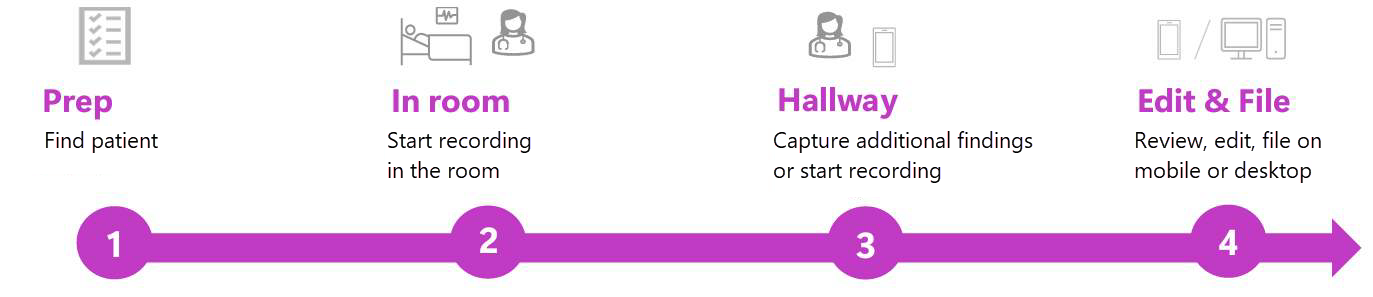
Prep: Locate your patient in Rover so you’re ready to start recording after you enter the room.
In room: This is where you will primarily engage with Dragon Copilot's ambient flowsheet capture capabilities. Begin recording in Rover and speak your observations and assessments aloud during the interaction.
Hallway/outside of room: Use Dragon Copilot to capture details you didn’t want to say in front of the patient or forgot to mention.
Edit and file: Review the AI-generated flowsheet entries, make any edits, and file them in the EHR. Use the Dragon Copilot app on the web or desktop to ask questions about the patient interaction or generate nurse notes, which you can copy to the EHR.
Tip
Record with every patient, every time - even if it’s brief. Begin with quick, on‑the‑go voice entries during rounding. As comfort grows, add more flowsheet observations and use the Dragon Copilot app to bring in additional context, building toward a fully integrated AI workflow.
Practice before real patient care
Simulation mode gives you a safe, non-production place to practice 'care out loud' documentation before you work with live patients. In the Dragon Copilot app, choose a predefined practice patient, record a conversational or monologue practice session, and review AI insights about your verbalization. Practice sessions are not patient data and are kept separate from real clinical usage.
Watch the video before you get started
Watch this short walkthrough to see how Dragon Copilot fits into your nursing workflow from first recording to final documentation.
Obtain consent
Before recording, obtain patient consent according to your organization’s policy.
Important
- Obtain patient consent before using Dragon Copilot for ambient usage. Follow your organization’s guidelines.
- Recording consent laws vary by state, and all processes must comply with local and federal requirements.
- Your organization’s consent policies might also affect patient participation in recorded conversations. Always follow your organization’s guidelines on whether and how to capture patient input by using Dragon Copilot.