
Use anchor speech focus to keep dictation going to a specific location while you navigate elsewhere. For example, you can place your cursor in a note field in your EHR, anchor speech focus there, and then review other parts of the chart without changing where your dictated text appears.
Anchor speech focus manually
- Open Dragon Copilot and the application you want to dictate into.
- Place your cursor where you want your dictated text to appear.
- Turn on the microphone, and then say anchor speech focus. The microphone icon changes to a lock symbol.
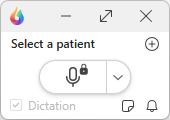
- Begin dictating. You can navigate to other applications while your dictated text continues to appear at the anchored location.
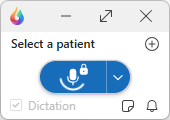
To stop anchoring and return to standard dictation, say release speech focus.
Other ways to control anchoring
Press Alt + Shift + A to turn anchoring on or off. Use a configured button on a supported microphone.
Note
Anchor speech focus might not work with some web-based EHRs or applications. If anchoring isn't supported, create a memo and transfer the text later.
Anchor speech focus automatically
You can set Dragon Copilot to automatically anchor speech focus when you dictate into a supported third-party text field.
To turn on automatic anchoring:
- Select Settings
 .
- Select General.
- Turn on Anchor speech focus automatically.
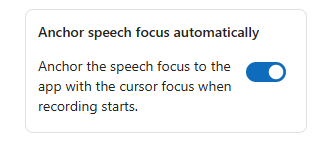
When you dictate into a supported third-party text field, Dragon Copilot automatically anchors speech focus and releases it when dictation ends.
You can still use voice commands, microphone buttons, or keyboard shortcuts to control anchoring manually.
Related topics
Create memos in Dragon Copilot