
You can send an Access object through email in a variety of formats. For example, you can email a report to a user as a PDF file or a query to a distribution list as an Excel workbook.
 Procedure
Do one of the following:
- Select the object in the navigation pane.
- Open an object and make sure it is the currently opened object. In this case, you can also select some content, such as a few rows in a datasheet.
Select External Data > Email.
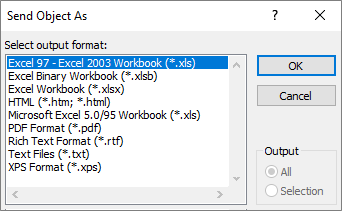
The Send Object As dialog box appears.Under Select output format, select one of the available formats.
Under Output, select All or Selection:
- If you selected some content in step 1, the default option is Selection, but you can still select All.
- If you didn't select some content, these options are dimmed and not available. All the content is sent.
Select OK.
Outlook opens a new message with the object attached in the format you selected.In the message, do the following:
- On the To line, Cc line, , and Bcc line, enter an email alias, aliases separated by a semicolon, or distribution list.
- In the message body, enter text.
When you are done, select Send.