Export grades from Microsoft Teams to Excel
Applies To
Export grades and feedback you've given in Microsoft Teams as a .csv file you can open in Excel. Export is available for all assignments in a class team, individual assignments, or individual students. Download Excel here.
After you export to Excel, use our guide to organize and sort your data.
- Export all grades from a class
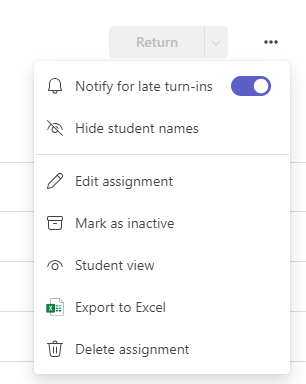
- Export grades from individual assignment
- Export grades for an individual student
Navigate to a class team and select Grades.
Select Export to Excel in the top right corner. You have the option of either exporting in an Excel File table format or the CSV format.

Save or Open the .csv file download.
Microsoft Teams will export the following data from your class team's assignments:
- First name
- Last name
- Email address
- Assignment title
- Points
- Feedback
Note: Filters set in the gradebook will also affect the export. For example: a custom date range of September 1, 2022 to January 13th, 2023 has been set in the below image. An excel export from the gradebook will contain information with in this filtered date range.