
When you create a publication, you might see some symbols within your text. These are actually formatting marks, such as dots (for spaces) or arrows (for tab characters) in Publisher. Formatting marks assist with text layout. They do not appear on a printed publication.
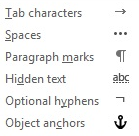
Quickly toggle all formatting marks
To turn formatting marks on or off, do the following:
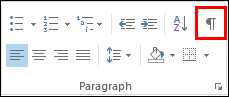
- On the Home tab, in the Paragraph group, click the button that looks like a paragraph mark. (When you point your mouse at the button, the tooltip says Show/Hide ¶).
Keyboard shortcut CTRL+SHIFT+*. (You must use the asterisk on the 8 key.)