
The Emotion Board is a Social-Emotional Learning (SEL) activity your students will love. It is a physical board that adapts Reflect for classrooms with young students or without student devices.
Once the board is set up, students can share how they feel during a lesson, every morning, or at the end of each day by placing their card in the emotional category they relate to. When students are done, capture their responses using the Reflect app on your mobile device to collect responses and gain valuable insights into their well-being.
Note
Emotion Board is currently available for users who use Microsoft Teams in English. It will soon be available in the Reflect web application, and support will be added for additional languages.
Build an emotion board in your classroom
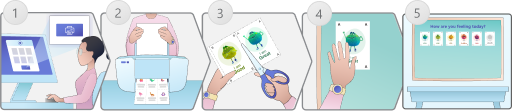
- Download the board kit from Reflect app in your class team.
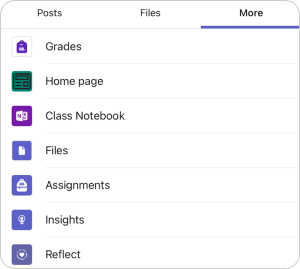
Open the Teams app on your desktop, navigate to the class where you want to set up the board, click on Reflect, and select Reflect emotion board tile on the right panel.
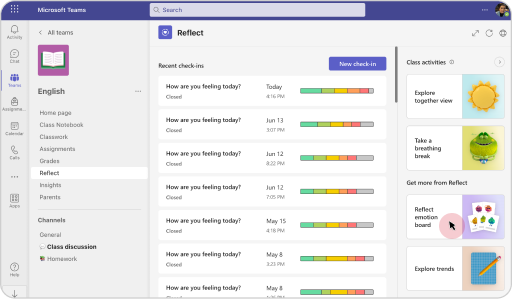
Next, click on Download emotion board kit to access the printable board kit.

- Print the emotion and animal pages.
Note
Emotion Board can be printed in color or grayscale.
- Cut the cards along the marked lines.
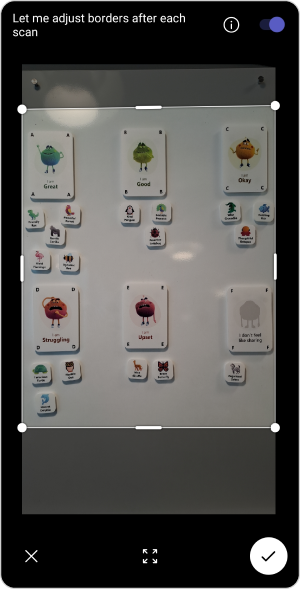
- Arrange the emotion cards on a board or wall
Note
Emotion Board can be set up in a landscape or portrait style, but Feelings Monster cards must be in straight lines and in order from A-F.

- The emotion board is all set up!
Assign a card to each of your students
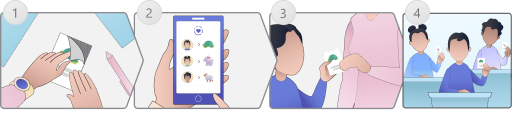
- Prepare the animal cards by using Velcro, reusable tape, magnets, etc.
- Review and assign the animal images to your students.
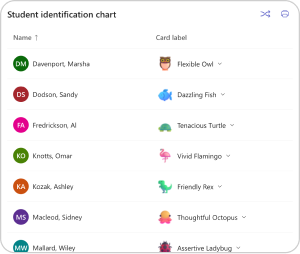
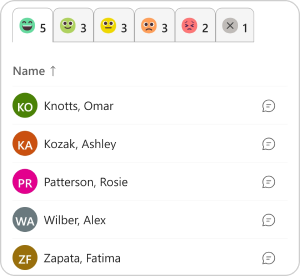
Open Reflect in your class team, select Reflect emotion board tile on the right panel, and review the student identification chart.
Tip
You can reshuffle the animal cards if students need a refresh or assign cards individually by selecting any animal card and choosing from the drop down.
- Hand an animal card to each student
- Your students are ready to share their emotions!



Downloadable guides
View Emotion Board quick guide (PDF)