
Aplica LAMBDA a cada columna y devuelve una matriz de los resultados. Por ejemplo, si la matriz original es de 3 columnas por 2 filas, la matriz devuelta es de 3 columnas por 1 fila.
Sintaxis
=BYCOL (matriz, lambda(columna))
La sintaxis de la función BYCOL tiene los siguientes argumentos y parámetros:
- matriz Es una matriz que se va a separar por columna.
- lambda LAMBDA que toma una columna como parámetro único y calcula un resultado. LAMBDA toma un parámetro:
- columna Una columna de la matriz.
Errores
Proporcionar una función LAMBDA no válida o un número incorrecto de parámetros devuelve un error #VALUE! llamado "Parámetros incorrectos".
Si no se proporciona una función LAMBDA ni nada más que un valor único devuelto por la función LAMBDA, se devuelve un error #CALC.
Ejemplos
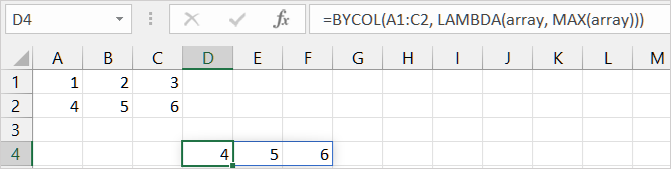
Ejemplo 1: Devolver el valor máximo de cada columna
Escriba los datos de ejemplo en las celdas A1: C2 y, a continuación, copie la fórmula en la celda D4:
=BYCOL(A1:C2, LAMBDA(array, MAX(array)))
Ejemplo 2: Devolver la suma del valor cuadrado de cada elemento de la matriz en cada columna
Escriba los datos de ejemplo en las celdas A1: C2 y, a continuación, copie la fórmula en la celda D4:
=BYCOL(A1:C2,LAMBDA(array,SUMSQ(array)))
