
Ketika menambahkan halaman modern ke situs, Anda dapat menambahkan dan menyesuaikan komponen web, yang merupakan blok penyusun halaman Anda. Artikel ini menjelaskan komponen web Pemisah.
Dengan komponen web Pemisah, Anda dapat menambahkan garis horizontal di antara komponen web lainnya untuk membantu membagi halaman dan membuatnya lebih mudah dibaca.
 Tambahkan komponen web pemisah
- Jika Anda belum berada dalam mode edit, klik Edit di kanan atas halaman.
- Arahkan kursor ke atas atau di bawah komponen web yang sudah ada atau di bawah wilayah judul, klik
 , lalu pilih komponen web Pemisah .
Sesuaikan komponen web pemisah
Klik Edit komponen web
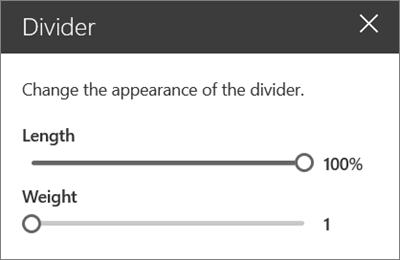
 (di sebelah kiri) untuk menyesuaikan panjang dan berat pemisah.
Atur Panjang pemisah dari 20% - 100%. (Panjang pemisah akan berubah saat Anda menyeret penggeser, sehingga Anda dapat melihat pratinjau perubahannya.)
Atur Berat pemisah dari 1 (paling tipis) hingga 6 (paling tebal). (Berat pemisah akan berubah saat Anda menyeret penggeser, sehingga Anda dapat melihat pratinjau perubahannya.)
Hapus komponen web pemisah
- Jika Anda belum berada dalam mode edit, klik Edit di kanan atas halaman.
- Pilih komponen web Pemisah, lalu klik tombol Hapus komponen web
 di sebelah kiri komponen web.