Outlook Desktop is slow to save attachments to a network path

적용 대상
Microsoft 365용 Outlook

Last Updated: May 14, 2024

ISSUE

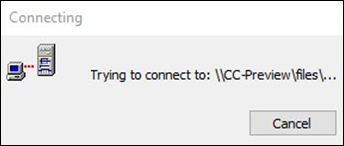
When Outlook is configured to save attachments by default to a network path, the following dialog can be seen for a while before the ‘Save As’ dialog finally loads:

Outlook Network path dialog

This is known to be happening in M365 Apps starting from the following builds: 

  • Current Channel: Version 2304 (Build 16327.20214)
  • Monthly Enterprise Channel: Version 2304 (Build 16327.20324)

STATUS: FIXED

Windows fixes are currently estimated for the following Windows patch Tuesday public updates below. Since these are estimated dates, they may change, and we will update the topic to reflect any changes. When we have the Windows update KB articles, we will include those here as well.

Windows Version Resolving KB Release Date
Windows Server, version 23H2 KB5036910 April 9, 2024
Windows 11 version 22H2, all editions
Windows 11 version 23H2, all editions
KB5036980 April 23, 2024
Windows 11 version 21H2, all editions KB5036894 April 9, 2024
Windows Server 2022
Azure Stack HCI, version 22H2
KB5036909 April 9, 2024
Windows 10, version 22H2, all editions KB5036979 April 23, 2024

WORKAROUND

If you urgently need to work around the issue or need a way to confirm the issue applies, use the following steps:

  1. Rollback the M365 Apps for a previous build: How to revert to an earlier version of Office.

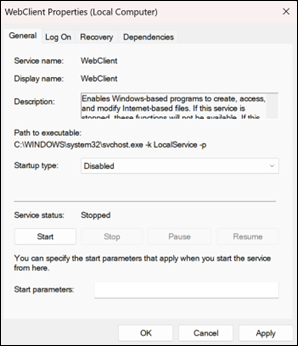
  2. Set the WebClient service Startup type to Disabled through Windows Services:

    1. Open services.msc from Run (Win+R).

    2. Find the WebClient service and open its properties.

    3. Stop the service and change the Startup type to Disabled.

      Outlook Webclient properties

More Resources

Icon Experts (brain, gears) Ask the experts

Connect with experts, discuss the latest Outlook news and best practices, and read our blog.

Outlook Tech Community

Icon Community Get help in the community

Ask a question and find solutions from Support Agents, MVPs, Engineers, and Outlook users.

Outlook Forum on Answers

Icon feature request (light bulb, idea) Suggest a new feature

We love reading your suggestions and feedback! Share your thoughts. We're listening.

Find out how

See Also

Fixes or workarounds for recent issues in Outlook for PC