개인 정보 설정을 변경하여 얼마나 많은 정보를 Microsoft와 공유할지 선택합니다.
이렇게 하려면 시작 을 선택한 다음 설정을
 열고 개인 정보 & 보안을
 선택합니다.

일반적인 개인 정보 옵션이 표시됩니다. 페이지의 왼쪽에는 구체적인 개인 정보 설정에 대한 링크가 제공됩니다.
자세한 내용은 Windows 데이터 수집 요약을 참조하세요.
Microsoft 계정의 개인 정보 설정 제어
참고
Windows 10에 대한 지원이 2025년 10월 14일에 종료되었습니다.
- 2025년 10월 14일 이후에 Microsoft는 더 이상 Windows 업데이트, 기술 지원 또는 Windows 10 대한 보안 수정 사항에서 무료 소프트웨어 업데이트를 제공하지 않습니다. PC는 계속 작동하지만 Windows 11 이동하는 것이 좋습니다.
-
자세한 정보
개인 정보 설정을 변경하여 얼마나 많은 정보를 Microsoft와 공유할지 선택합니다.
시작 메뉴에서 설정 >개인 정보를 선택합니다.
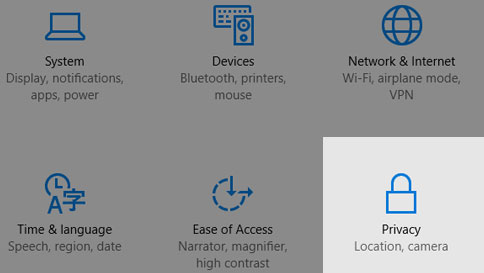
일반적인 개인 정보 옵션이 표시됩니다. 페이지의 왼쪽에는 구체적인 개인 정보 설정에 대한 링크가 제공됩니다.
자세한 내용은 Windows 데이터 수집 요약을 참조하세요.
Microsoft 계정의 개인 정보 설정을 제어합니다.
