
Understand diagnosis specificity suggestions
Diagnosis specificity suggestions help improve documentation accuracy by recommending more specific diagnoses for the Assessment and Plan section of your note.
After a note is generated, Dragon Copilot analyzes the documented clinical information and might suggest a more specific diagnosis when it finds sufficient evidence. Each suggestion includes supporting rationale to help you evaluate the recommendation.
You can:
- Accept a suggestion and update the note.
- Dismiss a suggestion.
- Ignore a suggestion and continue working.
The note is never updated automatically. If you choose not to take action, the note remains unchanged.
Benefits of diagnosis specificity suggestions
- Improve documentation accuracy by capturing greater diagnostic specificity.
- Support more complete and consistent clinical documentation.
- Help clinicians document more accurately the first time.
- Reduce the need for documentation updates and clarification requests.
- Surface relevant diagnosis suggestions directly within your workflow.
- Simplify note review by making it easy to apply supported diagnosis recommendations.
Activate diagnosis specificity suggestions
- Go to Settings > Extensions.
- Select diagnosis specificity suggestions.
- Turn on diagnosis specificity suggestions.

How diagnosis specificity suggestions work
- Generate or review a note in Dragon Copilot.
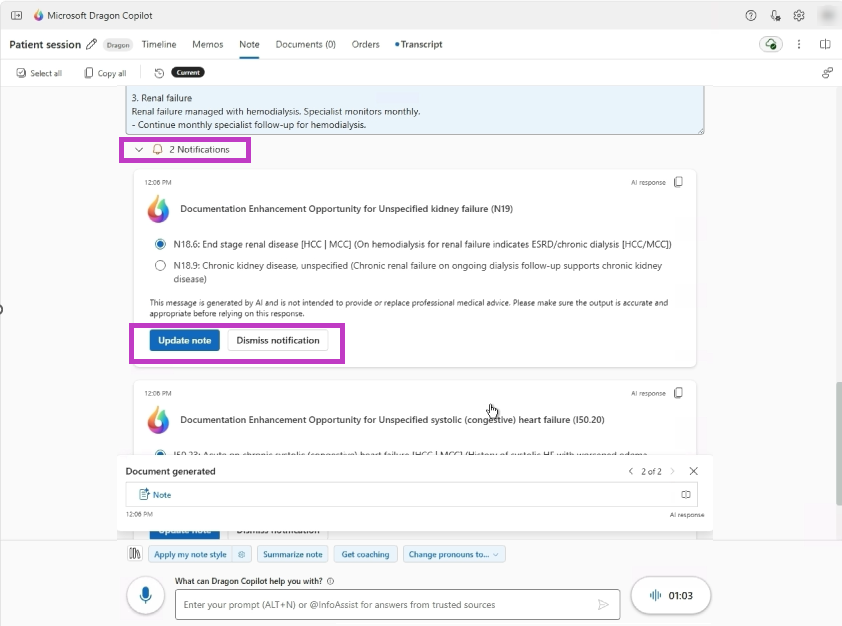
- Look for a notification indicator in the Assessment and Plan section.
- Select the notification indicator to review any diagnosis specificity suggestions and supporting rationale.
- Select Update note to replace the diagnosis with the more specific option, or select Dismiss notification.
Availability
- Available for ICD-10-CM coding guidance in the United States.
- Available in Dragon Copilot across supported experiences.
- Your organization must enable the feature before users can access it.