
Hoe kan ik automatische ruimte na interpunctie uitschakelen in Microsoft SwiftKey toetsenbord?
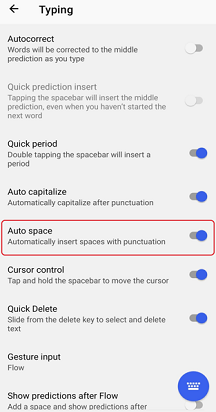
Microsoft SwiftKey toetsenbord voor Android heeft de functie Automatische ruimte. Standaard is de optie Automatische spatie ingeschakeld op uw Microsoft Swiftkey-toetsenbord, waarmee automatisch ruimte wordt toegevoegd wanneer u standaardinterpunctie typt. Dit omvat de komma, punt, uitroepteken, vraagteken.
Als u dit wilt uitschakelen, volgt u de onderstaande stappen.
- De app-instelling Microsoft SwiftKey openen
- Tik op Typen
- Schakel 'Automatische ruimte' uit
Neem contact met ons op
Neem voor meer hulp contact op met de ondersteuning van Microsoft SwiftKey- Neem contact met ons op