Use the Favorites folder in Outlook for Mac

Aplica-se a
Outlook para Microsoft 365 para Mac Outlook 2024 para Mac Outlook 2021 para Mac
  1. Select the folder you want to add to Favorites.
  2. Press Ctrl + Click.
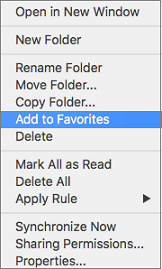
  3. Select Add to Favorites.
    Add to Favorites option on context menu

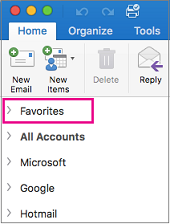
The Favorites folder now appears at the top of your folder list in the sidebar.

Favorites is at the top of the folder list in the sidebar

See Also

Outlook for Mac Help