
Vsebina poslovnega obveščanja (BI) običajno vključuje poročila, preglede rezultatov in nadzorne plošče, ki jih ljudje uporabljajo za spremljanje učinkovitosti delovanja in sprejemanje odločitev. V večini organizacij je v procese ustvarjanja in skupne rabe vsebine poslovnega obveščanja vključenih več oseb. Pomembno je, da imate osrednje mesto, kot je spletno mesto središča za poslovno obveščanje, za shranjevanje, upravljanje, skupno rabo in uporabo te vsebine.
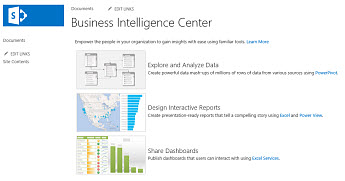
Spletno mesto središča za poslovno obveščanje je več kot le SharePointovo spletno mesto. To je tudi odličen način za povezovanje ljudi, procesov in informacij. Spletno mesto središča za poslovno obveščanje je lahko pomemben del rešitve poslovnega obveščanja v organizaciji, ne glede na to, ali ste skrbnik, avtor poročila ali potrošnik informacij.
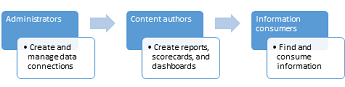
Na spletnem mestu središča za poslovno obveščanje lahko skrbniki ustvarijo in upravljajo vse podatkovne povezave, ki jih potrebujejo avtorji poročil. Avtorji vsebine lahko te vire podatkov uporabijo za ustvarjanje pregledov rezultatov, poročil in nadzornih plošč ter njihovo skupno rabo. Upravitelji in uporabniki informacij lahko vsebino poslovnega obveščanja uporabijo za spremljanje učinkovitosti delovanja, raziskovanje podatkov in sprejemanje boljših poslovnih odločitev. Ker se poslovne potrebe spreminjajo, lahko skrbniki in avtorji poročil preprosto posodobijo vsebino poslovnega obveščanja, tako da lahko uporabniki informacij uporabljajo najnovejše informacije.
| Ta opravila ... | Delajo ljudje v teh vlogah ... | In to naredite tako ... |
|---|---|---|
| Nastavite in upravljajte podatkovne povezave, ki jih bodo uporabljali avtorji poročil in nadzornih plošč | Skrbniki Avtorji vsebine |
Članek na spletnem mestu TechNet: skupna raba podatkovnih povezav z Excelom in Excelove storitve (SharePoint Server 2013) Članek na spletnem mestu TechNet: ustvarjanje podatkovnih povezav s storitve PerformancePoint (SharePoint Server 2013) |
| Ustvarjanje in objavljanje poročil, prikazov rezultatov ali nadzornih plošč | Avtor vsebine | Ustvarjanje in uporaba poročila ali pregleda rezultatov |
| Ogled in interakcija z vsebino poslovnega obveščanja | Potrošnik informacij | Raziskovanje in analiza podatkov v poročilih in na nadzornih ploščah |
Če želite izvedeti več o spletnih mestih središča za poslovno obveščanje, glejte Kaj je središče za poslovno obveščanje?