

Microsoft 365'teki Visio, temel Visio özelliklerini Microsoft 365'e getirir ve kurumsal kullanıcıların doğrudan bir web tarayıcısı üzerinden profesyonel diyagramlar oluşturmasına, düzenlemesine ve paylaşmasına olanak tanır. Microsoft 365 aboneliğinizdeki bu web uygulaması, temel çizim gereksinimleriniz için size güçlü bir araç sağlar.
Aşağıdaki tablolar, Microsoft 365'te Visio'yu kullanarak oluşturabileceğiniz ve oluşturamayacağınız ve/veya düzenleyebileceğiniz diyagram türlerini gösterir ve ayrıca bunu Visio Plan 1Visio Plan 1 ve Visio Plan 2Visio Plan 2 içindeki özelliklerle karşılaştırır.
Microsoft 365'teki Visio .vsdx dosya biçimini destekler ancak .vsd dosya biçimini desteklemez .
Desteklenen diyagram türleri
| Kategoriler | Diyagram türü | Microsoft 365’te Visio | Visio Plan 1 | Visio Plan 2 |
|---|---|---|---|---|
| Genel diyagramlar | Temel Diyagramlar | ⬤ | ⬤ | ⬤ |
| Blok Diyagramları | ⬤ | ⬤ | ⬤ | |
| İş Matrisi | ⬤ | ⬤ | ⬤ | |
| Venn Diyagramları | ⬤ | ⬤ | ⬤ | |
| Döngü Diyagramları | ⬤ | ⬤ | ⬤ | |
| Piramit Diyagramları | ⬤ | ⬤ | ⬤ | |
| Süreç diyagramları | Temel Akış Çizelgeleri | ⬤ | ⬤ | ⬤ |
| Süreç diyagramları | ⬤ | ⬤ | ⬤ | |
| İşlevsel Akış Çizelgeleri | ⬤ | ⬤ | ||
| SDL Diyagramları | ⬤ | ⬤ | ||
| BT Veritabanı diyagramları | UML Diyagramları | ⬤ | ⬤ | |
| ERD Diyagramları – Crow's Foot | ⬤ | ⬤ | ||
| ERD Diyagramları – Chen Notasyonu | ⬤ | ⬤ | ||
| Ağ diyagramları | Temel Ağ | ⬤ | ⬤ | |
| Ayrıntılı Ağ | ⬤ | ⬤ | ||
| AzureAzure Diagrams | ⬤ | ⬤ | ||
| AWS diyagramları | ⬤ | ⬤ | ||
| Süreç modeli akış çizelgeleri | İş Süreci Modeli ve Notasyonu (BPMN) | ⬤ | ||
| Haritalar ve kat planları | Kat planı, HVAC planları ve tesis düzeni | ⬤ | ||
| Diyagramları zamanlama | Zaman çizelgesi diyagramları, Gantt grafikleri ve PERT grafikleri | ⬤ | ||
| İş diyagramları | ITIL, Pivot, Altı Sigma diyagramı ve Değer akışı haritaları | ⬤ | ||
| Kuruluş şemaları* | ◒ | ⬤ | ⬤ |
* Microsoft 365'teki Visio'da kuruluş şemaları kısmen desteklenir. Resimler ve çalışan alanları gibi bazı özellikler Microsoft 365'teki Visio'da kullanılamaz.
Microsoft 365'te Visio'da bulunmayan şekiller içeren bir dosyayı açma
Microsoft 365'teki Visio, Microsoft 365 Kurumsal abonelerinin genel amaçlı diyagramlar oluşturmasına ve düzenlemesine olanak tanır. Microsoft 365'teki Visio'da özelleştirilmiş diyagramlar ve şekiller düzenlenemez.
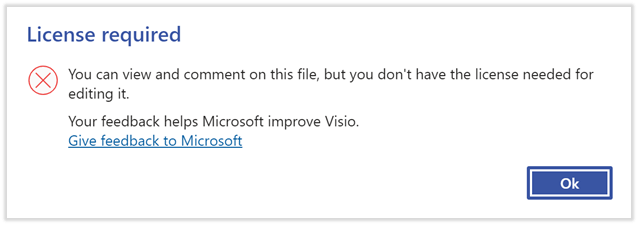
Visio çizimi, Microsoft 365'te Visio tarafından desteklenmeyen bir diyagram türünden bir şekil içeriyorsa, bu diyagramı düzenleyemezsiniz. Öte yandan, diyagramı görüntülemeye ve diyagrama açıklama eklemeye devam edebilirsiniz.
Özelleştirilmiş şekiller içeren bir çizimi açmaya çalıştığınızda aşağıdaki hata iletisini görürsünüz, çünkü çizimi düzenleyebilmeniz için ayrı bir Visio Plan 1Visio Plan 1 veya Visio Plan 2Visio Plan 2 lisansı gerekir:
Önemli
Web için Visio'da özelleşmiş şekiller içeren bir diyagram oluşturmak ve düzenlemek için Visio Plan 1Visio Plan 1 veya Visio Plan 2Visio Plan 2 lisansı gerekir. Daha fazla bilgi için Microsoft 365 yöneticinize başvurun. Ayrıca, ürün web sitelerinden çevrimiçi olarak self servis satın alma da yapabilirsiniz (yöneticiniz Visio için self servis satın almayı kapatmadıysa). Daha fazla bilgi için Self servis satın alma SSS'sini ziyaret edin.
Üçüncü taraf içeriği
Microsoft 365'te Visio kullanırken üçüncü taraf şekiller içeren Visio çizimleri düzenlenemez. Bununla birlikte, bu tür bir diyagramı görüntüleyebilir ve diyagrama açıklama ekleyebilirsiniz.
Veri bağlantılı çizimler
Visio Veri Görselleştiricisi eklentisiyle oluşturulan veya verilere bağlı Visio çizimleri, Microsoft 365'te Visio kullanırken düzenlenemez. Bununla birlikte, bu tür bir diyagramı görüntüleyebilir ve diyagrama açıklama ekleyebilirsiniz.