
With Outlook for Mac, we have reimagined the experience that you know and love, bringing even more power and simplicity to the product.
Outlook has many more features that are not in legacy Outlook for e.g., a fully customizable toolbar, swipe gestures, hover actions, theming, display density, search with natural language, meetings to be always Teams meeting, integrated My Day, advanced Microsoft Information Protection, text prediction, advanced dictation, retention and much more.
We are always actively listening for your feedback and making updates and changes to our feature roadmap based on what you tell us. If you have feedback on what we should consider adding to Outlook, please use the in-app Help > Give Feedback link.
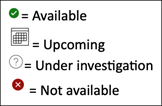
Account Support
| Feature Description | Available in Outlook, 16.58+, 16.58+ | |
|---|---|---|
| Close MSA accounts |

|
Available |
| Create a new account |
|
Available |
| Exchange (on-premises) |
|
Available |
|
|
Available | |
| iCloud |
|
Available |
| IMAP |
|
Available |
| LDAP |
|
Available Renamed to Directory Services |
| Office 365 |
|
Available |
| OnPrem ADFS |

|
Upcoming |
| Outlook.com |
|
Available |
| POP |
|
Available |
| Yahoo |
|
Available |
App Framework
| Feature Description | Available in Outlook, 16.58+, 16.58+ | |
|---|---|---|
| About dialog |
|
Available |
| Accessibility |
|
Available |
| Address Book / Browsable GAL |

|
Under Investigation |
| Calendar module |
|
Available |
| Collect Diagnostics |
|
Available |
| Contact Support |
|
Available |
| Contacts/People module |
|
Available |
| Give Feedback |
|
Available |
| Help (in-app) |
|
Available |
| Mail module |
|
Available |
| Multiple window support |
|
Available |
| Notes module (in-app) |
|
Upcoming |
| Preferences |
|
Available |
| Search |
|
Available |
| Search highlighting |
|
Available |
| Status bar |

|
Not available |
| Tasks module (in-app) |
|
Upcoming |
| What's New |
|
Available |
Calendar
| Feature Description | Available in Outlook, 16.58+, 16.58+ | |
|---|---|---|
| Calendar outbox |
|
Not available |
| Categorize events |
|
Available |
| Delete events |
|
Available |
| Dismiss and dismiss all reminders |
|
Available |
| Duplicate existing event |
|
Upcoming |
| From this day forward editing support |
|
Upcoming |
| Hide attendee list |
|
Available |
| Join online meeting button (Skype and Teams) |
|
Available |
| Mark events as private |
|
Available |
| Move and copy event to another folder/calendar (same account) |
|
Available |
| My day view |
|
Available |
| Online meetings (Skype and Teams) |
|
Available |
| Open, export and save .ics attachment |
|
Available |
| Propose new time |
|
Available |
| Recurring events |
|
Available |
| Request responses |
|
Available |
| Required, optional and resource attendees |
|
Available |
| RSVP (accept, tentative, decline) and forward |
|
Available |
| RSVP events in grid |
|
Available |
| Save and auto save event drafts |
|
Available |
| Scheduling assistant |
|
Available |
| Sensitivity labels with Microsoft Information Protection on events |
|
Available |
| Set and update reminders |
|
Available |
| Set start and end time zones |
|
Available |
| Shared and delegated calendars Note: Exchange (on-prem) support is coming soon. See Account Support section above or Coming Soon section of Outlook for Mac. |
|
Available |
| Show as free, tentative, busy, out of office |
|
Available |
| Show multiple time zones |
|
Available |
| Snooze reminders |
|
Available |
| Suggested times when creating event |
|
Available |
| Teams enabled by default |
|
Available |
| Weather in calendar |
|
Available |
Contacts
| Feature Description | Available in Outlook, 16.58+, 16.58+ | |
|---|---|---|
| Access non-default contact folders |
|
Available |
| Auto complete |
|
Available |
| Categorize contact |
|
Available |
| Contact availability in people card |
|
Available |
| Contact email |
|
Available |
| Contact fields |
|
Available |
| Contact notes |
|
Available |
| Contact photo |
|
Available |
| Delete contact |
|
Available |
| DL expansion and detection |
|
Available |
| Export contact as .vcf/vcard |
|
Available |
| Flag contact |
|
Not available |
| Mark as private |
|
Available |
| Meeting with contact |
|
Available |
| Move and copy contact to another folder (across account) |
|
Available |
| Move and copy contact to another folder (same account) |
|
Available |
| Open and save .vcf file |
|
Available |
| Org chart in contact preview |
|
Upcoming |
| Org chart in people card |
|
Available |
| People card |
|
Available |
| Personal Distribution List support |
|
Upcoming |
| Private Distribution Lists |
|
Upcoming |
| Resolve name and email address |
|
Available |
| See contacts in shared mailbox |
|
Available |
| Sort by display name, first name, last name, ascending or descending |
|
Available |
Extensibility
| Feature Description | Available in Outlook, 16.58+, 16.58+ | |
|---|---|---|
| Admin-managed Add-ins |
|
Available |
| Get Add-ins from App Source (Office store) |
|
Available |
| Injection-based plug-in support |
|
Not available |
Folders
| Feature Description | Available in Outlook, 16.58+, 16.58+ | |
|---|---|---|
| Access On My Computer (local) folders |
|
Available |
| Access Public Folders |
|
Not available We recommend Groups |
| Feature Description | Available in Outlook, 16.58+, 16.58+ | |
|---|---|---|
| @mentions in mail |
|
Available |
| Add attachments to drafts |
|
Available |
| Archive mail |
|
Available |
| Block sender |
|
Available |
| cc/bcc support in mail |
|
Available |
| Check Accessibility |
|
Available |
| Compose in plaintext |
|
Not available |
| Compose with different text encoding |
|
Not available |
| Create event from mail |
|
Available |
| Create, rename, and delete folders |
|
Available |
| Do Not Forward mail |
|
Available |
| Encrypt mail |
|
Available |
| External sender tag on mail |
|
Available |
| Favorite (mailbox, contacts and groups) |
|
Available |
| Favorite Shared mailbox |
|
Available |
| Filter by unread, flagged, mentions, attachments, To me and category |
|
Available |
| Find and replace |
|
Available |
| Flag for follow up and Reminders |
|
Available |
| Flag mail |
|
Available Note: In legacy Outlook, outgoing mails that're flagged don't retain the flag. |
| Focused inbox |
|
Available |
| Forward mail as attachment |
|
Available |
| Group by flag, category |
|
Available |
| Insert Online links |
|
Available |
| Mark as complete |
|
Upcoming |
| Mark mail as junk |
|
Available |
| Mark mail as phishing |
|
Available |
| Mark mail as read or unread |
|
Available |
| Move message to another folder (same account) |
|
Available |
| New mail |
|
Available |
| Online archive |
|
Available |
| Open and save .eml file |
|
Available |
| Outbox folder |
|
Available |
| Pop out to separate window |
|
Available |
| Preview / open / save attachments |
|
Available |
| Print mail |
|
Available |
| Remove attachment on received email |
|
Not available |
| Reorder Favorites |
|
Available |
| Reply, reply all, forward mail |
|
Available |
| Request delivery and read receipts |
|
Available with Microsoft 365 |
| Resend mail |
|
Available |
| Rich table formatting options |
|
Not available |
| S/MIME Note: With Legacy Outlook for Mac, distribution lists need to be expanded or an error occurs: "Missing or invalid encryption certificates" |
|
Available |
| Safe links |
|
Available |
| Save and auto save mail draft |
|
Available |
| Send later |
|
Available with Microsoft 365 |
| Set and manage categories |
|
Available |
| Set language in compose |
|
Available |
| Set Message Classification and Labels with Microsoft Information Protection on mail |
|
Available |
| Set priority on mail |
|
Available |
| Shared and delegate mailbox Note: Exchange (on-prem) support is coming soon. See 'Account Support' section above or Coming Soon section of Outlook for Mac. |
|
Available |
| Show folder size |
|
Under Investigation |
| Show message preview in message list |
|
Available |
| Show new message notification |
|
Available |
| Signatures |
|
Available |
| Sort by from, date, subject, size, importance, oldest or newest, ascending or descending |
|
Available |
| Sort by size |
|
Available |
| Spelling and Grammar |
|
Available |
| Swipe actions |
|
Available |
| Switch text formatting to plain text |
|
Upcoming |
| Total item count |
|
Available |
| Unified Inbox |
|
Available |
| Unread item count per folder |
|
Available |
| View source of received mail |
|
Available |
| Voice dictation |
|
Available |
| Voting buttons |
|
Available |
| Zoom mail |
|
Available |
Preferences
| Feature Description | Available in Outlook, 16.58+, 16.58+ | |
|---|---|---|
| Accounts |
|
Available |
| Add Online Meetings to all events |
|
Available |
| AutoCorrect |
|
Available |
| Categories |
|
Available |
| Composing |
|
Available |
| Fonts |
|
Available |
| General |
|
Available |
| Junk Mail |
|
Available (under customizable toolbar) |
| Notifications and Sounds |
|
Available |
| Privacy |
|
Available |
| Reading |
|
Available |
| Rules |
|
Available (under tools) |
| Search |
|
Available |
| Signatures |
|
Available |
| Spelling and Grammar |
|
Available |
Search
| Feature Description | Available in Outlook, 16.58+, 16.58+ | |
|---|---|---|
| Contacts search |
|
Available |
| Expanded (advanced) mail search |
|
Available |
| Fully delegated and shared calendar search |
|
Available |
| Offline search |
|
Available |
| Online Archive search |
|
Available |
| Partial delegated search |
|
Available |
| Saved searched (smart folders) |
|
Available |
| Search across all items |
|
Under Investigation |
| Search by attachment size |
|
Available |
| Search Contact suggestions |
|
Available |
| Search Feedback |
|
Not available |
| Search in calendar |
|
Available |
| Search in notes (in-app) |
|
Under Investigation |
| Search in tasks (in-app) |
|
Under Investigation |
| Search mail in current mailbox online |
|
Available |
| Search mail in folder online |
|
Available |
| Search mail in subfolder online |
|
Available |
| Search offline |
|
Available |
| Search Text suggestions |
|
Available |
| Unified inbox search |
|
Available |
Sync
| Feature Description | Available in Outlook, 16.58+, 16.58+ | |
|---|---|---|
| Synchronize now |
|
Available |
| View sync errors |
|
Not available |
| View sync status |
|
Not available |