有数个理由需要从 Outlook 数据文件 (.pst) 导入 Outlook 项。
- 建议将 Outlook 项从一个电子邮件帐户移到另一个电子邮件帐户。
- 建议将 Outlook 项从一台电脑移到另一台电脑
- 建议将 Outlook 项从一台电脑移动到 Mac,或从 Mac 移到电脑
- 您希望在本地文件夹和 IMAP 或 Exchange 服务器之间移动 Outlook 项目。
为正在使用的 Outlook 版本选择以下选项卡选项。
我的 Outlook 是哪个版本?
在新 Outlook 中导入
可以访问存储在新 Outlook 中的 .pst 数据文件中的电子邮件。 可以在 .pst 文件和邮箱之间拖放) (浏览、管理和移动电子邮件。
重要
在此版本中,无法访问保存在 .pst 文件中的Calendar和联系人项目。
但是,导入电子邮件、联系人和日历项目目前在新 Outlook 中不可用。 遵循 Microsoft 365 路线图站点上的未来版本。
步骤:从经典 Outlook 中的 .pst 文件导入 Outlook 项目
这些说明假设您已经导出 您的 Outlook 电子邮件、联系人和来自其他 Outlook 实例的日历,现在您要将它们导入 Outlook。
在 Outlook 功能区顶部,选择“文件”。
如果功能区的左上角没有“文件”选项,则说明你使用的不是安装在计算机上的 Outlook 应用。 请参阅我的 Outlook 是哪个版本?以查找你的 Outlook 版本并获取正确的导入步骤。
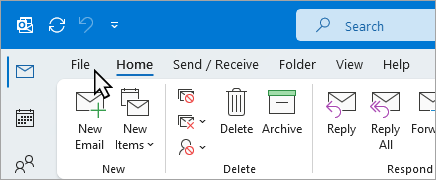
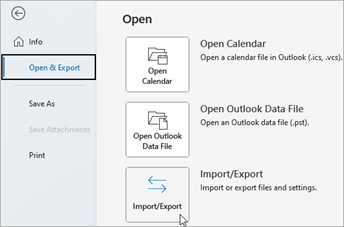
选择 “打开 & 导出>导入/导出”。 这将启动导入/导出向导。
选择“从另一程序或文件导入”,然后选择“下一步”。

选择 “Outlook 数据文件 (.pst) ”,然后选择“ 下一步”。
“浏览”到要导入的 .pst 文件。 在“选项”下,选择要如何处理电子邮件和联系人,然后选择“下一步”。

如果已将密码分配给 Outlook 数据文件 (.pst) ,请输入密码,然后选择“ 确定”。
如果要将 .pst 文件的内容导入 Microsoft 365 邮箱,请在此处选择该邮箱。
如果未导入到 Microsoft 365 邮箱,请选择“ 将项目导入当前文件夹”。 这会将数据导入到当前选择的文件夹中。
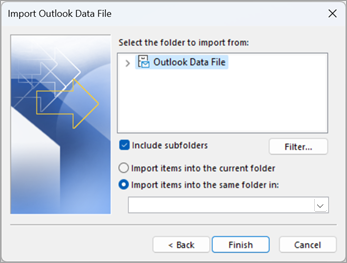
选择“完成”。 Outlook 立即开始导入 .pst 文件的内容。 进度框消失后,导入完毕。
如果要将 .pst 文件导入 Microsoft 365 邮箱,可能会看到一条消息,指出它正在尝试与 Microsoft 365 进行连接。 Internet 连接中断时会发生这种情况(即使是很短的时间)。 重新建立 Internet 连接后,Outlook 将继续导入 .pst 文件。
提示
如果只想从 Outlook 数据文件 (.pst) 检索少量电子邮件或联系人,可以 打开 Outlook 数据文件,然后在导航窗格中将 .pst 文件中的电子邮件和联系人拖放到现有 Outlook 文件夹。
导入什么数据?
将电子邮件、联系人和日历导出或备份到 Outlook .pst 文件时,系统会创建 .Pst 文件。 Outlook 会将电子邮件复制到 .pst 文件。
- Outlook 将电子邮件导出到 .pst 文件时,会包括任何附件。 因此,导入 .pst 文件时,会看到附件。
- Outlook 不会导出文件夹属性(视图、权限和自动存档设置)等元数据、消息规则和阻止发件人列表。 因此,也不会将其导入。
- Outlook 将电子邮件、联系人和日历信息导出到 .pst 文件时,会制作这些信息的副本。 不会删除 Outlook 中的任何内容。 仍可在 Outlook 中看到并访问你的电子邮件、联系人和日历。
没有帮助?
请参阅修复导入 Outlook .pst 文件时出现的问题获取有关常见问题和解决方案的列表。
导入和导出 Outlook 电子邮件、联系人和日历

