
简介
根据 Real Decreto 596/2016 在西班牙引入的立法更改,de 2 de diciembre 是一个基于即时提供信息的增值税管理系统, (SII 系统) 允许 AEAT 与纳税人之间建立双向、自动化和即时的关系。
请参阅有关如何设置和使用 Microsoft Dynamics 365 Finance 向 SII 系统报告的相关文档:https://learn.microsoft.com/en-us/dynamics365/finance/localizations/emea-esp-sii。
从 2021 年 1 月 1 日起,SII 系统) 版本 1.1 (bis 开始生效。 本文提供有关 Microsoft Dynamics 365 Finance 中为支持 SII 系统版本 1.1 (bis) 而进行的更改的信息。
应下载并导入以下版本的 GER 配置 ,以支持更新的功能:
| 配置名称 | 配置类型 | 版本 |
|---|---|---|
| 发票通信模型 | 模式 | 61 |
| SII 模型映射 | 模型映射 | 61.69 |
| SII 发票开具格式 (ES) | 格式 | 61.46 |
| SII 发票接收格式 (ES) | 格式 | 61.36 |
上表中格式的生效日期参数设置为 2021 年 1 月 1 日。 这意味着系统将从 2021 年 1 月 1 日起开始使用这些格式版本。
症状
有关 SII 系统中引入了哪些更改的完整信息,请参阅版本 1.1 (bis) 的官方文档:
以下版本 1.1 (bis 引入的更改) 这些更改对 Microsoft Dynamics 365 Finance 解决方案向 SII 系统报告信息有潜在影响,因此在当前热修复中涵盖这些更改:
| 更改说明 |
|---|
| NUEVAS VALIDACIONES LIBRO REGISTRO DE FACTURAS EMITIDAS |
| LRFE。 Bloque identificación de la contraparte (I) 1. 如果发票类型为 F1、F3、R1、R2、R3 和 R4,则必须完成对方的标识块。 2. 如果发票类型为 F2、F4 和 R5,则必须省略对方的标识块。 |
| LRFE。 Fecha de expedición y período de liquidación 1. 发行日期不得早于操作日期。 当任何特殊制度代码为 14 或 15 或通信类型 A4 时,此验证将不适用。 |
| LRFE。 IVA pendiente de devengo AAPP. 当单个制度标记为 14 时,发票类型必须为 F1、R1、R2、R3 或 R4 |
| NUEVAS VALIDACIONES LIBRO REGISTRO DE FACTURAS RECIBIDAS |
LRFR。 Cuota deducible
|
| LRFR。 Deducción en período posterior. 新字段“在以后的时间段内扣除”。 如果字段“Ejercicio de deducción”和“Periodo de deducción”已完成,则“Deducir en período posterior”字段必须为“是”。 |
| LRFR。 Período y ejercicio de deducción 新字段“Ejercicio” (会计年度) 和“Período de deducción” (扣减期) 。 |
下表介绍了 Microsoft Dynamics 365 Finance 解决方案中用于向 SII 系统报告信息以支持 SII 系统 1.1 (bis) 的更改:
| 收到的 SII 模型映射 > 发票 | |
|---|---|
已映射现有模型字段: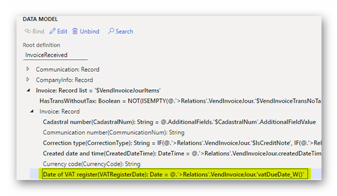
|
路径:Invoice/Invoice/VATRegisterDate 公式:@.'>关系”。VendInvoiceJour.'vatDueDate_W () ' |
| SII 发票接收格式 (ES) | |
| 重定基至模型版本 61 | |
添加了新的计算字段“$AreEquivalenceTaxesExist”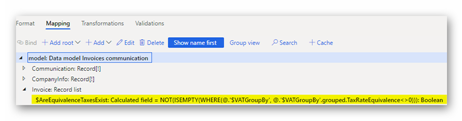
|
路径:模型/发票 公式:NOT (ISEMPTY (WHERE (@。$VATGroupBy'、@.'$VATGroupBy'.grouped。TaxRateEquivalence <> 0) ) ) |
更改了“CuotaDeducible”元素的公式: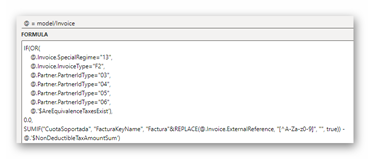
|
老: IF (@。Invoice.SpecialRegime=“13”, 0.0, SUMIF (“CuotaSoportada”, “FacturaKeyName”, “Factura”&REPLACE (@。Invoice.ExternalReference, “[^A-Za-z0-9]”, “”, true) ) - @.'$NonDeductibleTaxAmountSum') 新增功能: IF (或 ( @.Invoice.SpecialRegime=“13”, @.Invoice.InvoiceType=“F2”, @.Partner.PartnerIdType=“03”, @.Partner.PartnerIdType=“04”, @.Partner.PartnerIdType=“05”, @.Partner.PartnerIdType=“06”, @.'$AreEquivalenceTaxesExist') , 0.0, SUMIF (“CuotaSoportada”、“FacturaKeyName”、“Factura”&REPLACE (@。Invoice.ExternalReference, “[^A-Za-z0-9]”, “”, true) ) - @.'$NonDeductibleTaxAmountSum') |
发票下新的计算“$IsDeductedInLaterPeriod”字段: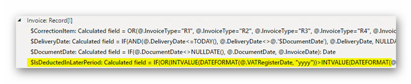
|
公式: IF( 或 ( INTVALUE (DATEFORMAT (@。VATRegisterDate,“yyyy”) ) > INTVALUE (DATEFORMAT (@。$DocumentDate'、“yyyy”) ) , AND ( INTVALUE (DATEFORMAT (@。VATRegisterDate,“yyyy”) ) = INTVALUE (DATEFORMAT (@。$DocumentDate'、“yyyy”) ) , INTVALUE (DATEFORMAT (@。VATRegisterDate,“MM”) ) > INTVALUE (DATEFORMAT (@。$DocumentDate'、“MM”) ) ) ) 、 true, false) |
“siiLR:FacturaRecibida”元素下的新元素: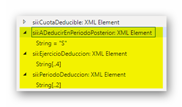
|
“Enabled”的公式如下: @.发票。'$IsDeductedInLaterPeriod' |
| 颁发的 SII 模型映射 > 发票 | |
新数据源 InventTrans: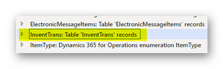
|
|
CustInvoiceJour 下的新计算字段: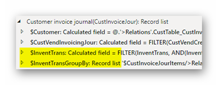
|
$InventTrans: IF( ISEMPTY (FILTER (InventTrans, AND (InventTrans.InvoiceId = @.InvoiceId,InventTrans.DateFinancial = @。InvoiceDate) ) ) , EMPTYLIST (InventTrans) , FILTER (InventTrans,AND (InventTrans.InvoiceId = @。InvoiceId,InventTrans.DateFinancial = @。InvoiceDate) ) ) $InventTransGroupBy: 要分组的内容:“$CustInvoiceJourItems”。>关系”。CustInvoiceJour.$InventTrans' 聚合: 字段:“$CustInvoiceJourItems”。>关系”。CustInvoiceJour.$InventTrans'DatePhysical 方法:Max 名称:DatePhysicalMax |
已映射现有模型字段: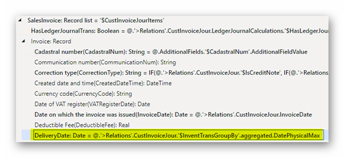
|
路径:SalesInvoice/Invoice/DeliveryDate 公式: @.'>关系”。CustInvoiceJour.$InventTransGroupBy'.aggregated。DatePhysicalMax |
ProjInvoiceJour 下的新计算字段: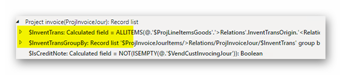
|
$InventTrans: IF( ISEMPTY (ALLITEMS (@。$ProjLineItemsGoods。”>关系”。InventTransOrigin。<关系”。InventTrans) ) , EMPTYLIST (InventTrans) , ALLITEMS (@.$ProjLineItemsGoods。”>关系”。InventTransOrigin。<关系”。InventTrans) ) $InventTransGroupBy: 要分组的内容:“$ProjInvoiceJourItems”。>关系”。ProjInvoiceJour.$InventTrans' 聚合: 字段:“$ProjInvoiceJourItems”。>关系”。ProjInvoiceJour.$InventTrans'DatePhysical 方法:Max 名称:DatePhysicalMax |
已映射现有模型字段:
|
路径:ProjInvoice/Invoice/DeliveryDate 公式: @.'>关系”。ProjInvoiceJour.$InventTransGroupBy'.aggregated。DatePhysicalMax |
| SII 发票开具格式 (ES) | |
发票下添加了新的计算字段“$DeliveryDate”:
|
公式: IF (@。DeliveryDate <> NULLDATE () ,@。DeliveryDate,@.'$DocumentDate') |
FechaOperacion 的新公式和启用条件: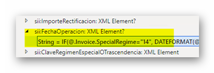
|
公式: 老: DATEFORMAT (@。Invoice.InvoiceDate,“dd-MM-yyyy”) 新增功能: IF (@。Invoice.SpecialRegime = “14”, DATEFORMAT (@。发票。'$DocumentDate' + 30,“dd-MM-yyyy”) , DATEFORMAT (@。发票。'$DeliveryDate'、“dd-MM-yyyy”) ) 已启用: 旧: false 新增功能: IF( 或 ( @.Invoice.SpecialRegime = “14”, @.Invoice.SpecialRegime = “15”, 模型。Communication.CommunicationType = “A4”, @.发票。'$DocumentDate' > @.发票。'$DeliveryDate') , true, false) |
Contraparte 元素的新启用条件: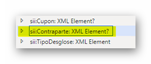
|
老: AND (AND (@。Invoice.InvoiceType <>“F2”, @.Invoice.InvoiceType <>“R5”) , OR (@。Invoice.InvoiceAmount <> @.Invoice.TaxBaseGroup, OR (@。Partner.TaxRegistrationNumber <> “”, @.Partner.PartnerID <> “”) ) ) 新增功能: 或 ( @.Invoice.InvoiceType = “F1”, @.Invoice.InvoiceType = “F3”, @.Invoice.InvoiceType = “R1”, @.Invoice.InvoiceType = “R2”, @.Invoice.InvoiceType = “R3”, @.Invoice.InvoiceType = “R4”) |
对于以下元素,转换已设置为 NumberFormat: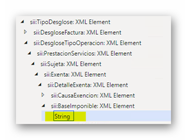
|
更多信息
可以使用这些特定于国家/地区的电话号码链接通过电话联系 Microsoft Dynamics 的技术支持。 为此,请访问以下Microsoft网站之一:
合作伙伴
https://mbs.microsoft.com/partnersource/resources/support/supportinformation/Global+Support+Contacts
客户
https://mbs.microsoft.com/customersource/northamerica/help/help/contactus
在特殊情况下,如果 Microsoft Dynamics 和相关产品的技术支持专业人员确定特定更新将解决你的问题,则通常由支持呼叫产生的费用可能会被取消。 通常的支持成本将适用于不符合特定更新条件的任何其他支持问题和问题。
注意这是一篇由 Microsoft 支持组织直接创建的“快速发布”文章。 此处包含的信息是按原样提供的,以响应新出现的问题。 由于发布速度较快,这些材料可能包含印刷错误,无需通知即可随时修改。 有关其他注意事项 ,请参阅使用条款 。