
注意
原始发布日期: 2026 年 3 月 16 日
上次更新日期: 2026 年 5 月 12 日
KB ID: 5084567
本文内容
概述
本指南介绍了使用组策略和渐进式推出波次的 Windows 安全启动数据库证书更新的自动部署系统。
安全启动证书推出自动化是基于 PowerShell 的系统,它以受控的分级方式将 Windows 安全启动数据库证书更新部署到加入域的计算机。
关键功能
| 功能 | 说明 |
|---|---|
| 分级推出 | 1 > 2 4 >> 8... 每个桶的设备数 |
| 自动阻止 | 具有无法访问设备的存储桶被排除 |
| 自动 GPO 部署 | 单个业务流程协调程序脚本处理所有内容 |
| 计划任务执行 | 无需交互式提示 |
| 实时监视 | 带进度栏的状态查看器 |
证书汇报设置参考
本节内容
AvailableUpdatesPolicy 组策略
| 注册表位置 | HKEY_LOCAL_MACHINE\SYSTEM\CurrentControlSet\Control\SecureBoot |
|---|---|
| 名称 | AvailableUpdatesPolicy |
| 值 | 0x5944 (DWORD) |
这是 GPO/ADMX 控制的密钥,用于:
- 在重新启动后仍持续存在
- 由组策略/MDM 设置
- 不会导致重试循环 (通过 ClearRolloutFlags 清除)
- 是策略驱动部署的正确密钥
参考:组策略对象 (GPO) 具有 IT 托管更新的 Windows 设备安全启动方法
WinCSFlags - Windows 配置系统标志
域管理员也可以使用随 Windows 操作系统更新一起发布的 Windows 配置系统 (WinCS) 跨已加入域的 Windows 客户端和服务器部署安全启动更新。 它包含命令 行界面 (CLI) 实用程序 ,用于查询安全启动配置并将其本地应用到计算机。
| 功能名称 | WinCS 密钥 | 说明 |
|---|---|---|
| Feature_AllKeysAndBootMgrByWinCS | F33E0C8E002 | 启用此密钥允许在设备上安装以下 Microsoft 提供的安全启动新证书。
|
参考: 用于安全启动的 Windows 配置系统 (WinCS) API
体系结构
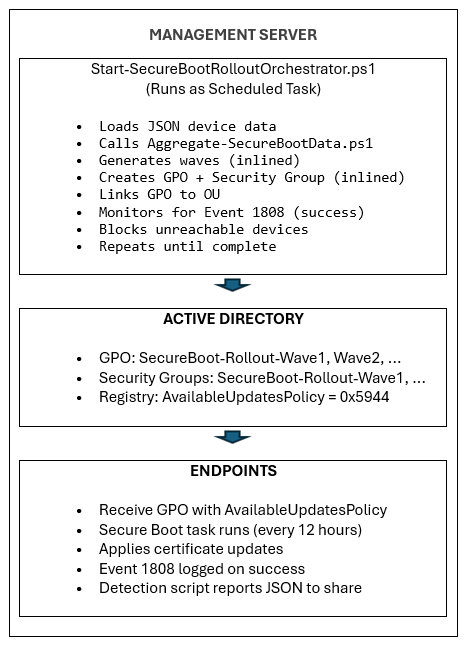
阶段 1:企业级别的检测和状态监视
本节内容
阶段 1 所需的脚本
安全启动清单数据收集脚本示例
注意
重要说明 以下包含示例脚本的文章已停用。 如果已安装 2026 年 5 月 12 日或之后发布的 Windows 更新,则可以在设备上的 %systemroot%\SecureBoot\ExampleRolloutScripts 文件夹中找到示例脚本。
| 示例脚本名称 | 用途 | 运行在 |
|---|---|---|
| 示例 Detect-SecureBootCertUpdateStatus.ps1 脚本 | 收集设备状态数据 | 每个终结点都通过 GPO) ( |
| 示例 Aggregate-SecureBootData.ps1 脚本 | 生成报表和仪表板 | 管理员工作站 |
| 示例 Deploy-GPO-SecureBootCollection.ps1 脚本 | 自动创建用于数据收集的 GPO | 域控制器 |
上述第 1 阶段脚本的示例输出
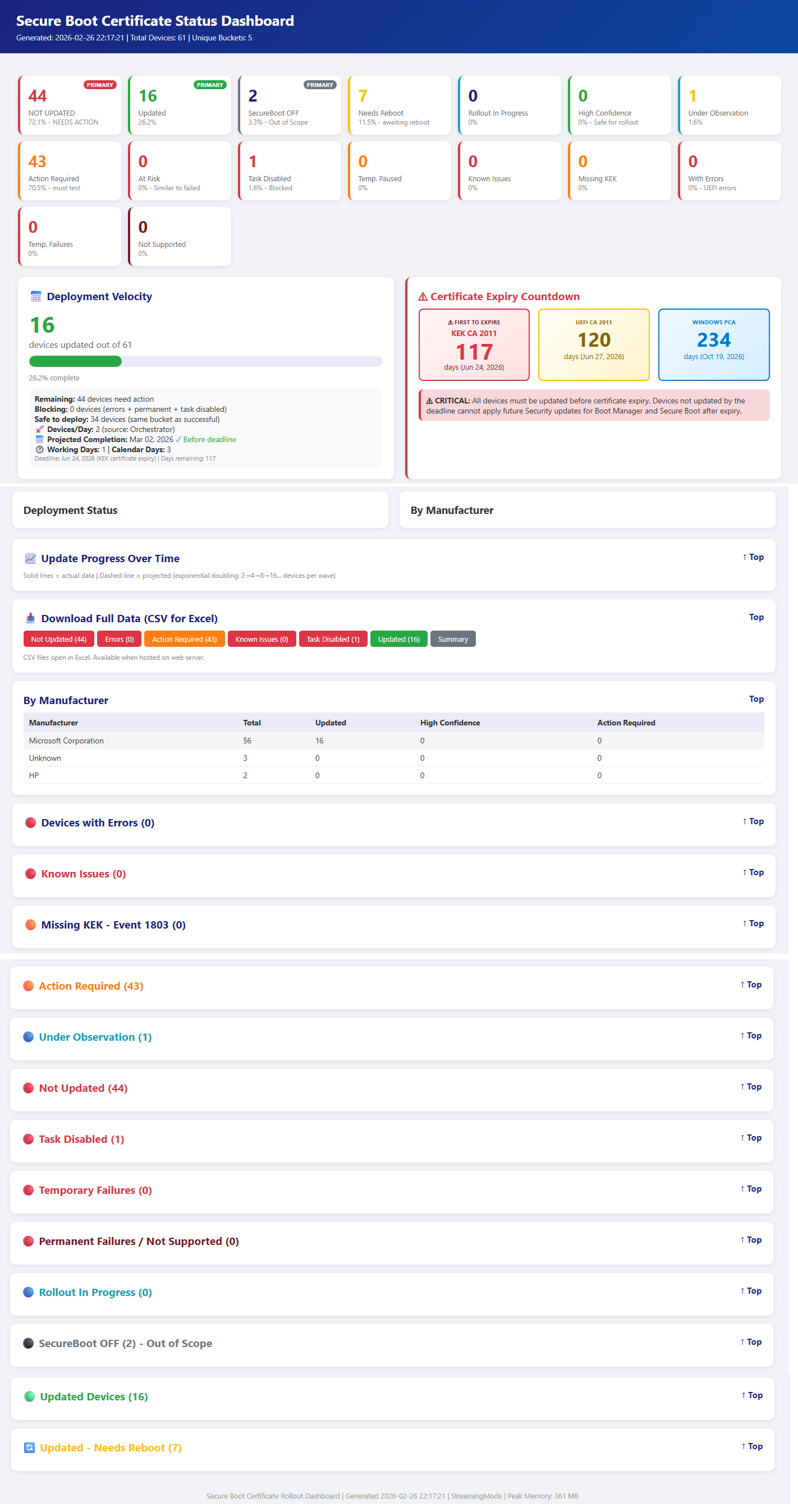
本地测试
在通过 GPO 进行部署之前,请在单台计算机上测试集合脚本以验证功能。
在本地运行集合脚本
打开提升的 PowerShell 提示符并执行:
& .\Detect-SecureBootCertUpdateStatus.ps1 -OutputPath "C:\Temp\SecureBootTest"验证 JSON 输出
# View the collected data
Get-Content "C:\Temp\SecureBootTest\*_latest.json" | ConvertFrom-Json | Format-List
要验证的关键字段
• SecureBootEnabled - 应为 True 或 False
• OverallStatus - Complete、ReadyForUpdate、NeedsData 或 Error
• BucketHash – 用于置信度数据匹配的设备存储桶
• SecureBootTaskEnabled - 显示安全启动更新任务的状态。测试聚合脚本
# Generate reports from collected data
& ".\Aggregate-SecureBootData.ps1" `
    -InputPath "C:\Temp\SecureBootTest" `
    -OutputPath "C:\Temp\SecureBootReports"

# Open the HTML dashboard
Start-Process "C:\Temp\SecureBootReports\SecureBoot_Dashboard_*.html"
网络共享设置
创建网络共享
在文件服务器上,为集合数据创建专用共享:
# Run on file server as Administrator
$SharePath = "D:\SecureBootCollection"
$ShareName = "SecureBootData$"

# Create folder
New-Item -ItemType Directory -Path $SharePath -Force

# Create hidden share ($ suffix hides from browse list)
New-SmbShare -Name $ShareName -Path $SharePath `
    -Description "Secure Boot Certificate Status Collection" `
    -FullAccess "Domain Admins" `
    -ChangeAccess "Domain Computers"
配置 NTFS 权限
# Get current ACL
$Acl = Get-Acl $SharePath

# Allow Authenticated Users to write files
$WriteRule = New-Object System.Security.AccessControl.FileSystemAccessRule(
    "Domain Computers",
    "Modify",
    "ContainerInherit,ObjectInherit",
    "None",
    "Allow"
)
$Acl.AddAccessRule($WriteRule)

# Allow Domain Admins full control (for aggregation)
$AdminRule = New-Object System.Security.AccessControl.FileSystemAccessRule(
    "Domain Admins",
    "FullControl",
    "ContainerInherit,ObjectInherit",
    "None",
    "Allow"
)
$Acl.AddAccessRule($AdminRule)

# Apply permissions
Set-Acl -Path $SharePath -AclObject $Acl
验证共享访问权限
# Test from a domain-joined workstation
Test-Path "\\fileserver\SecureBootData$"
# Should return: True
GPO 部署
使用域控制器提供的自动化脚本:
# Run on Domain Controller as Domain Admin for interactive OU Section – Recommended
# Replace the “Contoso.com”, “Contoso” with the name of the domain
# Replace FILESERVER with the file server name.  Script shows list of OUs to deploy GPO on
.\Deploy-GPO-SecureBootCollection.ps1 `
    -DomainName "contoso.com" `
    -AutoDetectOU `
    -CollectionSharePath "\\FILESERVER\SecureBootData$" `
    -ScriptSourcePath ".\Detect-SecureBootCertUpdateStatus.ps1" `
    -Schedule "Daily" `
    -ScheduleTime "14:00" `
    -RandomDelayHours 4
此脚本将执行以下操作:
- 创建具有指定名称的新 GPO
- 将集合脚本复制到 SYSVOL 以实现高可用性
- 配置计算机启动脚本
- 将 GPO 链接到目标 OU
- (可选)创建定期收集的计划任务
下表根据您的队列规模提供了有关延迟时间的指导。
| 舰队规模 | 延迟范围 |
|---|---|
| 1-10,000 台设备 | 4 小时 |
| 10K-50K 台设备 | 8 小时 |
| 50K+ 台设备 | 12-24 小时 |
GPO 设置摘要
| 设置 | 位置 | 值 |
|---|---|---|
| 启动脚本 | 计算机配置→脚本 | Detect-SecureBootCertUpdateStatus.ps1 |
| 脚本参数 | (相同的) | -OutputPath “\\server\share$” |
| 执行策略 | PowerShell →计算机配置→ 管理员模板 | 允许本地和远程签名 |
| 计划任务 | 计算机配置→首选项→计划任务 | 每日/每周收集 |
验证
强制在测试机器上更新 GPO
# On a test workstation
gpupdate /force

# Reboot the client machines to startup script or it will trigger on next schedule.
Restart-Computer -Force
验证数据收集
# Check if data was collected (on file server or from any machine)
Get-ChildItem "\\fileserver\SecureBootData$" |
    Sort-Object LastWriteTime -Descending |
    Select-Object -First 10

# Verify JSON content
Get-Content "\\fileserver\SecureBootData$\TESTPC_latest.json" | ConvertFrom-Json
检查 GPO 应用程序
# Verify GPO is applied to the computer
gpresult /r | Select-String "SecureBoot"
# The script also saves a local copy for redundancy.
Get-ChildItem "C:\ProgramData\SecureBootCollection\"
阶段 2:安全启动证书更新业务流程脚本
重要
确保第 1 阶段已完成,包括从远程服务器共享的每个终结点收集数据。
本节内容
- 阶段 2 所需的脚本
- Start-SecureBootRolloutOrchestrator.ps1
- Deploy-OrchestratorTask.ps1
- Get-SecureBootRolloutStatus.ps1
阶段 2 所需的脚本
安全启动清单数据收集脚本示例
注意
重要说明 以下包含示例脚本的文章已停用。 如果已安装 2026 年 5 月 12 日或之后发布的 Windows 更新,则可以在设备上的 %systemroot%\SecureBoot\ExampleRolloutScripts 文件夹中找到示例脚本。
| 示例脚本名称 | 用途 | 在以下位置上运行: |
|---|---|---|
| 示例 Detect-SecureBootCertUpdateStatus.ps1 脚本 | 收集设备状态数据 | 每个终结点都通过 GPO) ( |
| 示例 Aggregate-SecureBootData.ps1 脚本 | 生成报表和仪表板 | 管理员工作站 |
| 示例 Deploy-GPO-SecureBootCollection.ps1 脚本 | 自动创建用于数据收集的 GPO | 域控制器 |
| 示例 Start-SecureBootRolloutOrchestrator.ps1 脚本 | 通过自动 GPO 部署实现全自动的持续业务流程,用于证书安装 | 管理员工作站 |
| 示例 Deploy-OrchestratorTask.ps1 脚本 | 按计划部署 Orchestrator 脚本任务以实现自动推出 | 域控制器 |
| 示例 Get-SecureBootRolloutStatus.ps1 脚本 | 从任何工作站查看安全启动证书推出状态 | 管理员工作站 |
| 示例 Enable-SecureBootUpdateTask.ps1 脚本 | 启用安全启动更新任务 | 开 禁用任务的终点 (仅运行一次以启用任务(如果已禁用) |
Start-SecureBootRolloutOrchestrator.ps1
用途: 通过自动化 GPO 部署实现全自动的持续业务流程。
作用
设备状态的通话 Aggregate-SecureBootData.ps1
使用渐进式加倍生成推出波次
使用以下方法之一为证书部署创建 GPO
- 安全启动组策略 AvailableUpdatesPolicy = 0x5944 (默认)
- WinCS 方法 (参数 –UseWinCS)
创建用于目标的 AD 安全组
将计算机帐户添加到安全组
配置 GPO 安全筛选
将 GPO 链接到目标 OU
监视阻塞的存储桶 (无法访问的设备)
设备恢复时自动取消阻止
用法
# Interactive (testing)
.\Start-SecureBootRolloutOrchestrator.ps1 `
    -AggregationInputPath "\\fileserver\SecureBootData$" `
    -ReportBasePath "C:\SecureBootReports" `
    -PollIntervalMinutes 30
# Interactive (testing), leveraging WinCS method .\Start-SecureBootRolloutOrchestrator.ps1 ` -AggregationInputPath "\\fileserver\SecureBootData$" ` -ReportBasePath "C:\SecureBootReports" ` -PollIntervalMinutes 30 ` -UseWinCS管理员命令
# List blocked buckets
.\Start-SecureBootRolloutOrchestrator.ps1 -ReportBasePath "C:\SecureBootReports" -ListBlockedBuckets
# Unblock specific bucket .\Start-SecureBootRolloutOrchestrator.ps1 -ReportBasePath "C:\SecureBootReports" -UnblockBucket "Dell|Latitude5520|BIOS1.2"# Unblock all .\Start-SecureBootRolloutOrchestrator.ps1 -ReportBasePath "C:\SecureBootReports" -UnblockAll参数
参数 默认值 说明 AggregationInputPath 必需 终结点 JSON 文件的 UNC 路径 ReportBasePath 必需 报表和状态的本地路径 TargetOU 域根 用于链接 GPO 的 OU WavePrefix SecureBoot-Rollout GPO/组命名前缀 MaxWaitHours 72 检查设备可访问性的小时数 PollIntervalMinutes 1440 状态检查之间的分钟数 DryRun 假 显示不进行更改会发生的情况 注意
关于 PollIntervalMinutes 的说明: 直接运行业务流程协调程序时,默认值为 1440 分钟 (24 小时) 。 通过 Deploy-OrchestratorTask.ps1 部署时,默认值为 30 分钟。 部署脚本将其自己的默认值传递给业务流程协调程序。 将 30 分钟用于有效推出,将 1440 分钟用于维护监视。
可选参数
参数 默认值 说明 UseWinCS 假 使用 WinCS 方法而不是 AvailableUpdatesPolicy GPO WinCSKey F33E0C8E002 用于安全启动配置的 WinCS 密钥 AllowListPath (无) 具有主机名的文件的路径,以允许用于目标/试点推出。 支持 .txt 或 .csv。 AllowADGroup (无) AD 要允许的计算机帐户的安全组。 示例:“SecureBoot-pilot-computers” ExclusionListPath (无) 具有主机名的文件的路径 排除在 VIP/执行设备 (推出) ExcludeADGroup (无) 要排除的计算机帐户的 AD 安全组。 示例:“VIP-Computers” ListBlockedBuckets 假 显示当前阻止的设备存储桶 UnblockBucket (无) 取消阻止特定存储桶。 格式:“Manufacturer|模型 |BIOS” UnblockAll 假 取消阻止所有被阻止的设备存储桶
Deploy-OrchestratorTask.ps1
用途: 将业务流程协调程序部署为 Windows 计划任务。
优点
- 无 PowerShell 安全提示 (ExecutionPolicy 绕过)
- 在后台持续运行
- 无需用户交互
- 在重新启动后仍保留
用法
使用域服务帐户部署 (建议)
使用 AvailableUpdates 组策略 (默认方法)
.\Deploy-OrchestratorTask.ps1 `
    -AggregationInputPath "\\server\SecureBootData$" `
    -ReportBasePath "C:\SecureBootReports" `
    -ServiceAccount "DOMAIN\svc_secureboot"
使用 WinCS 方法
.\Deploy-OrchestratorTask.ps1 `
    -AggregationInputPath "\\server\SecureBootData$" `
    -ReportBasePath "C:\SecureBootReports" `
    -ServiceAccount "DOMAIN\svc_secureboot" -UseWinCS
使用系统帐户部署
使用 AvailableUpdates 组策略 (默认方法)
.\Deploy-OrchestratorTask.ps1 `
    -AggregationInputPath "\\server\SecureBootData$" `
    -ReportBasePath "C:\SecureBootReports"
使用 WinCS 方法
.\Deploy-OrchestratorTask.ps1 `
    -AggregationInputPath "\\server\SecureBootData$" `
    -ReportBasePath "C:\SecureBootReports"  -UseWinCS
服务帐户要求
- New-GPO、New-ADGroup、Add-ADGroupMember) 的域管理员 (
- 对 JSON 文件共享的读取访问权限
- 对 ReportBasePath 的写访问权限
Get-SecureBootRolloutStatus.ps1
用途: 从任何工作站查看推出进度。
显示的内容
- 计划任务状态 (运行/就绪/停止)
- 当前波数
- 目标设备与已更新设备
- 视觉进度栏
- 阻止的存储桶摘要
- 链接到最新的 HTML 仪表板
用法
# Quick status check
.\Get-SecureBootRolloutStatus.ps1 -ReportBasePath "C:\SecureBootReports"
# Continuous monitoring (refreshes every 30 seconds) .\Get-SecureBootRolloutStatus.ps1 -ReportBasePath "C:\SecureBootReports" -Watch 30# View blocked buckets .\Get-SecureBootRolloutStatus.ps1 -ReportBasePath "C:\SecureBootReports" -ShowBlocked# View wave history .\Get-SecureBootRolloutStatus.ps1 -ReportBasePath "C:\SecureBootReports" -ShowWaves# View recent log .\Get-SecureBootRolloutStatus.ps1 -ReportBasePath "C:\SecureBootReports" -ShowLog# Open dashboard in browser .\Get-SecureBootRolloutStatus.ps1 -ReportBasePath "C:\SecureBootReports" -OpenDashboard参数
参数 必填? 默认值 说明 ReportBasePath 必选 — 报表和状态文件的本地路径 ShowLog 可选 假 显示最近的业务流程协调程序日志条目 ShowBlocked 可选 假 显示阻止的存储桶详细信息 ShowWaves 可选 假 显示波形历史记录 查看数 可选 0 (已禁用) 自动刷新间隔(以秒为单位)。 示例:-监视 30 次,每 30 秒刷新一次。 OpenDashboard 可选 假 在默认浏览器中打开最新的 HTML 仪表板 示例输出
注意
==============================================================
安全启动推出状态
2026-02-17 19:30:00
======================================================Scheduled Task: RunningROLLOUT PROGRESS
状态: 正在进行中
当前波次:5
目标总数:1250
更新总数:847Progress: [█████████████████████░░░░░░░░░░░░░░░░░░░] 67.8%BLOCKED BUCKETS: 2 buckets need attention
使用 -ShowBlocked 运行以获取详细信息LATEST DASHBOARD
C:\SecureBootReports\Aggregation_20260217_193000\SecureBoot_Dashboard.html
__________________________________________________________________________________________
E2E 部署步骤 (快速参考指南)
本节内容
阶段 1:检测基础结构
第 1 步:创建集合共享
# On file server
$sharePath = "D:\SecureBootData"
New-Item -ItemType Directory -Path $sharePath -Force
New-SmbShare -Name "SecureBootData$" -Path $sharePath -FullAccess "Domain Admins" -ChangeAccess "Domain Computers"
# Set NTFS permissions $acl = Get-Acl $sharePath $rule = New-Object System.Security.AccessControl.FileSystemAccessRule("Domain Computers","Modify","Allow") $acl.AddAccessRule($rule) Set-Acl $sharePath $acl步骤 2:部署检测 GPO
.\Deploy-GPO-SecureBootCollection.ps1 `
    -DomainName "contoso.com" `
    -OUPath "OU=Workstations,DC=contoso,DC=com" `
    -CollectionSharePath "\\server\SecureBootData$"
步骤 3:等待终结点报告 24-48 小时 ()
# Check collection progress
(Get-ChildItem "\\server\SecureBootData$" -Filter "*.json").Count
阶段 2:精心安排的推出
步骤 4:必备组件检查
- 检测已部署 (步骤 2)
- 至少 50+ 个终结点报告 JSON
- 具有域管理员权限的服务帐户
- 使用 PowerShell 5.1+ 的管理服务器
第 5 步:按计划任务部署 Orchestrator
.\Deploy-OrchestratorTask.ps1 `
    -AggregationInputPath "\\server\SecureBootData$" `
    -ReportBasePath "C:\SecureBootReports" `
    -ServiceAccount "DOMAIN\svc_secureboot"
步骤 6:监视进度
.\Get-SecureBootRolloutStatus.ps1 -ReportBasePath "C:\SecureBootReports"第 7 步:查看仪表板
.\Get-SecureBootRolloutStatus.ps1 -ReportBasePath "C:\SecureBootReports" -OpenDashboard步骤 8:管理被阻止的存储桶
# List blocked
.\Start-SecureBootRolloutOrchestrator.ps1 -ReportBasePath "C:\SecureBootReports" -ListBlockedBuckets
# Investigate and unblock .\Start-SecureBootRolloutOrchestrator.ps1 -ReportBasePath "C:\SecureBootReports" -UnblockBucket "Manufacturer|Model|BIOS"步骤 9:验证完成情况
.\Get-SecureBootRolloutStatus.ps1 -ReportBasePath "C:\SecureBootReports"
# Status should show "Completed"
State Files
业务流程协调程序在 ReportBasePath\RolloutState\ 中维护状态:
| 文件 | 说明 |
|---|---|
| RolloutState.json | 波形历史记录、目标设备、状态 |
| BlockedBuckets.json | 需要调查的存储桶 |
| DeviceHistory.json | 按主机名跟踪设备 |
| Orchestrator_YYYYMMDD.log | 每日活动日志 |
疑难解答
本节内容
Orchestrator 未进行
检查计划任务
Get-ScheduledTask -TaskName "SecureBoot-Rollout-Orchestrator"检查日志
Get-Content "C:\SecureBootReports\RolloutState\Orchestrator_*.log" -Tail 50验证 JSON 数据新鲜度
(Get-ChildItem "\server\SecureBootData$" -Filter "*.json" | Where-Object { $_.LastWriteTime -gt (Get-Date).AddDays(-1) }).Count
阻止的存储桶
列表被阻止。
.\Start-SecureBootRolloutOrchestrator.ps1 -ReportBasePath "C:\SecureBootReports" -ListBlockedBuckets调查设备的可访问性。
检查固件问题。
调查后取消阻止。
未应用 GPO
验证 GPO 是否存在。
Get-GPO -Name "SecureBoot-Rollout-Wave*"检查安全筛选。
Get-GPPermission -Name "GPO-Name" -All验证计算机是否在安全组中。
在目标上应用 GPO。
gpupdate /force
更改日志
| 更改日期 | 更改说明 |
|---|---|
| 2026 年 5 月 12 日 | 以前,每个示例脚本文件都作为单独的文章发布,你可以从中复制并粘贴脚本。 从 2026 年 5 月 12 日及之后发布的 Windows 更新开始,示例脚本位于设备上的 %systemroot%\SecureBoot\ExampleRolloutScripts 文件夹中 。 |