-
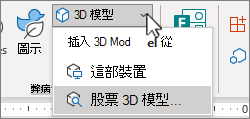
移至 [插入],然後選取 [3D 模型] 旁的箭號。
-
選 取 [此裝置] 以選擇計算機上的 3D 影像,或選取 [ 庫存 3D 模型 ] 以從 在線 3D 模型 庫選擇檔案。
-
選擇您想要的 3D 影像,然後選取 [插入]。
提示: 查看圖庫頂端的 動畫模型 類別。
-
移至 [插入],然後選取 [3D 模型] 旁的箭號。
-
選 取 [此裝置] 以選擇計算機上的 3D 影像,或選取 [ 庫存 3D 模型 ] 以從 在線 3D 模型 庫選擇檔案。
-
選擇您想要的 3D 影像,然後選取 [插入]。
提示: 查看圖庫頂端的 動畫模型 類別。
目前無法在 PowerPoint 網頁版中插入立體影像。 不過,您可以在PowerPoint傳統型應用程式中插入立體影像。
-
若要開啟傳統型應用程式,請選取功能區頂端的 [


沒有 PowerPoint 傳統型應用程式嗎? 試用或購買 Microsoft 365。