Microsoft 365 會自動對序數末尾套用上標格式,這些數字顯示序列中某物的相對位置,例如 21st、22nd、23rd,等等。
以下是取消上標模式來停止自動格式化的方法。
在 PowerPoint 中
- 選取 [檔案選項]>。
- 選擇 校樣,然後在 自動更正選項中,再選 自動更正選項。
- 在「 自動格式化」 標籤中,請清除 序數 (第一) 加上上標 的勾選框,以防止應用程式對數字套用上標格式。
在 Outlook 中
- 選擇「檔案>選項」>「郵件>」,在「Compose 訊息」中,再選「編輯器選項」。
- 選擇 校樣,然後在 自動更正選項中,再選 自動更正選項。
- 在「 自動格式化」 標籤中,請清除 序數 (第一) 加上上標 的勾選框,以防止應用程式對數字套用上標格式。
另請參閱
設定或關閉自動文字格式設定 (自動格式設定)
在 PowerPoint 中將文字格式化為上標或下標
在 PowerPoint 中
- 在 PowerPoint 選單中,選擇 偏好設定,然後選擇 自動更正。
- 在「 自動格式化」 標籤中,請清除 序數 (第一) 加上上標 的勾選框,以防止應用程式對數字套用上標格式。
在 Outlook 中
在電子郵件正文中,輸入一個序數,例如1st。
當數字自動轉換為上標後,點擊藍色底線,點擊自動更正按鈕,然後選擇 停止自動上標序數。
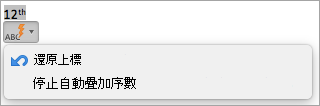
注意
這將永久禁用序數的自動上標功能。 若要逐案取消上標,請在 Outlook 自動套用上標格式後出現的自動更正選單中 點擊「復原上標 」,或  + Z 鍵可解除格式。
另請參閱
在 Word 和 OneNote 中將文字格式化為上標或下標
在 PowerPoint 中將文字格式化為上標或下標
