
注意
原始發佈日期: 2026 年 3 月 16 日
上次更新日期: 2026 年 5 月 12 日
KB 識別碼: 5084567
本文內容
概觀
本指南說明使用群組原則和漸進式推出波次,以進行 Windows 安全開機 DB 憑證更新的自動化部署系統。
安全開機憑證推出自動化是 PowerShell 型系統,可以受控、分級的方式,將 Windows 安全開機 DB 憑證更新部署至已加入網域的電腦。
主要功能
| 功能 | 描述 |
|---|---|
| 分級推出 | 1 > 2 > 4 > 8... 每個貯體的裝置數 |
| 自動封鎖 | 具有無法連線裝置的貯體會排除 |
| 自動化 GPO 部署 | 單一協調器指令碼可處理所有項目 |
| 排定的工作執行 | 不需要互動式提示 |
| 即時監控 | 狀態檢視器與進度列 |
憑證匯報設定參考
本節內容
AvailableUpdatesPolicy 群組原則
| 登錄位置 | HKEY_LOCAL_MACHINE\SYSTEM\CurrentControlSet\Control\SecureBoot |
|---|---|
| 名稱 | AvailableUpdatesPolicy |
| 值 | 0x5944 (DWORD) |
這是由 GPO/ADMX 控制的金鑰,能夠:
- 在重新開機後持續存在
- 由群組原則/MDM 設定
- 不會造成重試迴圈 (透過 ClearRolloutFlags 清除)
- 是原則導向部署的正確金鑰
參考:針對具有 IT 管理更新的 Windows 裝置, (GPO) Objects 安全開機方法群組原則
WinCSFlags - Windows 設定系統旗標
網域系統管理員也可以使用 Windows 作業系統更新一起發行的 Windows 設定系統 (WinCS) ,在加入網域的 Windows 用戶端和伺服器之間部署安全開機更新。 它包含命令 列介面 (CLI) 公用程式 ,可在本機查詢安全開機設定並將其套用至電腦。
| 功能名稱 | WinCS 金鑰 | 描述 |
|---|---|---|
| Feature_AllKeysAndBootMgrByWinCS | F33E0C8E002 | 啟用此機碼可讓您在裝置上安裝下列 Microsoft 提供的安全開機新憑證。
|
參考: Windows 設定系統 (WinCS) API 進行安全開機
架構
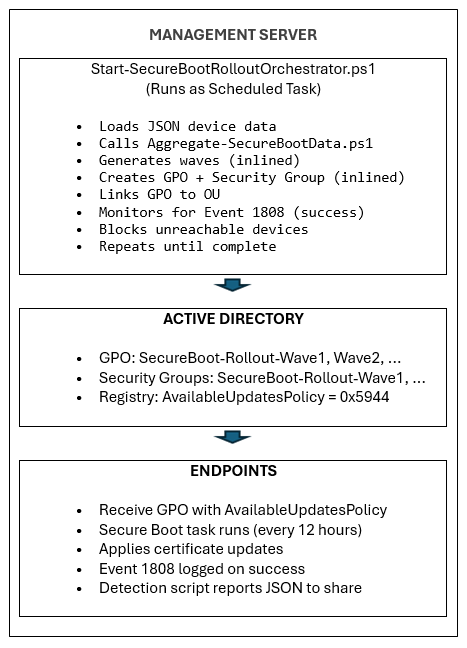
階段 1:企業層級的偵測和狀態監控
本節內容
第 1 階段所需的指令碼
安全開機清查資料收集指令碼範例
注意
重要 下列包含範例指令碼的文章已淘汰。 如果您已安裝 2026 年 5 月 12 日或之後發行的 Windows 更新,您可以在裝置上的 %systemroot%\SecureBoot\ExampleRolloutScripts 資料夾中找到範例指令碼。
| 範例指令碼名稱 | 用途 | 執行 |
|---|---|---|
| Detect-SecureBootCertUpdateStatus.ps1 指令碼範例 | 收集裝置狀態資料 | 每個端點都會透過 GPO) ( |
| Aggregate-SecureBootData.ps1 指令碼範例 | 產生報表和儀表板 | 管理員工作站 |
| Deploy-GPO-SecureBootCollection.ps1 指令碼範例 | 自動建立 GPO 以收集資料 | 網域控制站 |
上述第 1 階段指令碼的範例輸出
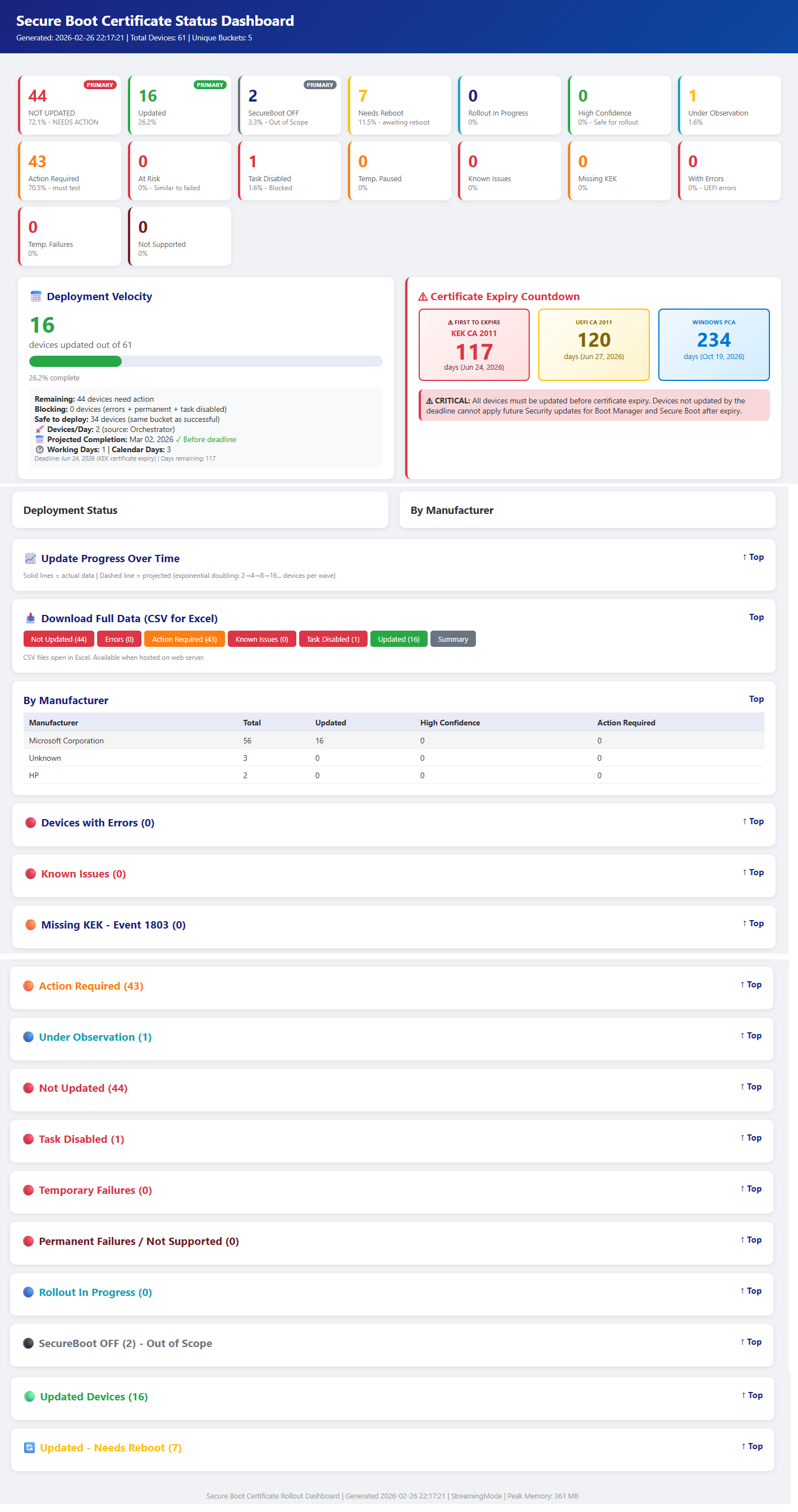
本機測試
透過 GPO 部署之前,請先在單一電腦上測試集合指令碼以驗證功能。
在本機執行集合指令碼
開啟提升權限的 PowerShell 提示字元,然後執行:
& .\Detect-SecureBootCertUpdateStatus.ps1 -OutputPath "C:\Temp\SecureBootTest"驗證 JSON 輸出
# View the collected data
Get-Content "C:\Temp\SecureBootTest\*_latest.json" | ConvertFrom-Json | Format-List
要驗證的關鍵欄位
• SecureBootEnabled – 應為 True 或 False
• OverallStatus – Complete、ReadyForUpdate、NeedsData 或 Error
• BucketHash – 用於置信度數據匹配的設備桶
• SecureBootTaskEnabled - 顯示安全開機更新工作的狀態。測試彙總指令碼
# Generate reports from collected data
& ".\Aggregate-SecureBootData.ps1" `
    -InputPath "C:\Temp\SecureBootTest" `
    -OutputPath "C:\Temp\SecureBootReports"

# Open the HTML dashboard
Start-Process "C:\Temp\SecureBootReports\SecureBoot_Dashboard_*.html"
網路共用設定
建立網路共用
在檔案伺服器上,為集合資料建立專用共用:
# Run on file server as Administrator
$SharePath = "D:\SecureBootCollection"
$ShareName = "SecureBootData$"

# Create folder
New-Item -ItemType Directory -Path $SharePath -Force

# Create hidden share ($ suffix hides from browse list)
New-SmbShare -Name $ShareName -Path $SharePath `
    -Description "Secure Boot Certificate Status Collection" `
    -FullAccess "Domain Admins" `
    -ChangeAccess "Domain Computers"
設定 NTFS 權限
# Get current ACL
$Acl = Get-Acl $SharePath

# Allow Authenticated Users to write files
$WriteRule = New-Object System.Security.AccessControl.FileSystemAccessRule(
    "Domain Computers",
    "Modify",
    "ContainerInherit,ObjectInherit",
    "None",
    "Allow"
)
$Acl.AddAccessRule($WriteRule)

# Allow Domain Admins full control (for aggregation)
$AdminRule = New-Object System.Security.AccessControl.FileSystemAccessRule(
    "Domain Admins",
    "FullControl",
    "ContainerInherit,ObjectInherit",
    "None",
    "Allow"
)
$Acl.AddAccessRule($AdminRule)

# Apply permissions
Set-Acl -Path $SharePath -AclObject $Acl
驗證共用存取權
# Test from a domain-joined workstation
Test-Path "\\fileserver\SecureBootData$"
# Should return: True
GPO 部署
使用網域控制站提供的自動化指令碼:
# Run on Domain Controller as Domain Admin for interactive OU Section – Recommended
# Replace the “Contoso.com”, “Contoso” with the name of the domain
# Replace FILESERVER with the file server name.  Script shows list of OUs to deploy GPO on
.\Deploy-GPO-SecureBootCollection.ps1 `
    -DomainName "contoso.com" `
    -AutoDetectOU `
    -CollectionSharePath "\\FILESERVER\SecureBootData$" `
    -ScriptSourcePath ".\Detect-SecureBootCertUpdateStatus.ps1" `
    -Schedule "Daily" `
    -ScheduleTime "14:00" `
    -RandomDelayHours 4
指令碼將執行以下操作:
- 建立具有指定名稱的新 GPO
- 將集合指令碼複製到 SYSVOL 以實現高可用性
- 設定電腦啟動指令碼
- 將 GPO 連結到目標 OU
- 選擇性地建立定期收集的排程任務
下表根據您的叢集規模提供延遲時間的指引。
| 機群規模 | 延遲範圍 |
|---|---|
| 1-10K 裝置 | 4 小時 |
| 10K-50K 裝置 | 8 小時 |
| 50K+ 裝置 | 12-24 小時 |
GPO 設定摘要
| 設定 | 位置 | 值 |
|---|---|---|
| 啟動指令碼 | 電腦設定→指令碼 | Detect-SecureBootCertUpdateStatus.ps1 |
| 指令碼參數 | (相同的) | -OutputPath “\\server\share$” |
| 執行原則 | PowerShell →電腦設定→ 管理員範本 | 允許本機和遠端簽署 |
| 排定的工作 | 排定工作→電腦設定→喜好設定 | 每日/每週收集 |
驗證
強制在測試機械上更新 GPO
# On a test workstation
gpupdate /force

# Reboot the client machines to startup script or it will trigger on next schedule.
Restart-Computer -Force
驗證資料收集
# Check if data was collected (on file server or from any machine)
Get-ChildItem "\\fileserver\SecureBootData$" |
    Sort-Object LastWriteTime -Descending |
    Select-Object -First 10

# Verify JSON content
Get-Content "\\fileserver\SecureBootData$\TESTPC_latest.json" | ConvertFrom-Json
檢查 GPO 應用程式
# Verify GPO is applied to the computer
gpresult /r | Select-String "SecureBoot"
# The script also saves a local copy for redundancy.
Get-ChildItem "C:\ProgramData\SecureBootCollection\"
階段 2:安全開機憑證更新協調流程指令碼
重要
確定階段 1 已完成,包括從每個端點到遠端伺服器共用的資料收集。
本節內容
- 階段 2 所需的指令碼
- Start-SecureBootRolloutOrchestrator.ps1
- Deploy-OrchestratorTask.ps1
- Get-SecureBootRolloutStatus.ps1
階段 2 所需的指令碼
安全開機清查資料收集指令碼範例
注意
重要 下列包含範例指令碼的文章已淘汰。 如果您已安裝 2026 年 5 月 12 日或之後發行的 Windows 更新,您可以在裝置上的 %systemroot%\SecureBoot\ExampleRolloutScripts 資料夾中找到範例指令碼。
| 範例指令碼名稱 | 用途 | 在下列裝置執行: |
|---|---|---|
| Detect-SecureBootCertUpdateStatus.ps1 指令碼範例 | 收集裝置狀態資料 | 每個端點都會透過 GPO) ( |
| Aggregate-SecureBootData.ps1 指令碼範例 | 產生報表和儀表板 | 管理員工作站 |
| Deploy-GPO-SecureBootCollection.ps1 指令碼範例 | 自動建立 GPO 以收集資料 | 網域控制站 |
| Start-SecureBootRolloutOrchestrator.ps1 指令碼範例 | 全自動、持續的協調流程,搭配自動 GPO 部署以進行憑證安裝 | 管理員工作站 |
| Deploy-OrchestratorTask.ps1 指令碼範例 | 將 Orchestrator 指令碼作為排程任務部署,以自動推出 | 網域控制站 |
| Get-SecureBootRolloutStatus.ps1 指令碼範例 | 從任何工作站檢視安全開機憑證推出狀態 | 管理員工作站 |
| Enable-SecureBootUpdateTask.ps1 指令碼範例 | 啟用安全開機更新工作 | 在工作停用的終點上 (如果已停用,僅執行一次以啟用該工作) |
Start-SecureBootRolloutOrchestrator.ps1
用途: 具有自動化 GPO 部署的完全自動化、持續的協調流程。
作用
裝置狀態的通話 Aggregate-SecureBootData.ps1
使用漸進式加倍產生推出波次
使用下列其中一種方法建立憑證部署的 GPO
- 安全開機群組原則 AvailableUpdatesPolicy = 0x5944 (預設)
- WinCS 方法 (參數 –UseWinCS)
建立目標 AD 安全性群組
將電腦帳戶新增至安全性群組
設定 GPO 安全性篩選
將 GPO 連結到目標 OU
監視封鎖的貯體 (無法連線的裝置)
當裝置復原時自動解除封鎖
用法
# Interactive (testing)
.\Start-SecureBootRolloutOrchestrator.ps1 `
    -AggregationInputPath "\\fileserver\SecureBootData$" `
    -ReportBasePath "C:\SecureBootReports" `
    -PollIntervalMinutes 30
# Interactive (testing), leveraging WinCS method .\Start-SecureBootRolloutOrchestrator.ps1 ` -AggregationInputPath "\\fileserver\SecureBootData$" ` -ReportBasePath "C:\SecureBootReports" ` -PollIntervalMinutes 30 ` -UseWinCS管理員命令
# List blocked buckets
.\Start-SecureBootRolloutOrchestrator.ps1 -ReportBasePath "C:\SecureBootReports" -ListBlockedBuckets
# Unblock specific bucket .\Start-SecureBootRolloutOrchestrator.ps1 -ReportBasePath "C:\SecureBootReports" -UnblockBucket "Dell|Latitude5520|BIOS1.2"# Unblock all .\Start-SecureBootRolloutOrchestrator.ps1 -ReportBasePath "C:\SecureBootReports" -UnblockAll參數
參數 預設 描述 AggregationInputPath 必要 端點 JSON 檔案的 UNC 路徑 ReportBasePath 必要 報表及狀態的本機路徑 TargetOU 網域根目錄 OU 連結 GPO WavePrefix SecureBoot-Rollout GPO/群組命名前置詞 MaxWaitHours 72 檢查裝置連線能力前的數小時 PollIntervalMinutes 1440 狀態檢查之間的分鐘數 DryRun 否 顯示如果不進行變更會發生什麼情況 注意
關於 PollIntervalMinutes 的備註:直接執行 Orchestrator 時,預設值為 1440 分鐘 (24 小時) 。 透過 Deploy-OrchestratorTask.ps1 部署時,預設值為 30 分鐘。 部署指令碼會將自己的預設值傳遞給協調器。 使用 30 分鐘進行主動推出,使用 1440 分鐘進行維護監視。
選用參數
參數 預設 描述 UseWinCS 否 使用 WinCS 方法而不是 AvailableUpdatesPolicy GPO WinCSKey F33E0C8E002 安全開機設定的 WinCS 金鑰 AllowListPath (無) 具有主機名稱的檔案路徑,以允許用於目標/試驗推出。 支援 .txt 或 .csv。 AllowADGroup (無) AD 安全性電腦帳戶群組要允許。 範例: 「SecureBoot-pilot-computers」 ExclusionListPath (無) 要從 VIP/執行裝置推出 (排除的檔案路徑) ExcludeADGroup (無) 要排除的電腦帳戶的 AD 安全性群組。 範例:「貴賓電腦」 ListBlockedBuckets 否 顯示目前封鎖的裝置貯體 UnblockBucket (無) 解除封鎖特定貯體。 格式:「製造商|型號 |BIOS」 UnblockAll 否 解除封鎖所有封鎖的裝置貯體
Deploy-OrchestratorTask.ps1
用途: 將協調器部署為 Windows 排程工作。
優點
- 沒有 PowerShell 安全性提示 (ExecutionPolicy 略過)
- 在背景中持續執行
- 無需使用者互動
- 在重新開機後仍能倖存
用法
使用網域服務帳戶進行部署 (建議)
使用 AvailableUpdates 群組原則 (預設方法)
.\Deploy-OrchestratorTask.ps1 `
    -AggregationInputPath "\\server\SecureBootData$" `
    -ReportBasePath "C:\SecureBootReports" `
    -ServiceAccount "DOMAIN\svc_secureboot"
使用 WinCS 方法
.\Deploy-OrchestratorTask.ps1 `
    -AggregationInputPath "\\server\SecureBootData$" `
    -ReportBasePath "C:\SecureBootReports" `
    -ServiceAccount "DOMAIN\svc_secureboot" -UseWinCS
使用 SYSTEM 帳戶進行部署
使用 AvailableUpdates 群組原則 (預設方法)
.\Deploy-OrchestratorTask.ps1 `
    -AggregationInputPath "\\server\SecureBootData$" `
    -ReportBasePath "C:\SecureBootReports"
使用 WinCS 方法
.\Deploy-OrchestratorTask.ps1 `
    -AggregationInputPath "\\server\SecureBootData$" `
    -ReportBasePath "C:\SecureBootReports"  -UseWinCS
服務帳戶需求
- New-GPO、New-ADGroup、Add-ADGroupMember) 的網域管理員 (
- JSON 檔案共用的讀取權限
- ReportBasePath 的寫入權限
Get-SecureBootRolloutStatus.ps1
用途: 從任何工作站檢視推出進度。
顯示內容
- 排程的工作狀態 (執行/就緒/停止)
- 目前波數
- 裝置已鎖定與更新
- 視覺進度列
- 封鎖的貯體摘要
- 連結至最新的 HTML 儀表板
用法
# Quick status check
.\Get-SecureBootRolloutStatus.ps1 -ReportBasePath "C:\SecureBootReports"
# Continuous monitoring (refreshes every 30 seconds) .\Get-SecureBootRolloutStatus.ps1 -ReportBasePath "C:\SecureBootReports" -Watch 30# View blocked buckets .\Get-SecureBootRolloutStatus.ps1 -ReportBasePath "C:\SecureBootReports" -ShowBlocked# View wave history .\Get-SecureBootRolloutStatus.ps1 -ReportBasePath "C:\SecureBootReports" -ShowWaves# View recent log .\Get-SecureBootRolloutStatus.ps1 -ReportBasePath "C:\SecureBootReports" -ShowLog# Open dashboard in browser .\Get-SecureBootRolloutStatus.ps1 -ReportBasePath "C:\SecureBootReports" -OpenDashboard參數
參數 必填嗎? 預設 描述 ReportBasePath 必要 — 報告與狀態檔案的本機路徑 ShowLog 選用 否 顯示最近的 Orchestrator 記錄項目 ShowBlocked 選用 否 顯示封鎖的貯體詳細資料 ShowWaves 選用 否 顯示波歷程記錄 觀賞 選用 0 (已停用) 自動重新整理間隔,以秒為單位。 範例:-Watch 30 每 30 秒重新整理一次。 OpenDashboard 選用 否 在預設瀏覽器中開啟最新的 HTML 儀表板 範例輸出
注意
==============================================================
安全開機推出狀態
2026-02-17 19:30:00
======================================================Scheduled Task: RunningROLLOUT PROGRESS
狀態: 進行中
電流波:5
目標總數:1250
更新總計:847Progress: [█████████████████████░░░░░░░░░░░░░░░░░░░] 67.8%BLOCKED BUCKETS: 2 buckets need attention
使用 -ShowBlocked 執行以取得詳細資料LATEST DASHBOARD
C:\SecureBootReports\Aggregation_20260217_193000\SecureBoot_Dashboard.html
__________________________________________________________________________________________
E2E 部署步驟 (快速參考指南)
本節內容
階段 1:偵測基礎結構
步驟 1:建立集合共用
# On file server
$sharePath = "D:\SecureBootData"
New-Item -ItemType Directory -Path $sharePath -Force
New-SmbShare -Name "SecureBootData$" -Path $sharePath -FullAccess "Domain Admins" -ChangeAccess "Domain Computers"
# Set NTFS permissions $acl = Get-Acl $sharePath $rule = New-Object System.Security.AccessControl.FileSystemAccessRule("Domain Computers","Modify","Allow") $acl.AddAccessRule($rule) Set-Acl $sharePath $acl步驟 2:部署偵測 GPO
.\Deploy-GPO-SecureBootCollection.ps1 `
    -DomainName "contoso.com" `
    -OUPath "OU=Workstations,DC=contoso,DC=com" `
    -CollectionSharePath "\\server\SecureBootData$"
步驟 3:等待端點報告 (24-48 小時)
# Check collection progress
(Get-ChildItem "\\server\SecureBootData$" -Filter "*.json").Count
階段 2:精心策劃的推出
步驟 4:必要條件檢查
- 偵測 (步驟 2 部署的 GPO)
- 至少 50+ 個端點報告 JSON
- 具有網域管理員權限的服務帳戶
- 使用 PowerShell 5.1+ 的管理伺服器
步驟 5:根據排程任務部署 Orchestrator
.\Deploy-OrchestratorTask.ps1 `
    -AggregationInputPath "\\server\SecureBootData$" `
    -ReportBasePath "C:\SecureBootReports" `
    -ServiceAccount "DOMAIN\svc_secureboot"
步驟 6:監視進度
.\Get-SecureBootRolloutStatus.ps1 -ReportBasePath "C:\SecureBootReports"步驟 7:檢視儀表板
.\Get-SecureBootRolloutStatus.ps1 -ReportBasePath "C:\SecureBootReports" -OpenDashboard步驟 8:管理封鎖的貯體
# List blocked
.\Start-SecureBootRolloutOrchestrator.ps1 -ReportBasePath "C:\SecureBootReports" -ListBlockedBuckets
# Investigate and unblock .\Start-SecureBootRolloutOrchestrator.ps1 -ReportBasePath "C:\SecureBootReports" -UnblockBucket "Manufacturer|Model|BIOS"步驟 9:驗證完成
.\Get-SecureBootRolloutStatus.ps1 -ReportBasePath "C:\SecureBootReports"
# Status should show "Completed"
State Files
協調器會維護 ReportBasePath\RolloutState\ 中的狀態:
| 檔案 | 描述 |
|---|---|
| RolloutState.json | 波浪歷程記錄、目標裝置、狀態 |
| BlockedBuckets.json | 需要調查的貯體 |
| DeviceHistory.json | 依主機名稱追蹤裝置 |
| Orchestrator_YYYYMMDD.log | 每日活動記錄 |
疑難排解
本節內容
Orchestrator 不在繼續
檢查排程工作
Get-ScheduledTask -TaskName "SecureBoot-Rollout-Orchestrator"檢查記錄
Get-Content "C:\SecureBootReports\RolloutState\Orchestrator_*.log" -Tail 50驗證 JSON 資料有效期限
(Get-ChildItem "\server\SecureBootData$" -Filter "*.json" | Where-Object { $_.LastWriteTime -gt (Get-Date).AddDays(-1) }).Count
封鎖的貯體
清單已封鎖。
.\Start-SecureBootRolloutOrchestrator.ps1 -ReportBasePath "C:\SecureBootReports" -ListBlockedBuckets調查裝置連線能力。
檢查韌體問題。
調查後解除封鎖。
未套用 GPO
驗證 GPO 存在。
Get-GPO -Name "SecureBoot-Rollout-Wave*"檢查安全性篩選。
Get-GPPermission -Name "GPO-Name" -All確認電腦是否位於安全性群組中。
在目標上套用 GPO。
gpupdate /force
變更記錄
| 變更日期 | 變更描述 |
|---|---|
| 2026 年 5 月 12 日 | 先前,每個範例指令碼檔案都發佈為個別文章,您可以從中複製並貼上指令碼。 從 2026 年 5 月 12 日及之後發行的 Windows 更新開始,範例指令碼位於裝置上的 %systemroot%\SecureBoot\ExampleRolloutScripts 資料夾中。 |