
Last Updated: February 11, 2022
ISSUE
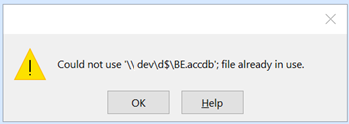
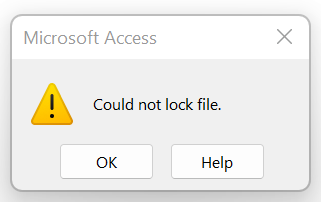
When opening a database on a network file share, or with links to another database on a network file share, you may receive one of these errors:
- Could not use ‘path to database.accdb’; file already in use.
- Could not lock file
STATUS: FIXED FOR THE FOLLOWING BUILDS
The following table indicates the KB update or Version/build that first introduced the issue along with each of the two fixes released to address this issue.
- Standard UNC paths – This fix corrects the issue when using a standard UNC path (\\Server2\Share\Test\Database.accdb where the Database.accdb is a file in the Test directory of the \\Server2\Share volume)
- All remaining network paths – This fix corrects the issue for all other network paths, such as: DFS Namespaces, Short file names, and Mapped drives.
Note
These updates are cumulative, so updating to the latest update will include the fix for standard UNC paths.
| Office Product | Issue introduced | Resolved for standard UNC paths | Resolved for remaining network paths |
|---|---|---|---|
| Office 2013 | KB 5002104 | KB 2965317 KB 5002124 |
KB 5002151 |
| Office 2016 | KB 5002099 | KB 4484211 KB 5002115 |
KB 5002138 |
| Office LTSC 2019 | Version 1808, build 10381.20020 | Version 1808, build 10382.20010 | Version 1808, build 10382.20034 |
| Office LTSC 2021 | Version 2108, build 14332.20204 | Version 2108, build 14332.20216 | Version 2108, build 14332.20216 |
| Office 2016 C2R | Version 2111, build 14701.20248 | Version 2111, build 14701.20262 | Version 2112, build 14729.20248 |
| Office 2019 Consumer | Version 2111, build 14701.20248 | Version 2111, build 14701.20262 | Version 2112, build 14729.20248 |
| Office 2021 Consumer | Version 2111, build 14701.20248 | Version 2111, build 14701.20262 | Version 2112, build 14729.20248 |
| Microsoft 365 Apps Current Channel | Version 2111, build 14701.20248 | Version 2111, build 14701.20262 | Version 2112, build 14729.20248 |
| Microsoft 365 Apps Monthly Enterprise Channel | Version 2110, build 14527.20340 Version 2109, build 14430.20380 |
Version 2110, build 14527.20344 Version 2109, build 14430.20386 |
Version 2111, build 14701.20290 Version 2110, build 14527.20364 |
| Microsoft 365 Apps Semi-Annual Enterprise Channel (Preview) | Version 2108, build 14326.20692 | Version 2108, build 14326.20702 | Version 2108, build 14326.20738 |
| Microsoft 365 Apps Semi-Annual Enterprise Channel | Version 2102, build 13801.21086 | Version 2102, build 13801.21092 | Version 2102, build 13801.21156 |
| Microsoft 365 Apps Semi-Annual Enterprise Channel Extended | Version 2008, build 13127.21842 | Version 2008, build 13127.21846 | Version 2008, build 13127.21886 |
The fix may not be applied automatically. To apply the fix, install the latest updates by following the instructions here: Install Office updates
Note
Office must be updated on all machines running Access that have the impacted versions.
More Resources
 Ask the experts
Connect with experts, discuss the latest news, updates, and best practices, and read our blog.
 Get help in the community
Ask a question and find solutions from Support Agents, MVPs, Engineers, and other Office users.
 Suggest a new feature
We love reading your suggestions and feedback! Share your thoughts. We're listening.
See Also
Fixes or workarounds for recent issues in Access
December 29, 2021, update for Office 2013 (KB2965317)
Databases on network share can't be accessed by multiple users in Office 2016 (KB4484211)
Description of the security update for Office 2013: January 11, 2022 (KB5002124)
Description of the security update for Office 2016: January 11, 2022 (KB5002115)
Description of the security update for Office 2013: December 14, 2021 (KB5002104)
Description of the security update for Office 2016: December 14, 2021 (KB5002099)