

In Excel for the web, you can view regression analysis results, but you can't create a regression analysis because the Regression tool isn't available.
You also can't use the statistical worksheet function LINEST to perform meaningful regression analysis because Excel for the web doesn't support the array-formula entry method that LINEST requires.
If you have the Excel desktop application, you can use either Data Analysis or statistical LINEST functions to perform a regression analysis.
Select Open in Desktop. Select Data Analysis in the Analysis group.
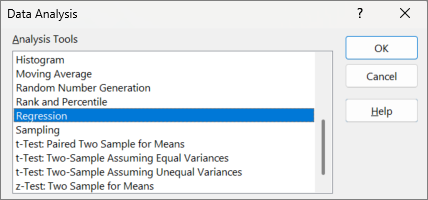
If you don't see Data Analysis, try File > Options > Data > Enable Data Analysis add-ins: Power Pivot and 3D Mapps, select OK.
For news about the latest Excel for the web updates, visit the Microsoft Excel blog.
For the full suite of Office applications and services, try or buy it at Office.com.