
Symptom
Form controls, ActiveX controls, and other controls or objects obscure cells, which makes it difficult to see or edit the values in those cells.
Cause
Excel always places controls and objects on the drawing canvas, which is a hidden layer that exists above the cell grid on the worksheet.
Resolution
You can do the following tasks:
Move the control or object to a different location, either temporarily or permanently.
For more information, see Group, copy, move, or align controls on a worksheet.To maintain the current location of an object or control, you can view and edit the contents of the cell by following these steps:
- Make sure that the formula bar
 is visible.
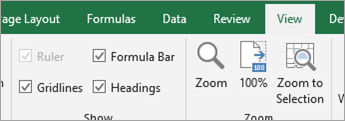
Display the formula bar
On the View tab, in the Show group, select Formula Bar.
- In the Name box (to the left of the Formula Bar), enter the reference of the cell that is covered by the object, and then press Enter.
- Edit the cell contents in the Formula Bar.
- Make sure that the formula bar
Need more help?
You can always ask an expert in the Excel Tech Community or get support in Communities.