When the numbers in a chart vary widely from data series to data series, or when you have mixed types of data (price and volume), plot one or more data series on a secondary vertical (value) axis. The scale of the secondary vertical axis shows the values for the associated data series. A secondary axis works well in a chart that shows a combination of column and line charts. You can quickly show a chart like this by changing your chart to a combo chart.
- Select a chart to open Chart Tools.
- On the Design tab, select Change Chart Type.
- Select Combo and choose Cluster Column - Line on Secondary Axis.
- Select the Secondary Axis checkbox for the data series you want to show.
- Select the drop-down arrow and choose Line.
- Select OK.
When the values in a chart vary widely from data series to data series, you can plot one or more data series on a secondary axis. A secondary axis can also be used as part of a combination chart when you have mixed types of data (for example, price and volume) in the same chart.
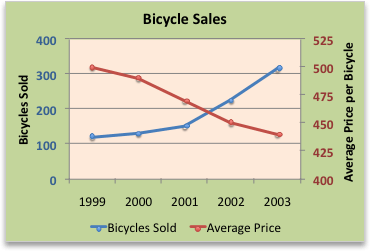
In this chart, the primary vertical axis on the left is used for sales volumes, whereas the secondary vertical axis on the right side is for price figures.
Do any of the following:
Add a secondary axis
- This step applies to Word for Mac only: On the View menu, click Print Layout.
- In the chart, select the data series that you want to plot on a secondary axis.
For example, in a line chart, select one of the lines in the chart, and all the data marker of that data series become selected.
- On the Chart Design tab, select Add Chart Element and choose Axes.
- Select between Secondary Horizontal or Second Vertical.
Add an axis title for a secondary axis
- This step applies to Word for Mac only: On the View menu, click Print Layout.
- In the chart, select the data series that you want to plot on a secondary axis.
For example, in a line chart, select one of the lines in the chart, and all the data marker of that data series become selected.
- On the Chart Design tab, select Add Chart Element.
- Select Axis Titles and choose between Secondary Horizontal or Second Vertical.
Need more help?
You can always ask an expert in the Excel Tech Community, get support in the Answers community, or suggest a new feature or improvement. See How do I give feedback on Microsoft Office? to learn how to share your thoughts. We're listening.

