
You can access the public folders that are displayed in the Favorites folder under Public Folders when you don't have a connection to your mail server or are working offline.
Note
This feature requires a What is a Microsoft Exchange account? configured to use Cached Exchange Mode.
- Click the File tab.
- Click Account Settings, and then click Account Settings.
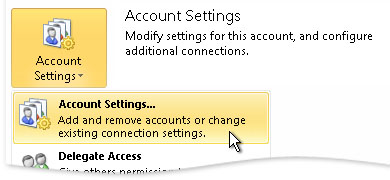
- On the E-mail tab, select the Exchange Server email account, and then click Change.
- Click More Settings, and then click the Advanced tab.
- Under Cached Exchange Mode Settings, select the Download Public Folder Favorites check box.
Note
Only your public folder items in the Favorites folder are downloaded.