
Go from free-form ink to Microsoft 365 shapes, text, or a mathematical expression in a couple of strokes.
You can also scribble the title of a slide with your pen. When you do this, PowerPoint automatically offers to convert the ink to standard text.
 These features are available to Microsoft 365 Subscribers on Windows and iOS.
The Ink to Math feature is only available to Microsoft 365 subscribers on Windows right now.
To convert ink you've drawn elsewhere on your slide
Draw or write in digital ink.
Select your ink by tapping on it, or using the Lasso selection tool.
On the Draw tab, choose Ink to Text, Ink to Shape, or Ink to Math.

Or just click the Convert Your Ink button.

If the result isn't what you hoped for, select the More Suggestions button
 to the right of your converted shape to see other options.
Requirements for the Ink Conversion options
To use these conversion features, you must turn on Microsoft 365 "connected experiences":
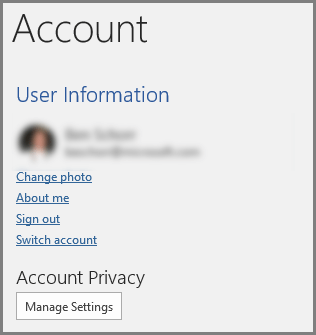
Open any Microsoft 365 desktop application on Windows, go to File > Account, and under Account Privacy, select Manage Settings. This opens the account Privacy Settings dialog box where you can select your privacy options.
For Ink-to-Text conversions, right-to-left languages are not currently supported.
See Languages supported for ink-to-text conversion for a complete list of supported languages.

|
This is a subscriber-only, Microsoft 365 feature. |
|---|---|
| Write a title with your pen Applies to: |
PowerPoint for Microsoft 365 Current Channel: Version 1806 or later Semi-Annual Enterprise Channel (Preview): Version 1808 or later Semi-Annual Enterprise Channel: Version 1808 or later Find your Office version |
| Convert ink to text or shapes in the body of a slide Applies to: |
PowerPoint for Microsoft 365 Current Channel: Version 1804 Semi-Annual Enterprise Channel (Preview): Version 1808 or later Semi-Annual Enterprise Channel: Version 1808 or later Find your Office version PowerPoint for iOS Version 2.19 |
| Convert ink to math in the body of a slide Applies to: |
PowerPoint for Microsoft 365 Monthly Channel: Version 1901 or later Semi-Annual Enterprise Channel (Preview): Version 2008 or later Semi-Annual Enterprise Channel: Version 2008 or later Find your Office version |
| Operating system: | Windows 10, version 1511 Find your Windows version |