
In PowerPoint, you can copy animations from one object to another by using the Animation Painter.
Animation Painter applies animation effects and characteristics uniformly to other objects with one click.
1-minute demonstration
Copy an animation
Select the object that has the animations that you want to copy.
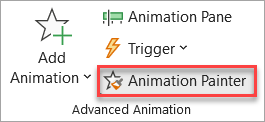
On the Animations tab of the toolbar ribbon, in the Advanced Animation group, click Animation Painter.
Your cursor changes to appear like this:

On the slide, click the object to which you want to copy the animations.