

Note
This content applies to the desktop versions of Word. Some table features may not be available in Word for the web or mobile apps.
To tab text inside a table cell
Click or tap in front of the text or numbers you want to indent, and then press CTRL+TAB.
To set a tab stop
- Go to Home and select the Paragraph dialog launcher
 .
. - Select Tabs.
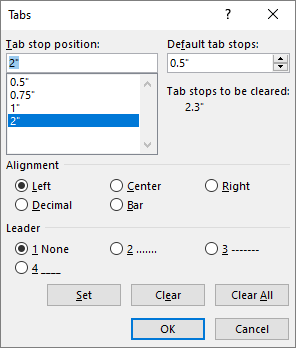
- In the Tab stop position field, type a measurement where you want the tab stop.
- Select an Alignment.
- Select a Leader if you want one.
- Select Set.
- Select OK.
To clear a tab stop
Go to Home and select the Paragraph dialog launcher
.Select Tabs.
Do one of the following:
- Select a tab stop and select Clear.
- Select Clear All to remove all tab stops.
Select OK.


To use the ruler to set and remove tab stops, see Using the ruler in Word.