
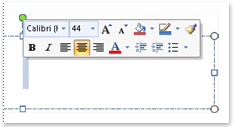
When you select text with the mouse, the Mini toolbar appears, as illustrated below. It has options for changing fonts, alignment, text color, indenting, and bullets.
Note
You can't customize which options appear on the Mini toolbar.
To use the Mini toolbar, select the text you want to format, then click an option on the mini toolbar. If you move the mouse elsewhere, the Mini toolbar disappears so that it doesn't get in the way of your work.
If you don't want to see the Mini toolbar at all, you can turn it off, as explained below.
Turn off the Mini toolbar
- In your app, click File > Options > General.
- Under User interface options, clear the Show Mini Toolbar on selection check box.
- Click OK.