
Note
- Notice
- This update is no longer available. To fix the issues that are described in this article, install the latest Microsoft Office update from the following Microsoft Learn article:
- Latest updates for versions of Office that use Windows Installer (MSI)
This article describes update KB3114390 for Microsoft Office 2016 that was released on December 8, 2015. This update has a prerequisite.
Be aware that the update in Download Center applies to the Microsoft Installer (.msi)-based edition of Office 2016. It doesn't apply to the Office 2016 Click-to-Run editions such as Microsoft Office 365 Home. (How to determine?)
Improvements and fixes
Fixes the following issues:
Screen readers (such as Narrator) can't read the detailed permissions for each collaborator on the Share pane of a document in Office 2016 applications.
When you use the MAPI over HTTP transport protocol in Outlook 2016, you may experience repeated reconnect attempts. This issue occurs because the X-PendingPeriod header field isn't respected.
Update information
Restart information
You may have to restart the computer after you install this update.
Prerequisite
To apply this update, you must have Microsoft Office 2016 installed.
More Information
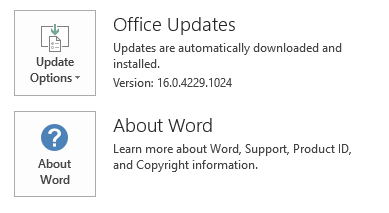
To determine whether your Office installation is Click-to-Run or MSI-based, follow these steps:
- Start an Office 2016 application.
- On the File menu, select Account.
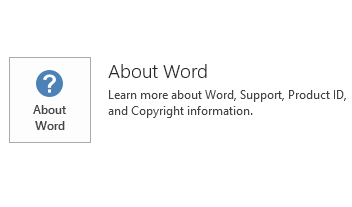
- For Office 2016 Click-to-Run installations, an Update Options item is displayed. For MSI-based installations, the Update Options item isn't displayed.
| Office 2016 Click-to-Run installation | MSI-based Office 2016 |
|---|---|
|
|
How to uninstall this update
Windows 10
- Go to Start, enter View Installed Updates in the Search Windows box, and then press Enter.
- In the list of updates, locate and then select update KB3114390, and then select Uninstall.
Windows 8 and Windows 8.1
- Swipe in from the right edge of the screen, and then select Search. If you're using a mouse, point to the lower-right corner of the screen, and then select Search.
- Enter windows update, select Windows Update, and then select Installed Updates.
- In the list of updates, locate and then select update KB3114390, and then select Uninstall.
Windows 7
- Go to Start, enter Run, and then select Run.
- Enter Appwiz.cpl, and then select OK.
- Select View installed updates.
- In the list of updates, locate and then select update KB3114390, and then select Uninstall.
References
Learn about the standard terminology that Microsoft used to describe software updates. The Office System TechCenter contains the latest administrative updates and strategic deployment resources for all versions of Office.
File Information
The global version of this update has the file attributes (or later file attributes) that are listed in the following table. The dates and times for these files are listed in Coordinated Universal Time (UTC). When you view the file information, it is converted to local time. To find the difference between UTC and local time, use the Time Zone tab in the Date and Time item in Control Panel.
x86
msodll20-x-none.msp file information
| File identifier | File name | File version | File size | Date | Time |
|---|---|---|---|---|---|
| Mso20win32client.dll.x64 | Mso20win32client.dll | 16.0.4312.1000 | 3,148,480 | 12-Nov-2015 | 09:53 |
| Mso20win32client.dll.x86 | Mso20win32client.dll | 16.0.4312.1000 | 1,910,976 | 12-Nov-2015 | 09:21 |
x64
msodll20-x-none.msp file information
| File identifier | File name | File version | File size | Date | Time |
|---|---|---|---|---|---|
| Mso20win32client.dll.x64 | Mso20win32client.dll | 16.0.4312.1000 | 3,148,480 | 12-Nov-2015 | 09:21 |
| Mso20win32client.dll.x86 | Mso20win32client.dll | 16.0.4312.1000 | 1,910,976 | 12-Nov-2015 | 09:31 |