
This article describes update KB3114972 for Microsoft Outlook 2016, which was released on April 5, 2016. This update has a prerequisite.
Be aware that the update on the Download Center applies to the Microsoft Installer (.msi)-based edition of Office 2016. It doesn't apply to the Office 2016 Click-to-Run editions, such as Microsoft Office 365 Home. (How to determine?)
Improvements and fixes
Updates Add-in support to the current API version 1.3.
Fixes the following issues:
When you add a user as a contact in Outlook 2016 online mode by using the MAPI over HTTP transport protocol, the new contact isn’t created. When this issue occurs, no error message is displayed. This fix requires either Exchange Server 2013 CU12 (KB3108023) or Exchange Server 2016 CU1 (KB3134844) installed on the Exchange backend as well.
When you connect to an Exchange server in Outlook 2016, you still receive a prompt that lets you connect to the server if the security certificate is mismatched.
Note To fix this issue, see KB3114926 for more information to add a registry key.
The synchronization of groups fails in Outlook 2016.
Fixes the following issues that cause online archives to experience connectivity issues:
- The Inbox folder doesn't synchronize in Outlook 2016. In addition, your mailbox is renamed as Archive or an archive mailbox is renamed as your mailbox, and you may see a duplicate view of your mailbox when you expand an archive mailbox.
- When you change the protocol between the MAPI over HTTP protocol and the RPC protocol in Outlook 2016, the primary mailbox isn't displayed.
Profile creation fails for hidden global address list (GAL) users.
After receiving the RPC_S_SERVER_TOO_BUSY response from the Exchange Server, Outlook 2016 that has the MAPI over HTTP transport protocol enabled should resend the request after some back-off time instead of immediately reconnecting to the server.
You can't open Exchange Server 2010 public folders in Outlook 2016 in some scenarios.
When you download email attachments through the MAPI over HTTP transport protocol in Outlook 2016, attachments may be corrupted in some scenarios. This issue occurs in multi-core processor systems and Outlook 2016 with online mode.
When you configure a profile that uses the MAPI over HTTP transport protocol in Outlook 2016, Outlook 2016 may crash.
When you access public folders by using the MAPI over HTTP protocol in Outlook 2016, you may receive the following error message:
Note
Cannot display the folder. Your server administrator has limited the number of items you can open simultaneously. Try closing messages you have opened or removing attachments and images from unsent messages you are composing.
You may see incorrect search results in shared mailboxes in Outlook 2016.
When Outlook 2016 connects to both an on-premises Exchange Server and Modern-Authentication-enabled Exchange Online, the HTTP 500 error occurs, and the Free/Busy information isn't displayed. This issue occurs if the AlwaysUseMSOAuthForWebServices registry key is set.
Note To fix this issue, see KB3114976 for the information on how to replace the AlwaysUseMSOAuthForWebServices registry key with the AlwaysUseMSOAuthForAutodiscover registry key.
You can't select multiple attachments of an email message in Outlook 2016 by pressing SHIFT.
How to download and install the update
Microsoft Update
Use Microsoft Update to automatically download and install the update.
Download Center
This update is also available for manual download and installation from the Microsoft Download Center.
-
 Download update KB3114972 for 32-bit version of Outlook 2016
 -
Download update KB3114972 for 64-bit version of Outlook 2016
If you're not sure what platform (32-bit or 64-bit) you're running, see Am I running 32-bit or 64-bit Office? Additionally, see more information about how to download Microsoft support files.
Virus-scan claim
Microsoft scanned this file for viruses by using the most current virus-detection software that was available on the date that the file was posted. The file is stored on security-enhanced servers that help prevent any unauthorized changes to it.
Update information
Restart informationYou may have to restart the computer after you install this update.
PrerequisiteTo apply this update, you must have Microsoft Outlook 2016 installed.
More Information
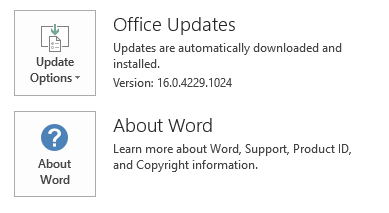
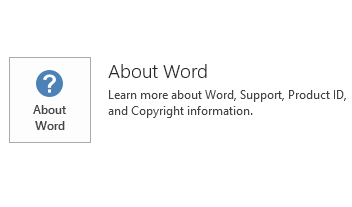
To determine whether your Office installation is Click-to-Run or MSI-based, follow these steps:
- Start an Office 2016 application.
- On the File menu, select Account.
- For Office 2016 Click-to-Run installations, an Update Options item is displayed. For MSI-based installations, the Update Options item isn't displayed.
| Office 2016 Click-to-Run installation | MSI-based Office 2016 |
|---|---|
|
|
How to uninstall this update
Windows 10
- Go to Start, enter View Installed Updates in the Search Windows box, and then press Enter.
- In the list of updates, locate and select KB3114972, and then select Uninstall.
Windows 8 and Windows 8.1
- Swipe in from the right edge of the screen, and then select Search. If you're using a mouse, point to the lower-right corner of the screen, and then select Search.
- Enter windows update, select Windows Update, and then select Installed Updates.
- In the list of updates, locate and select KB3114972, and then select Uninstall.
Windows 7
- Go to Start, enter Run, and then select Run.
- Enter Appwiz.cpl, and then select OK.
- Select View installed updates.
- In the list of updates, locate and select KB3114972, and then select Uninstall.
References
Learn about the standard terminology that's used to describe Microsoft software updates. The Office System TechCenter contains the latest administrative updates and strategic deployment resources for all versions of Office.
File Information
The global version of this update has the file attributes (or later file attributes) that are listed in the following table.
x86
outlook-x-none.msp file information
| File identifier | File name | File version | File size | Date | Time |
|---|---|---|---|---|---|
| Contab32.dll | Contab32.dll | 16.0.4366.1000 | 152,824 | 16-Mar-2016 | 14:56 |
| Dlgsetp.dll | Dlgsetp.dll | 16.0.4345.1000 | 109,800 | 15-Mar-2016 | 06:17 |
| Envelope.dll | Envelope.dll | 16.0.4366.1000 | 189,200 | 16-Mar-2016 | 14:56 |
| Mapiph.dll | Mapiph.dll | 16.0.4366.1000 | 332,608 | 16-Mar-2016 | 14:56 |
| Mimedir.dll | Mimedir.dll | 16.0.4366.1000 | 446,144 | 16-Mar-2016 | 14:56 |
| Olmapi32.dll | Olmapi32.dll | 16.0.4366.1000 | 4,751,104 | 16-Mar-2016 | 14:56 |
| Omsmain.dll | Omsmain.dll | 16.0.4366.1000 | 753,416 | 16-Mar-2016 | 14:56 |
| Omsxp32.dll | Omsxp32.dll | 16.0.4366.1000 | 261,416 | 16-Mar-2016 | 14:56 |
| Outllibr.dll_1033 | Outllibr.dll | 16.0.4342.1000 | 7,491,816 | 15-Mar-2016 | 06:16 |
| Outlmime.dll | Outlmime.dll | 16.0.4366.1000 | 610,584 | 16-Mar-2016 | 14:56 |
| Outlook.exe | Outlook.exe | 16.0.4366.1000 | 23,086,280 | 16-Mar-2016 | 14:56 |
| Outlph.dll | Outlph.dll | 16.0.4366.1000 | 355,632 | 16-Mar-2016 | 14:56 |
| Outlvba.dll | Outlvba.dll | 16.0.4366.1000 | 76,536 | 16-Mar-2016 | 14:56 |
| Pstprx32.dll | Pstprx32.dll | 16.0.4366.1000 | 1,383,640 | 16-Mar-2016 | 14:56 |
| Rm.dll | Rm.dll | 16.0.4312.1000 | 81,584 | 15-Mar-2016 | 06:17 |
| Scnpst32.dll | Scnpst32.dll | 16.0.4366.1000 | 453,976 | 16-Mar-2016 | 14:56 |
| Scnpst64.dll | Scnpst64.dll | 16.0.4366.1000 | 464,744 | 16-Mar-2016 | 14:56 |
| Scnpst64c.dll | Scnpst64c.dll | 16.0.4366.1000 | 666,488 | 16-Mar-2016 | 14:56 |
x64
outlook-x-none.msp file information
| File identifier | File name | File version | File size | Date | Time |
|---|---|---|---|---|---|
| Contab32.dll | Contab32.dll | 16.0.4366.1000 | 199,920 | 16-Mar-2016 | 14:55 |
| Dlgsetp.dll | Dlgsetp.dll | 16.0.4366.1000 | 138,472 | 16-Mar-2016 | 14:55 |
| Envelope.dll | Envelope.dll | 16.0.4366.1000 | 248,592 | 16-Mar-2016 | 14:55 |
| Mapiph.dll | Mapiph.dll | 16.0.4366.1000 | 481,088 | 16-Mar-2016 | 14:55 |
| Mimedir.dll | Mimedir.dll | 16.0.4366.1000 | 601,280 | 16-Mar-2016 | 14:55 |
| Olappt.fae | Olappt.fae | 16.0.4366.1000 | 134,480 | 16-Mar-2016 | 14:55 |
| Olmapi32.dll | Olmapi32.dll | 16.0.4366.1000 | 6,572,288 | 16-Mar-2016 | 14:55 |
| Omsmain.dll | Omsmain.dll | 16.0.4366.1000 | 1,004,288 | 16-Mar-2016 | 14:55 |
| Omsxp32.dll | Omsxp32.dll | 16.0.4366.1000 | 352,040 | 16-Mar-2016 | 14:55 |
| Outllibr.dll_1033 | Outllibr.dll | 16.0.4342.1000 | 7,491,816 | 15-Mar-2016 | 06:23 |
| Outlmime.dll | Outlmime.dll | 16.0.4366.1000 | 781,592 | 16-Mar-2016 | 14:55 |
| Outlook.exe | Outlook.exe | 16.0.4366.1000 | 34,799,816 | 16-Mar-2016 | 14:55 |
| Outlph.dll | Outlph.dll | 16.0.4366.1000 | 424,752 | 16-Mar-2016 | 14:55 |
| Outlvba.dll | Outlvba.dll | 16.0.4366.1000 | 97,016 | 16-Mar-2016 | 14:55 |
| Pstprx32.dll | Pstprx32.dll | 16.0.4366.1000 | 2,566,352 | 16-Mar-2016 | 14:55 |
| Rm.dll | Rm.dll | 16.0.4339.1000 | 110,800 | 15-Mar-2016 | 06:23 |
| Scnpst32.dll | Scnpst32.dll | 16.0.4366.1000 | 602,456 | 16-Mar-2016 | 14:55 |
| Scnpst64.dll | Scnpst64.dll | 16.0.4366.1000 | 605,544 | 16-Mar-2016 | 14:55 |
| Scnpst64c.dll | Scnpst64c.dll | 16.0.4366.1000 | 805,744 | 16-Mar-2016 | 14:55 |