
This article describes update KB3191883 for Microsoft Office 2016, which was released on May 2, 2017. This update has a prerequisite.
Be aware that the update on the Microsoft Download Center applies to the Microsoft Installer (.msi)-based edition of Office 2016. It doesn't apply to the Office 2016 Click-to-Run editions, such as Microsoft Office 365 Home. (How to determine?)
Improvements and fixes
This update includes the following fixes and improvements:
- When the Save method of an item is called in the AppointmentItem.Write event handler in Outlook 2016, Outlook 2016 crashes.
- After you import a webcal calendar to Outlook 2016, the reminder of the webcal calendar isn't created automatically. To fix this issue, see KB3085592 for more information.
- When a delegate opens a meeting request in Outlook 2016, some respond buttons, such as the Accept, Tentative, and Decline buttons, aren't displayed.
- When you click the Meeting button to create a meeting request for a contact in the Contacts hub in Outlook 2016, the "Unknown Error" error message is displayed.
- Assume that you open a calendar in a new window in Outlook 2016. When you open another calendar in the new window, the calendar can't be updated to display the information.
- Outlook 2016 crashes when you run VBA code in a custom form.
- Disables the rule actions to start an application or run a macro in Outlook 2016. You can also enable them by setting the EnableUnsafeClientMailRules registry value, see KB3191893 for more information.
- After you send a signed plain text email message in Outlook 2016, some edits may be lost if the email message has been saved as a draft for multiple times.
- When you try to delete items from public folders, you receive the following error message:
Changes made to the item were lost due to a reconnect with the server. - When you use a POP or an IMAP account, some received email messages have a blank body.
- Provides a clearer message to the attendees when an attendee of a meeting request proposes a new time for the meeting in Outlook 2016.
- Adds the ability to display digitally signed email message in its native HTML format and unsigned mail in Plain Text format through a registry key. To enable this ability, see KB3118320 for more information.
- When you send an email message to a large dynamic distribution list in Outlook 2016, mail tips aren't displayed.
- When you create an email message for a contact in the Business Card view in Outlook 2016, you may see the recipient is displayed as multiple times in the To field.
- When you select the Outlook 2016 icon on the Windows taskbar, Outlook 2016 may crash sometimes.
- When you set the ForceAccountSelection policy for Outlook 2016 in online mode, the policy is applied to reply email message.
- Message preview font settings are not available in the view settings in Outlook 2016.
- You may see a flicker on the To Do bar when the group policy is being updated.
- When you download full item for changed headers in Outlook 2016, Outlook 2016 may crash.
- Translates some terms in multiple languages to make sure that the meaning is accurate.
How to download and install the update
Microsoft Update
Use Microsoft Update to automatically download and install the update.
Download Center
This update is also available for manual download and installation from the Microsoft Download Center.
-
 Download update KB3191883 for 32-bit version of Outlook 2016
 -
Download update KB3191883 for 64-bit version of Outlook 2016
If you're not sure what platform (32-bit or 64-bit) you're running, see Am I running 32-bit or 64-bit Office? Additionally, see more information about how to download Microsoft support files.
Virus-scan claim
Microsoft scanned this file for viruses by using the most current virus-detection software that was available on the date that the file was posted. The file is stored on security-enhanced servers that help prevent any unauthorized changes to it.
Update information
Prerequisite
To apply this update, you must have Microsoft Office 2016 installed.
Restart information
You may have to restart the computer after you install this update.
More information
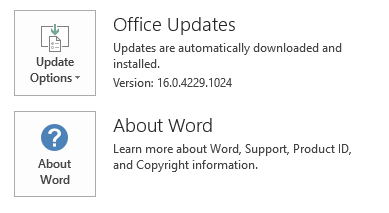
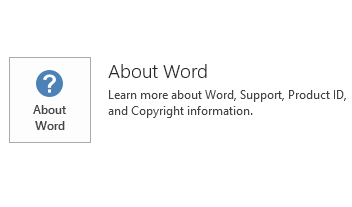
To determine whether your Office installation is Click-to-Run or MSI-based, follow these steps:
- Start an Office 2016 application.
- On the File menu, select Account.
- For Office 2016 Click-to-Run installations, an Update Options item is displayed. For MSI-based installations, the Update Options item isn't displayed.
| Office 2016 Click-to-Run installation | MSI-based Office 2016 |
|---|---|
|
|
How to uninstall this update
Windows 10
- Go to Start, enter View Installed Updates in the Search Windows box, and then press Enter.
- In the list of updates, locate and select KB3191883, and then select Uninstall.
Windows 8 and Windows 8.1
- Swipe in from the right edge of the screen, and then select Search. If you're using a mouse, point to the lower-right corner of the screen, and then select Search.
- Enter windows update, select Windows Update, and then select Installed Updates.
- In the list of updates, locate and select KB3191883, and then select Uninstall.
Windows 7
- Go to Start, enter Run, and then select Run.
- Enter Appwiz.cpl, and then select OK.
- Select View installed updates.
- In the list of updates, locate and select KB3191883, and then select Uninstall.
References
Learn about the standard terminology that's used to describe Microsoft software updates. The Office System TechCenter contains the latest administrative updates and strategic deployment resources for all versions of Office.
File informationThe global version of this update has the file attributes (or later file attributes) that are listed in the following table.
x86
outlook-x-none.msp file information
| File identifier | File name | File version | File size | Date | Time |
|---|---|---|---|---|---|
| Contab32.dll | Contab32.dll | 16.0.4534.1000 | 152,816 | 17-Apr-2017 | 20:12 |
| Dlgsetp.dll | Dlgsetp.dll | 16.0.4534.1000 | 109,800 | 17-Apr-2017 | 20:12 |
| Envelope.dll | Envelope.dll | 16.0.4534.1000 | 189,192 | 17-Apr-2017 | 20:12 |
| Mapiph.dll | Mapiph.dll | 16.0.4498.1000 | 332,616 | 17-Apr-2017 | 20:12 |
| Mapir.dll_1033 | Mapir.dll | 16.0.4444.1000 | 1,280,736 | 17-Apr-2017 | 20:11 |
| Mimedir.dll | Mimedir.dll | 16.0.4498.1000 | 446,144 | 17-Apr-2017 | 20:12 |
| Olmapi32.dll | Olmapi32.dll | 16.0.4534.1000 | 4,775,168 | 17-Apr-2017 | 20:12 |
| Omsmain.dll | Omsmain.dll | 16.0.4528.1000 | 753,408 | 17-Apr-2017 | 20:12 |
| Omsxp32.dll | Omsxp32.dll | 16.0.4531.1000 | 261,416 | 17-Apr-2017 | 20:12 |
| Outllibr.dll_1033 | Outllibr.dll | 16.0.4531.1000 | 7,491,816 | 17-Apr-2017 | 20:11 |
| Outlmime.dll | Outlmime.dll | 16.0.4534.1000 | 611,600 | 17-Apr-2017 | 20:12 |
| Outlook.exe | Outlook.exe | 16.0.4534.1001 | 23,192,776 | 18-Apr-2017 | 16:28 |
| Outlook.hol_1033 | Outlook.hol | Not applicable | 1,334,660 | 17-Apr-2017 | 20:11 |
| Outlph.dll | Outlph.dll | 16.0.4534.1000 | 358,704 | 17-Apr-2017 | 20:12 |
| Outlvba.dll | Outlvba.dll | 16.0.4534.1000 | 76,536 | 17-Apr-2017 | 20:12 |
| Pstprx32.dll | Pstprx32.dll | 16.0.4534.1000 | 1,386,192 | 17-Apr-2017 | 20:12 |
| Rm.dll | Rm.dll | 16.0.4312.1000 | 81,584 | 17-Apr-2017 | 20:12 |
| Scnpst32.dll | Scnpst32.dll | 16.0.4534.1000 | 460,632 | 17-Apr-2017 | 20:12 |
| Scnpst64.dll | Scnpst64.dll | 16.0.4534.1000 | 472,424 | 17-Apr-2017 | 20:12 |
| Scnpst64c.dll | Scnpst64c.dll | 16.0.4534.1000 | 673,648 | 17-Apr-2017 | 20:12 |
x64
outlook-x-none.msp file information
| File identifier | File name | File version | File size | Date | Time |
|---|---|---|---|---|---|
| Contab32.dll | Contab32.dll | 16.0.4534.1000 | 199,928 | 17-Apr-2017 | 20:20 |
| Dlgsetp.dll | Dlgsetp.dll | 16.0.4534.1000 | 138,472 | 17-Apr-2017 | 20:20 |
| Envelope.dll | Envelope.dll | 16.0.4534.1000 | 248,584 | 17-Apr-2017 | 20:20 |
| Mapiph.dll | Mapiph.dll | 16.0.4498.1000 | 481,088 | 17-Apr-2017 | 20:20 |
| Mapir.dll_1033 | Mapir.dll | 16.0.4444.1000 | 1,280,736 | 17-Apr-2017 | 20:19 |
| Mimedir.dll | Mimedir.dll | 16.0.4531.1000 | 601,280 | 17-Apr-2017 | 20:20 |
| Olappt.fae | Olappt.fae | 16.0.4366.1000 | 134,480 | 17-Apr-2017 | 20:20 |
| Olmapi32.dll | Olmapi32.dll | 16.0.4534.1000 | 6,606,080 | 17-Apr-2017 | 20:20 |
| Omsmain.dll | Omsmain.dll | 16.0.4528.1000 | 1,004,288 | 17-Apr-2017 | 20:20 |
| Omsxp32.dll | Omsxp32.dll | 16.0.4528.1000 | 352,040 | 17-Apr-2017 | 20:20 |
| Outllibr.dll_1033 | Outllibr.dll | 16.0.4531.1000 | 7,491,816 | 17-Apr-2017 | 20:19 |
| Outlmime.dll | Outlmime.dll | 16.0.4534.1000 | 783,120 | 17-Apr-2017 | 20:20 |
| Outlook.exe | Outlook.exe | 16.0.4534.1001 | 34,981,576 | 18-Apr-2017 | 16:30 |
| Outlook.hol_1033 | Outlook.hol | Not applicable | 1,334,660 | 17-Apr-2017 | 20:19 |
| Outlph.dll | Outlph.dll | 16.0.4375.1000 | 429,360 | 17-Apr-2017 | 20:20 |
| Outlvba.dll | Outlvba.dll | 16.0.4534.1000 | 97,016 | 17-Apr-2017 | 20:20 |
| Pstprx32.dll | Pstprx32.dll | 16.0.4534.1000 | 2,570,448 | 17-Apr-2017 | 20:20 |
| Rm.dll | Rm.dll | 16.0.4444.1000 | 110,800 | 17-Apr-2017 | 20:20 |
| Scnpst32.dll | Scnpst32.dll | 16.0.4534.1000 | 611,168 | 17-Apr-2017 | 20:20 |
| Scnpst64.dll | Scnpst64.dll | 16.0.4534.1000 | 614,248 | 17-Apr-2017 | 20:20 |
| Scnpst64c.dll | Scnpst64c.dll | 16.0.4534.1000 | 814,448 | 17-Apr-2017 | 20:20 |