
Symptoms
You install a SQL Server cumulative update or an installation of SQL Server that includes a cumulative update (also referred to as a slip-streamed installation) on a version of Windows Server 2016 that has Secure Boot enabled.
In this scenario, the Setup program either reports an error and fails or else it succeeds while triggering warnings and error messages that resemble the following.
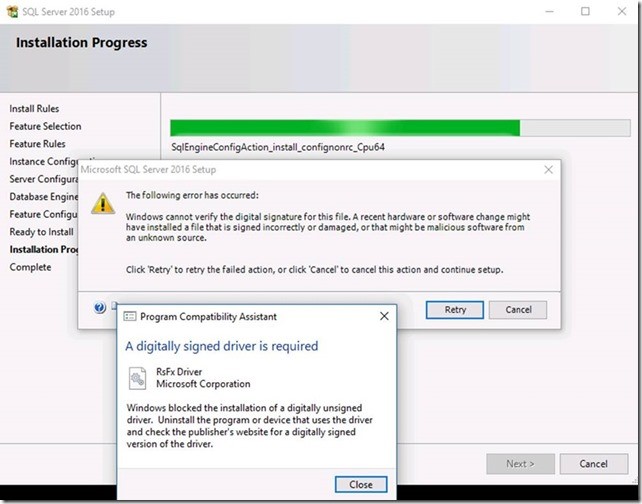
Error message when Filestream feature is selected during Setup or is already enabled on an existing installation of SQL Server to which a cumulative update is being applied:
Note
The following error has occurred:
Windows cannot verify the digital signature for this file. A recent hardware or software change might have installed a file that is signed incorrectly or damaged, or that might be malicious software from an unknown source.
Click ‘Retry’ or retry the failed action, or click ‘Cancel’ to cancel this action and continue setup.
And this:
Program Compatibility Assistant
Note
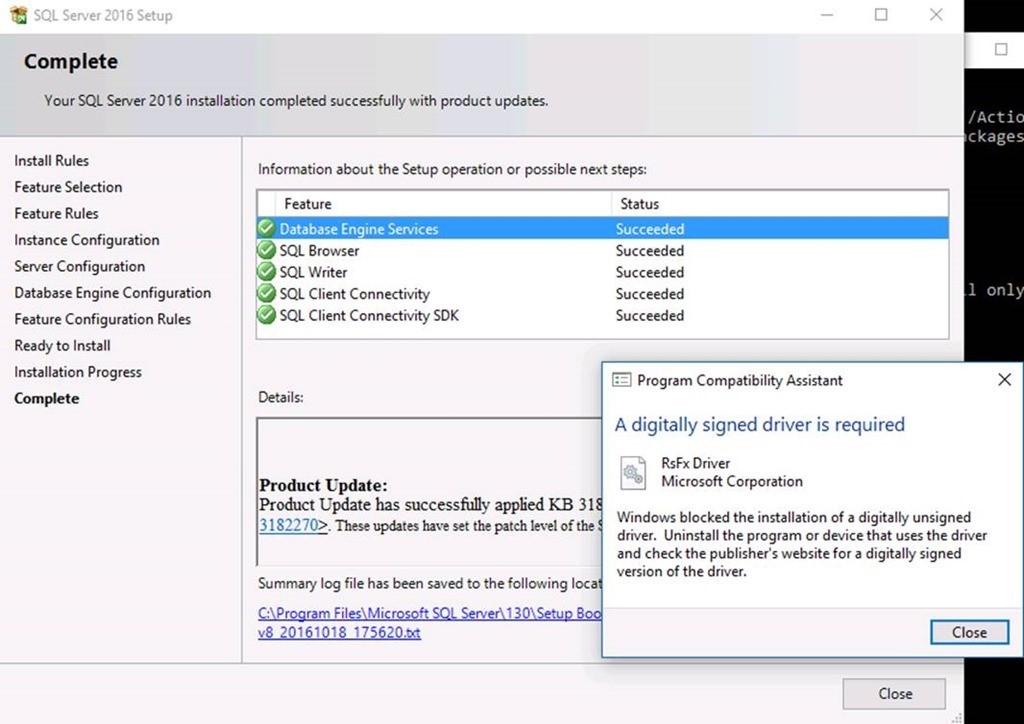
A digitally signed driver is required
RsFx Driver
Microsoft Corporation
Warning message when the Filestream feature is not selected during a slip-streamed installation of SQL server that includes a cumulative update:
Note In this scenario, you cannot enable the Filestream feature by using SQL Server Configuration Manager after setup is completed.
The following table summarizes the combinations by which these symptoms may occur in various versions of SQL Server.
SQL Server 2016 (affects CU2 for RTM)
| Combination | Filestream feature | Error/Warning? |
|---|---|---|
| CU2 on SQL 2016 | Enabled | Error |
| SQL 2016+ CU2 Slipstream | Enabled | Error |
| SQL 2016+ CU2 Slipstream | Disabled or not selected (default) | Warning |
SQL Server 2014 (affects CU9 for SP1)
| Combination | Filestream feature | Error/Warning? |
|---|---|---|
| CU9 on SQL 2014 SP1 | Enabled | Error |
| SQL 2014+ SP1+ CU9 Slipstream | Enabled | Error |
| SQL 2014+ SP1+ CU9 Slipstream | Disabled or not selected (default) | Warning |
SQL Server 2012 (affects CU5 for SP3 and CU14 for SP2)
| Combination | Filestream feature | Error/Warning? |
|---|---|---|
| CU5 on SQL 2012 SP3 | Enabled | Error |
| SQL 2012+ SP3+CU5 Slipstream | Enabled | Error |
| SQL 2012+ SP3+CU5 Slipstream | Disabled or not selected (default) | Warning |
| CU14 on SQL 2012 SP2 | Enabled | Error |
| SQL 2012+ SP2+CU14 Slipstream | Enabled | Error |
| SQL 2012+ SP2+CU14 Slipstream | Disabled or not selected (default) | Warning |
Note Hyper-V Gen2-type VMs have Secure Boot enabled by default, and therefore users are more likely to encounter this issue when they install SQL 2016 and Cumulative Update 2 (CU2) on Windows Server 2016 or Windows 10 on a Gen2 Hyper-V VM. However, the issue may also occur on physical servers if Secure Boot is turned on.
Resolution
To resolve this issue, install Microsoft SQL Server 2016 Service Pack 1 (SP1)
SQL Server 2016
Cumulative Update 4 for SQL Server 2016
SQL Server 2014
Cumulative Update 11 for SQL Server 2014 SP1
SQL Server 2012
Cumulative Update 7 for SQL Server 2012 Service Pack 3
Cumulative Update 16 for SQL Server 2012 SP2
Recommendation: Install the latest cumulative update for SQL Server
Each new cumulative update for SQL Server contains all the hotfixes and all the security fixes that were included with the previous cumulative update. We recommend that you download and install the latest cumulative updates for SQL Server:
Workaround
To work around this issue, use one of the following methods as applicable to your environment:
- If the Filestream feature is not in use for your environment, this issue won't affect you except for the warning message that pops up at the end of the installation process. You can safely ignore the warning in this scenario.
- If the Filestream/FileTable feature is in use for your environment and if you plan to install one of the affected cumulative updates described in the "Symptoms" section on Windows Server 2016, you may opt to temporarily disable Secure Boot. This lets you work around the issue until the upcoming servicing release that contains the code-signed RsFx driver is released.
- If the Filestream/FileTable feature is in use for your environment and if you plan to install SQL Server 2016 on Windows Server 2016 and cannot disable Secure Boot, we recommend that you do not install the affected cumulative updates. Instead, wait for a future cumulative update release that has a signed RsFx driver.
More Information
- Filestream RsFx driver fails to load after installing SQL Server 2016 with CU2 on Windows Server 2016 with SecureBoot ON
- Disabling Secure Boot
- Cumulative Update 2 for SQL Server 2016
- Cumulative Update 9 for SQL Server 2014 SP1
- Cumulative Update 5 for SQL Server 2012 Service Pack 3
- Cumulative Update 14 for SQL Server 2012 SP2