Set Skype Meetings App and Skype for Business Web App audio, video, and other options under in meeting options.
To set Skype Meetings App options, go to More options > Meeting Options.
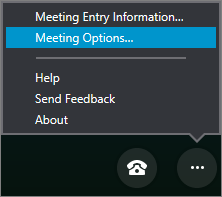 Choose the options you want and click OK.
| Option tab |
Description |
| General |
- Change the font style, and turn emoticons on or off in instant messages
- Turn on logging to collect troubleshooting information
|
| Audio device |
Set the audio device you prefer to use in Skype Meetings App meetings. Learn more. |
| Video device |
Set the video device you prefer to use in Skype Meetings App meetings. Learn more. |
To set Skype for Business Web App options, go to More options > Meeting options.
Choose the set of options you want, and then select OK when you're done.
| Option tab |
Description |
| General |
- Save your sign-in information and other preferences so you can join a meeting more quickly
- Change the font style, and turn emoticons on or off in instant messages
- Turn on logging to collect troubleshooting information
|
| Phones |
Set your preferences for joining meeting audio. Learn more.
Note: This option isn't available unless you select Remember me on this computer on the General tab. |
| Audio device |
Set the audio device you prefer to use in Skype for Business Web App meetings. Learn more. |
| Video device |
Set the video device you prefer to use in Skype for Business Web App meetings. Learn more. |
