
Overview
Starting January 1st 2019, B2B eInvoicing will be mandatory in Italy. This update provides feature support for this requirement. In Dynamics 2016 and newer versions, we have previously supported B2G eInvoicing by supporting the FatturaPA XML format used by the Italian tax authorities. B2B eInvoicing will use the same format with minor changes that mainly concerns the need to identify whether the received customer is a private or public company. This is identified by a customer in the PA Code field. If this field has a length of 6 characters, the customer is treated as a public company. In all other cases (except blank), it is treated as a private company. This way we can handle the XML format accordingly. For all versions from Dynamics 2015 and up to and including Dynamics 365 Business Central, the user can generate an XML and save it locally and then manually upload it to the Italian tax authorities. For Dynamics NAV 2015 this is the only way of handling B2B eInvoicing. For Dynamics NAV 2016 up to and including Dynamics 365 Business Central, it is also possible to continue using the Document Exchange Framework and send these invoices through TradeShift (which requires an account with TradeShift), who then handles the further communication, document signing, etc. Using TradeShift may come with a cost. Please contact TradeShift regarding this.
This update also adds some setup fields necessary for the feature to work properly.
Additionally, it is now possible to setup the system to validate an invoice pre-posting so it can be exported in FatturaPA format. Please see the Setup and functionality section below.
Reference Information
| Reference No. | 259342 |
|---|---|
| Product Area | Financial Management |
| Discovered in | Microsoft Dynamics NAV 2016, 2017, 2018 and Dynamics 365 Business Central |
| Title | [IT] Mandatory B2B eInvoicing |
| Released on | Dynamics NAV 2015, 2016, 2017, 2018: September 2018 Dynamics 365 Business Central: October 2018 |
Important Notice to Customers
We recommend that you contact your Microsoft Dynamics Partner before installing service packs or hotfixes. It is important to verify that your environment is compatible with the service pack(s), hotfix(es), or download(s) being installed. A service pack, hotfix, or download may cause interoperability issues with customizations, and third-party products that work with your Microsoft Dynamics solutions.
Important Notice to Partners
As per the SPA, it is non-compliant for partners to redistribute tax and regulatory updates to ERP customers not enrolled in the Business Ready Enhancement Plan. Partners can verify their customer's status in VOICE. If they're not enrolled, Partners will need to get them current before they can distribute.
Installation
Before this update can be installed, the following prerequisites are required:
- Microsoft Dynamics 365 Business Central (Fall release 2018 – upgraded automatically)
- Microsoft Dynamics NAV 2018 Italy
- Microsoft Dynamics NAV 2017 Italy
- Microsoft Dynamics NAV 2016 Italy
- Microsoft Dynamics NAV 2015 Italy
This update is available through:
- Microsoft Dynamics ® NAV 2018 Italy, Cumulative Update CU 9
- Microsoft Dynamics ® NAV 2017 Italy, Cumulative Update CU 22
- Microsoft Dynamics ® NAV 2016 Italy, Cumulative Update CU 35
- Microsoft Dynamics ® NAV 2015 Italy, Cumulative Update CU 47
Installation Steps
For more information about how to install an update rollup, click the following article number to view the article in the Microsoft Knowledge Base:
- 3021418 - How to Install a Microsoft Dynamics NAV 2015 Cumulative Update
- 3109325 - How to install a Microsoft Dynamics NAV 2016 Cumulative Update
- 3204818 - How to install a Microsoft Dynamics NAV 2017 Cumulative Update
- 4072484 - How to install a Microsoft Dynamics NAV 2018 Cumulative Update
Notes:
- Existing customizations in objects that are included in this update file may break when you import the regulatory feature.
- No data upgrade is required before you can use this feature.
Licensing
Refresh your license to access the new objects that are added with this release.
Objects
The following object have been added/modified through this release:
Dynamics NAV 2018
| Type | No. | Name | Added/Modified |
|---|---|---|---|
| Codeunit | 12179 | Export FatturaPA Document | Modified |
| Codeunit | 12180 | FatturaPA Sales Validation | Modified |
| Codeunit | 12181 | FatturaPA Service Validation | Modified |
| Page | 459 | Sales & Receivables Setup | Modified |
| Page | 5919 | Service Mgt. Setup | Modified |
| Table | 18 | Customer | Modified |
| Table | 311 | Sales & Receivables Setup | Modified |
| Table | 5911 | Service Mgt. Setup | Modified |
Dynamics NAV 2016 and 2017
| Type | No. | Name | Added/Modified |
|---|---|---|---|
| Codeunit | 5980 | Service-Post | Modified |
| Codeunit | 12179 | Export FatturaPA Document | Modified |
| Codeunit | 12180 | FatturaPA Sales Validation | Modified |
| Codeunit | 12181 | FatturaPA Service Validation | Modified |
| Page | 459 | Sales & Receivables Setup | Modified |
| Page | 5919 | Service Mgt. Setup | Modified |
| Table | 18 | Customer | Modified |
| Table | 61 | Electronic Document Format | Modified |
| Table | 311 | Sales & Receivables Setup | Modified |
| Table | 5911 | Service Mgt. Setup | Modified |
Dynamics NAV 2015
| Type | No. | Name | Added/Modified |
|---|---|---|---|
| Codeunit | 2 | Company-Initialize | Modified |
| Codeunit | 80 | Sales-Post | Modified |
| Codeunit | 700 | Page Management | Modified |
| Codeunit | 701 | Data Type Management | Modified |
| Codeunit | 1235 | XML Buffer Writer | Added |
| Codeunit | 1239 | XML Buffer Reader | Added |
| Codeunit | 5980 | Service-Post | Modified |
| Codeunit | 12169 | FatturaPA Send | Added |
| Codeunit | 12179 | Export FatturaPA Document | Added |
| Codeunit | 12180 | FatturaPA Sales Validation | Added |
| Codeunit | 12181 | FatturaPA Service Validation | Added |
| Page | 1 | Company Information | Modified |
| Page | 4 | Payment Terms | Modified |
| Page | 21 | Customer Card | Modified |
| Page | 30 | Item Card | Modified |
| Page | 42 | Sales Order | Modified |
| Page | 43 | Sales Invoice | Modified |
| Page | 44 | Sales Credit Memo | Modified |
| Page | 132 | Posted Sales Invoice | Modified |
| Page | 134 | Posted Sales Credit Memo | Modified |
| Page | 143 | Posted Sales Invoices | Modified |
| Page | 144 | Posted Sales Credit Memos | Modified |
| Page | 363 | Electronic Document Format | Added |
| Page | 366 | Electronic Document Formats | Added |
| Page | 427 | Payment Methods | Modified |
| Page | 459 | Sales & Receivables Setup | Modified |
| Page | 700 | Error Messages | Modified |
| Page | 5900 | Service Order | Modified |
| Page | 5919 | Service Mgt. Setup | Modified |
| Page | 5933 | Service Invoice | Modified |
| Page | 5935 | Service Credit Memo | Modified |
| Page | 5971 | Posted Service Credit Memos | Modified |
| Page | 5972 | Posted Service Credit Memo | Modified |
| Page | 5977 | Posted Service Invoices | Modified |
| Page | 5978 | Posted Service Invoice | Modified |
| Page | 6630 | Sales Return Order | Modified |
| Page | 12200 | Fattura Codes | Added |
| Table | 3 | Payment Terms | Modified |
| Table | 18 | Customer | Modified |
| Table | 27 | Item | Modified |
| Table | 36 | Sales Header | Modified |
| Table | 61 | Electronic Document Format | Added |
| Table | 62 | Record Export Buffer | Added |
| Table | 79 | Company Information | Modified |
| Table | 112 | Sales Invoice Header | Modified |
| Table | 114 | Sales Cr.Memo Header | Modified |
| Table | 289 | Payment Method | Modified |
| Table | 311 | Sales & Receivables Setup | Modified |
| Table | 700 | Error Message | Modified |
| Table | 823 | Name/Value Buffer | Modified |
| Table | 1235 | XML Buffer | Added |
| Table | 5900 | Service Header | Modified |
| Table | 5911 | Service Mgt. Setup | Modified |
| Table | 5992 | Service Invoice Header | Modified |
| Table | 5994 | Service Cr.Memo Header | Modified |
| Table | 12198 | Fattura Code | Added |
| Table | 12199 | Fattura Project Info | Added |
| Menu | 1030 | Dept - Country | Modified |
Setup and functionality
Electronic Document Formats
(/Departments/Administration/Application Setup/General)
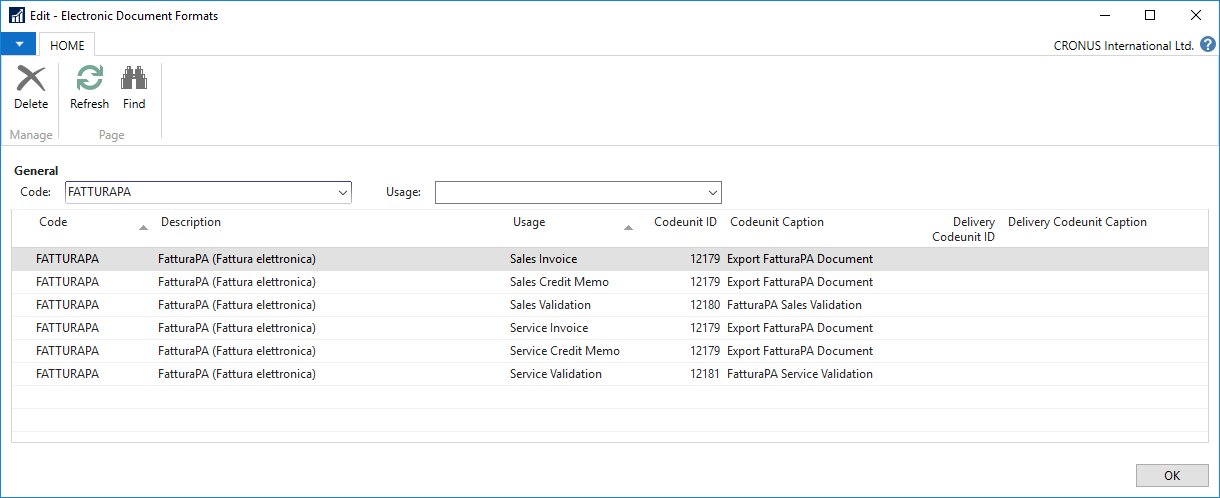
| Code | Description | Usage | Codeunit ID | Codeunit Caption |
|---|---|---|---|---|
| FATTURAPA | FatturaPA (Fattura elettronica) | Sales Invoice | 12179 | Export FatturaPA Document |
| FATTURAPA | FatturaPA (Fattura elettronica) | Sales Credit Memo | 12179 | Export FatturaPA Document |
| FATTURAPA | FatturaPA (Fattura elettronica) | Sales Validation | 12180 | FatturaPA Sales Validation |
| FATTURAPA | FatturaPA (Fattura elettronica) | Service Invoice | 12179 | Export FatturaPA Document |
| FATTURAPA | FatturaPA (Fattura elettronica) | Service Credit Memo | 12179 | Export FatturaPA Document |
| FATTURAPA | FatturaPA (Fattura elettronica) | Service Validation | 12181 | FatturaPA Service Validation |
Notes:
- You can choose any "Code" value (not necessarily "FATTURAPA")
- It is recommended to have setup both for sales and service even if you don't work with service
Document Sending Profile (Not applicable for Dynamics NAV 2015)
(/Departments/Administration/Application Setup/General)
Is it recommended to have a document sending profile for Fattura PA XML file export. Use "Disk" = "Electronic Document", "Format" = "FATTURAPA" (Fattura PA electronic document format "Code" value – see 8.1) to setup profile for manual export of Fattura PA XML files.
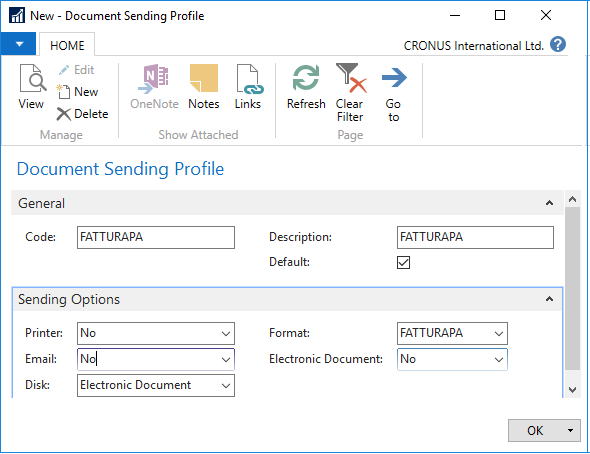
This profile can be used as a default when performing the Post And Send or Send actions.
It also can be setup for a particular customer.
Sales & Receivables Setup
(/Departments/Sales & Marketing/Setup)
There are two new fields under the General FastTab:
- Fattura PA Electronic Format
This is a Fattura PA electronic document format code (see 8.1).
- Validate Document On Posting
This checkbox enables automatic validation of the necessary fields when posting a sales documents and prevents the user from posting a document having any Fattura PA errors. The default value (after upgrade or for a demo company) is FALSE. It is recommended to enable this checkbox.
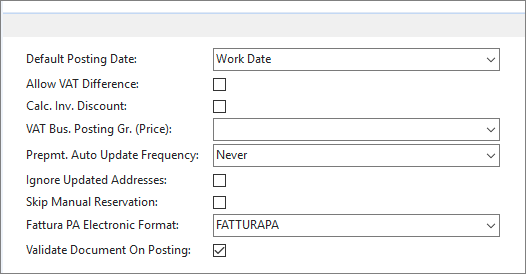
Note auto validation is ignored (by passed) in case of customer with blanked «PA Code»
This functionality also applies for Service invoices and you can find the same setup on the Service Setup
For Dynamics NAV 2015 parts of the Document Exchange framework has been implemented, though not enough to use Document Sending but enough to use formatting and generation of XML. Therefore, to generate the XML file on Dynamics 2015 the user must manually export the XML file from the posted invoices.
Support Information
If you are experiencing issues downloading the install file or documentation, please contact ITMBSSUP@microsoft.com.
For technical support questions, contact your partner or, if enrolled in a support plan directly with Microsoft, you can enter a new support request to Microsoft Dynamics® Technical Support from Customer Source or Partner Source under Support >> New Support Request.
You can also contact Microsoft Dynamics® Technical Support by phone using these links for country specific phone numbers.
Partners - Global Support Contacts (requires Partner Source login)
Customers - Global Support Contacts (requires Customer Source login)
Linguistic Quality Feedback
Thank you for taking the time to give us your feedback. It will be used to evaluate the linguistic quality of the translated Dynamics NAV user interface and make improvements if needed.
Please use this feedback link to provide your feedback to the below questions.
Q1: Which language and version of the product are you working on?
Q2: What is your role in your organization / company?
Q3: Is the used terminology correct for your market/locale?
Q4: Please include any other feedback you may have on the linguistic quality of the product.
Privacy Statement: Microsoft is committed to protecting your privacy, while delivering software that brings you the performance, power, and convenience you desire in your personal computing. This privacy statement explains the data collection and use practices. It does not apply to other online or offline Microsoft sites, products, or services.
If you choose to provide feedback about the linguistic quality of this regulatory feature, then your email address and any additional information that you choose to provide will be included. We will only use your feedback data to help improve the linguistic quality. Microsoft will not contact you to further investigate your feedback or to ask you for more information. Your email address will be removed from our systems after 90 days.