
Summary
This update makes improvements to the Windows recovery features for Windows 10, version 1507.
How to get this update
Install this update
| Release Channel | Available | Next Step |
|---|---|---|
| Windows Update and Microsoft Update | Yes | This update is available through Windows Update. It will be downloaded and installed automatically. |
| Microsoft Update Catalog | Yes | To get the standalone package for this update, go to the Microsoft Update Catalog website. To download updates from the Update Catalog, see Steps to download updates from the Windows Update Catalog. |
| Windows Server Update Services (WSUS) and Microsoft Endpoint Configuration Manager | No | See the other release channels. |
| Prerequisites | There are no prerequisites to apply this update. |
|---|---|
| Restart information | You do not have to restart your device after you apply this update. |
| Removal information | This update cannot be removed once it is applied to a Windows image. |
| Update replacement information | This update replaces the previously released update KB5031470. |
| Verify the installation of this update | After installing this update, the WinRE version installed on the device should be 10.0.10240.20400. |
Methods to verify the WinRE version installed
Run the following PowerShell script "GetWinReVersion.ps1" with Administrator credentials. After you run the script, you should receive the installed WinRE version as in the following example:
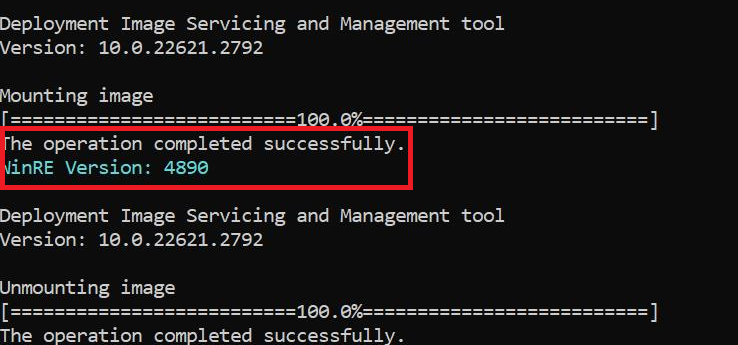
GetWinReVersion.ps1 PowerShell script
################################################################################################

#

# Copyright (c) Microsoft Corporation.

# Licensed under the MIT License.

#

# THE SOFTWARE IS PROVIDED *AS IS*, WITHOUT WARRANTY OF ANY KIND, EXPRESS OR

# IMPLIED, INCLUDING BUT NOT LIMITED TO THE WARRANTIES OF MERCHANTABILITY,

# FITNESS FOR A PARTICULAR PURPOSE AND NONINFRINGEMENT. IN NO EVENT SHALL THE

# AUTHORS OR COPYRIGHT HOLDERS BE LIABLE FOR ANY CLAIM, DAMAGES OR OTHER

# LIABILITY, WHETHER IN AN ACTION OF CONTRACT, TORT OR OTHERWISE, ARISING FROM,

# OUT OF OR IN CONNECTION WITH THE SOFTWARE OR THE USE OR OTHER DEALINGS IN THE

# SOFTWARE.

#

################################################################################################
# Function to get WinRE path

function GetWinREPath {

    $WinRELocation = (reagentc /info | Select-String "Windows RE location")

    if ($WinRELocation) {

        return $WinRELocation.ToString().Split(':')[-1].Trim()

    } else {

        Write-Host "Failed to find WinRE path" -ForegroundColor Red

        exit 1

    }

}


# Creates and needs to be return the mount directory
function GetMountDir {
    # systemdirve\mnt
    $MountDir = "$env:SystemDrive\mnt"
    if (-not (Test-Path $MountDir)) {
        New-Item -ItemType Directory -Path $MountDir -Force | Out-Null
    }
    return $MountDir
}

# Function to get WinRE version
function GetWinREVersion {

    $mountedPath = GetMountDir
    $filePath = "$mountedPath\Windows\System32\winpeshl.exe"

    $WinREVersion = (Get-Item $filePath).VersionInfo.FileVersionRaw.Revision

    return [int]$WinREVersion

}

# Main Execution

$WinREPath = GetWinREPath

# Make dir C:\mnt if not exists

$TempDir = GetMountDir

# Get the read write permission for this directory

if (-not (Test-Path $TempDir)) {

    New-Item -ItemType Directory -Path $TempDir -Force | Out-Null

}

# Mount WinRE image

dism /Mount-Image /ImageFile:"$WinREPath\winre.wim" /Index:1 /MountDir:"$TempDir"

$WinREVersion = GetWinREVersion

Write-Host "WinRE Version: $WinREVersion" -ForegroundColor Cyan

dism /Unmount-Image /MountDir:"$TempDir" /Discard

Remove-Item -Path $TempDir -Force -Recurse
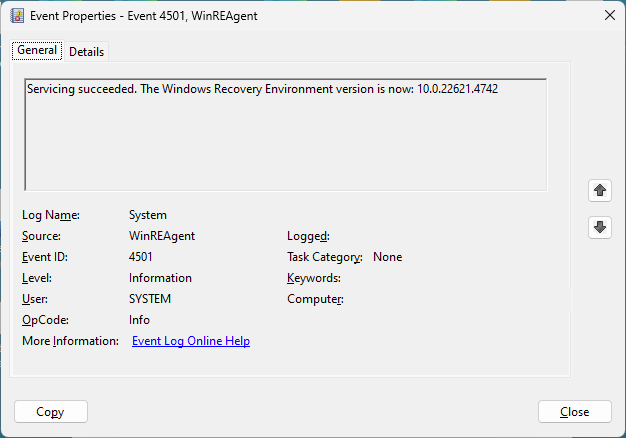
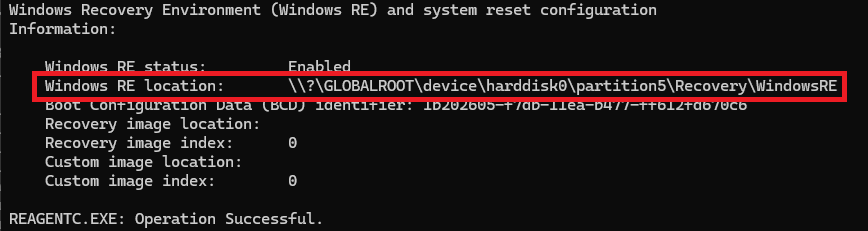
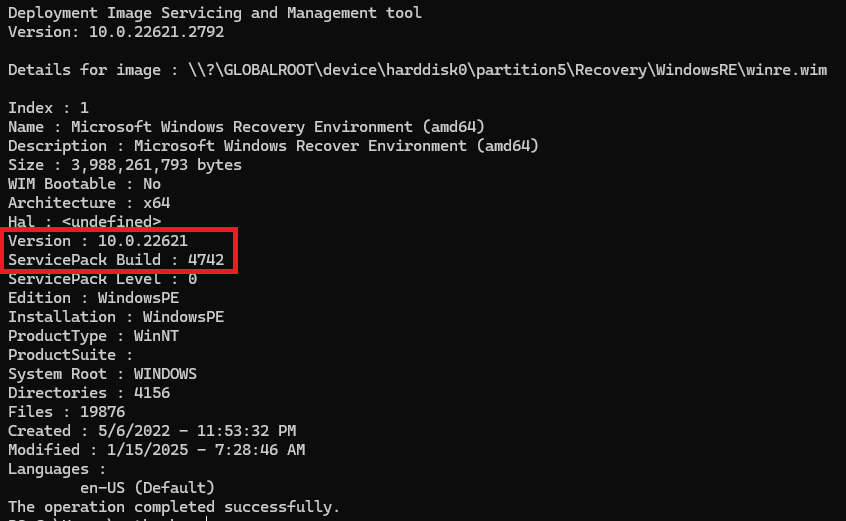
File information
The English (United States) version of this software update installs files that have the attributes that are listed in the following tables.
For all supported x86-based versions
| File name | File version | Date | Time | File size |
|---|---|---|---|---|
| winload.exe | 10.0.10240.20400 | 11-Dec-23 | 23:19 | 916,320 |
| winload.efi | 10.0.10240.20400 | 11-Dec-23 | 23:19 | 1,043,792 |
| bootmgfw.efi | 10.0.10240.20400 | 11-Dec-23 | 23:18 | 991,040 |
| bootmgr.efi | 10.0.10240.20400 | 11-Dec-23 | 23:18 | 988,064 |
| boot.stl | Not versioned | 8-Aug-23 | 16:24 | 10,689 |
| winresume.exe | 10.0.10240.20400 | 11-Dec-23 | 23:20 | 760,272 |
| winresume.efi | 10.0.10240.20400 | 11-Dec-23 | 23:20 | 876,440 |
| ci.dll | 10.0.10240.20400 | 11-Dec-23 | 23:18 | 553,232 |
| driver.stl | Not versioned | 8-Aug-23 | 16:17 | 15,792 |
For all supported x64-based versions
| File name | File version | Date | Time | File size |
|---|---|---|---|---|
| skci.dll | 10.0.10240.20400 | 11-Dec-23 | 23:46 | 165,424 |
| winload.exe | 10.0.10240.20400 | 12-Dec-23 | 0:03 | 1,135,368 |
| winload.efi | 10.0.10240.20400 | 12-Dec-23 | 0:03 | 1,308,784 |
| bootmgfw.efi | 10.0.10240.20400 | 12-Dec-23 | 0:01 | 1,177,504 |
| bootmgr.efi | 10.0.10240.20400 | 12-Dec-23 | 0:01 | 1,173,808 |
| boot.stl | Not versioned | 8-Aug-23 | 16:24 | 10,895 |
| winresume.exe | 10.0.10240.20400 | 12-Dec-23 | 0:04 | 865,656 |
| winresume.efi | 10.0.10240.20400 | 12-Dec-23 | 0:03 | 1,026,760 |
| ci.dll | 10.0.10240.20400 | 12-Dec-23 | 0:01 | 612,744 |
| driver.stl | Not versioned | 8-Aug-23 | 16:17 | 25,628 |
References
Learn about the standard terminology that is used to describe Microsoft software updates.
Query words SafeOS DU