
INTRODUCTION
Microsoft has released security bulletin MS14-045. To learn more about this security bulletin:
Home users:
https://www.microsoft.com/security/pc-security/updates.aspx Skip the details: Download the updates for your home computer or laptop from the Microsoft Update website now:
IT professionals:
How to obtain help and support for this security update
Help installing updates:
Support for Microsoft Update
Security solutions for IT professionals:
TechNet Security Troubleshooting and Support
Help protect your Windows-based computer Windows from viruses and malware:
Virus Solution and Security Center
Local support according to your country:
International Support
More Information
Known issues with this security update
Known issue 1
After you install this security update, fonts that are installed in a location other than the default fonts directory (%windir%\fonts\) cannot be changed when they are loaded into any active session. Attempts to change, replace, or delete these fonts will be blocked, and a "File in use" message will be presented.For more information, go to the following Microsoft webpages:
Font Installation and Deletion
AddFontResource function
AddFontResourceEx function
RemoveFontResource function
RemoveFontResourceEx functionKnown issue 2
Microsoft is investigating behavior in which fonts do not render correctly after any of the following updates are installed:2982791 MS14-045: Description of the security update for kernel-mode drivers: August 12, 2014
2970228 Update to support the new currency symbol for the Russian ruble in Windows
2975719 August 2014 update rollup for Windows RT 8.1, Windows 8.1, and Windows Server 2012 R2
2975331 August 2014 update rollup for Windows RT, Windows 8, and Windows Server 2012Status
KB 2993651 replaces this security update and resolves this known issue.Mitigations
Open the Programs and Features item in Control Panel, and then click View installed updates. Find and then uninstall any of the following updates that are currently installed:- KB2982791
- KB2970228
- KB2975719
- KB2975331
Known issue 3
Microsoft is investigating behavior in which systems may crash with a 0x50 Stop error message (bugcheck) after any of the following updates are installed:2982791 MS14-045: Description of the security update for kernel-mode drivers: August 12, 2014
2970228 Update to support the new currency symbol for the Russian ruble in Windows
2975719 August 2014 update rollup for Windows RT 8.1, Windows 8.1, and Windows Server 2012 R2
2975331 August 2014 update rollup for Windows RT, Windows 8, and Windows Server 2012This condition may be persistent and may prevent the system from starting correctly.Status
KB 2993651 replaces this security update and resolves this known issue.Mitigations
Restart the computer in safe mode:
Windows 8 and Windows 8.1:
- If you have installation media for Windows 8.1 (such as a DVD or USB), start your computer by using the installation media. Insert the DVD or USB flash drive, and restart the computer. If you see a message that asks you to "Press any key to boot from DVD," do this. If you do not receive the message, you may have to change the restart order in your computer's BIOS settings so that the computer first starts to the DVD or USB. When you reach the Install Windows page, you should click Repair your computer to start the Windows Recovery Environment.
- If you do not have media, you should use the power button to restart your computer during the startup process three times. This should start the Windows Recovery Environment.
- As soon as your computer starts in the Windows Recovery Environment, tap or click Troubleshoot on the Choose an option screen. If you do not see the Startup Settings option, tap or click Advanced options.
- Tap or click Startup Settings., and then tap or click Restart.
- On the Startup Settings screen, select the startup setting that you want. (Press 4 for safe mode.)
- Sign in to your computer by using a user account that has administrator rights.
Delete the fntcache.dat file. To do this, type the following command at command prompt, and then press Enter:
del %windir%\system32\fntcache.dat
After you delete fntcache.dat, restart the computer. The computer should now start successfully.
Click Start, click Run, type regedit in the Open box, and then click OK.
Locate and then click the following subkey in the registry:
HKEY_LOCAL_MACHINE\Software\Microsoft\Windows NT\CurrentVersion\Fonts\
Right-click the Fonts registry subkey, and then click Export.
Type a name for the exported reg file, and select a location to store the file. You will use this file later to restore the font registration that you will remove in the following steps.
After you save the reg file, find any registry values under the Fonts registry subkey for which the data field meets the following criteria:
- Contains a full file path (not just a file name)
- The full file path ends in an ".otf" extension. (This indicates an OpenType font file.)
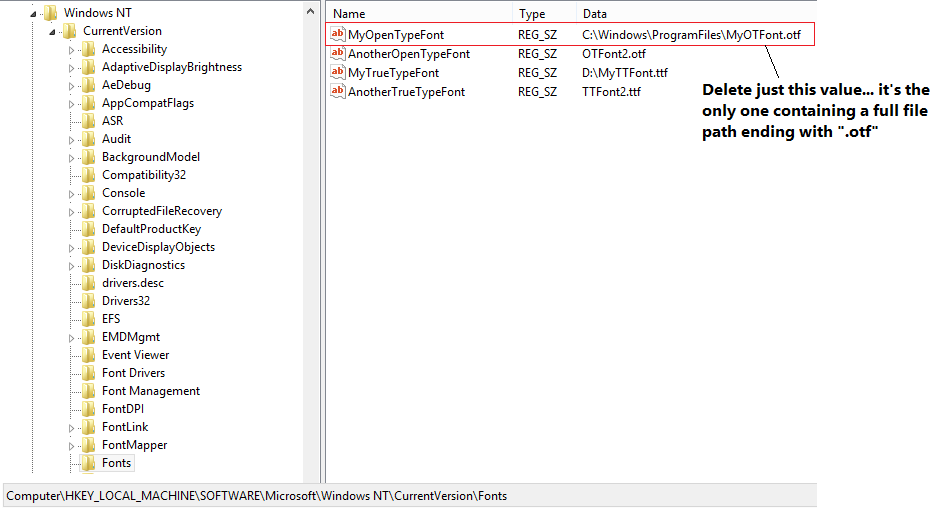
Delete the fntcache.dat file again. (It will have been re-created.) To do this, type the following command at command prompt, and then press Enter:
del %windir%\system32\fntcache.dat
Open the Programs and Features item in Control Panel, and then click View installed updates. Find and then uninstall any of the following update that are currently installed:
- KB2982791
- KB2970228
- KB2975719
- KB2975331
Restart the computer.
Find the reg file that you saved earlier, right-click the file, and then click Merge to restore the font registry values that you previously removed.
Note It’s safe to re-add these registry values now that the offending updates have been removed.
Known issue 4After you install this update, the z-order of the windows is changed. (The z-order calls the SetWindowPos function together with the HWND_TOP parameter.) Therefore, certain applications’ windows may become invisible or may be displayed behind other windows incorrectly.
Resolution
To resolve this issue, install update 2998984. For more information, click the following article number to view the article in the Microsoft Knowledge Base:2998984 You cannot dock MicroStation toolbars after you install update 2973201 in Windows
Notes
This issue also occurs after you install the following updates:2965768 Stop error 0x3B when an application changes the z-order of a window in Windows 7 SP1 and Windows Server 2008 R2 SP1
2970228 Update to support the new currency symbol for the Russian ruble in Windows
2973201 MS14-039: Description of the security update for Windows on-screen keyboard: July 8, 2014
2975719 August 2014 update rollup for Windows RT 8.1, Windows 8.1, and Windows Server 2012 R2
FILE INFORMATION
The English (United States) version of this software update installs files that have the attributes that are listed in the following tables. The dates and times for these files are listed in Coordinated Universal Time (UTC). The dates and times for these files on your local computer are displayed in your local time and with your current daylight saving time (DST) bias. Additionally, the dates and times may change when you perform certain operations on the files.
Windows Server 2003 file information
- The files that apply to a specific milestone (SPn) and service branch (QFE, GDR) are noted in the "SP requirement" and "Service branch" columns.
- GDR service branches contain only those fixes that are widely released to address widespread, critical issues. QFE service branches contain hotfixes in addition to widely released fixes.
- In addition to the files that are listed in these tables, this software update also installs an associated security catalog file (KBnumber.cat) that is signed with a Microsoft digital signature.
For all supported x64-based versions of Windows Server 2003
| File name | File version | File size | Date | Time | Platform | SP requirement | Service branch |
|---|---|---|---|---|---|---|---|
| Spuninst.exe | 6.3.4.1 | 221,488 | 19-Jan-2014 | 04:57 | x86 | None | Not Applicable |
| Gdi32.dll | 5.2.3790.5398 | 285,696 | 16-Jul-2014 | 20:29 | x86 | SP2 | SP2QFE |
| Win32k.sys | 5.2.3790.5398 | 1,881,600 | 16-Jul-2014 | 20:15 | x86 | SP | SP2QFE |
For all supported x86-based versions of Windows Server 2003
| File name | File version | File size | Date | Time | Platform | SP requirement | Service branch |
|---|---|---|---|---|---|---|---|
| Spuninst.exe | 6.3.4.1 | 293,168 | 16-Jul-2014 | 20:37 | x64 | None | Not Applicable |
| Gdi32.dll | 5.2.3790.5398 | 623,616 | 16-Jul-2014 | 20:35 | x64 | SP2 | SP2QFE |
| Win32k.sys | 5.2.3790.5398 | 4,649,984 | 16-Jul-2014 | 20:35 | x64 | SP | SP2QFE |
| Wgdi32.dll | 5.2.3790.5398 | 293,888 | 16-Jul-2014 | 20:35 | x86 | SP2 | SP2QFE\WOW |
For all supported IA-64-based versions of Windows Server 2003
| File name | File version | File size | Date | Time | Platform | SP requirement | Service branch |
|---|---|---|---|---|---|---|---|
| Spuninst.exe | 6.3.4.1 | 501,552 | 16-Jul-2014 | 20:37 | IA-64 | None | Not Applicable |
| Gdi32.dll | 5.2.3790.5398 | 919,552 | 16-Jul-2014 | 20:34 | IA-64 | SP2 | SP2QFE |
| Win32k.sys | 5.2.3790.5398 | 5,656,064 | 16-Jul-2014 | 20:34 | IA-64 | SP | SP2QFE |
| Wgdi32.dll | 5.2.3790.5398 | 293,888 | 16-Jul-2014 | 20:34 | x86 | SP2 | SP2QFE\WOW |
Windows Vista and Windows Server 2008 file information
The files that apply to a specific product, milestone (SPn), and service branch (LDR, GDR) can be identified by examining the file version numbers as shown in the following table:
Version Product Milestone Service branch 6.0.6002.18xxx Windows Vista SP2 and Windows Server 2008 SP2 SP2 GDR 6.0.6002.23xxx Windows Vista SP2 and Windows Server 2008 SP2 SP2 LDR GDR service branches contain only those fixes that are widely released to address widespread, critical issues. LDR service branches contain hotfixes in addition to widely released fixes.
Note The MANIFEST files (.manifest) and MUM files (.mum) that are installed are not listed.
For all supported x86-based versions of Windows Vista and Windows Server 2008
| File name | File version | File size | Date | Time | Platform |
|---|---|---|---|---|---|
| Gdi32.dll | 6.0.6002.19150 | 297,984 | 25-Jul-2014 | 04:26 | x86 |
| Gdi32.dll | 6.0.6002.23454 | 297,984 | 25-Jul-2014 | 04:04 | x86 |
| Win32k.sys | 6.0.6002.19150 | 2,054,656 | 25-Jul-2014 | 02:53 | x86 |
| Win32k.sys | 6.0.6002.23454 | 2,062,336 | 25-Jul-2014 | 02:51 | x86 |
For all supported x64-based versions of Windows Vista and Windows Server 2008
| File name | File version | File size | Date | Time | Platform |
|---|---|---|---|---|---|
| Gdi32.dll | 6.0.6002.19150 | 390,144 | 25-Jul-2014 | 04:18 | x64 |
| Gdi32.dll | 6.0.6002.23454 | 389,632 | 25-Jul-2014 | 04:36 | x64 |
| Win32k.sys | 6.0.6002.19150 | 2,781,696 | 25-Jul-2014 | 03:15 | x64 |
| Win32k.sys | 6.0.6002.23454 | 2,784,768 | 25-Jul-2014 | 03:47 | x64 |
| Gdi32.dll | 6.0.6002.19150 | 304,128 | 25-Jul-2014 | 04:27 | x86 |
| Gdi32.dll | 6.0.6002.23454 | 304,128 | 25-Jul-2014 | 04:05 | x86 |
For all supported IA-64-based versions of Windows Server 2008
| File name | File version | File size | Date | Time | Platform |
|---|---|---|---|---|---|
| Gdi32.dll | 6.0.6002.19150 | 952,320 | 25-Jul-2014 | 03:59 | IA-64 |
| Gdi32.dll | 6.0.6002.23454 | 951,808 | 25-Jul-2014 | 04:11 | IA-64 |
| Win32k.sys | 6.0.6002.19150 | 6,657,024 | 25-Jul-2014 | 03:06 | IA-64 |
| Win32k.sys | 6.0.6002.23454 | 6,666,752 | 25-Jul-2014 | 03:18 | IA-64 |
| Gdi32.dll | 6.0.6002.19150 | 304,128 | 25-Jul-2014 | 04:27 | x86 |
| Gdi32.dll | 6.0.6002.23454 | 304,128 | 25-Jul-2014 | 04:05 | x86 |
Windows 7 and Windows Server 2008 R2 file information
The files that apply to a specific product, milestone (RTM, SPn), and service branch (LDR, GDR) can be identified by examining the file version numbers as shown in the following table:
Version Product Milestone Service branch 6.1.7601.18xxx Windows 7 and Windows Server 2008 R2 SP1 GDR 6.1.7601.22xxx Windows 7 and Windows Server 2008 R2 SP1 LDR GDR service branches contain only those fixes that are widely released to address widespread, critical issues. LDR service branches contain hotfixes in addition to widely released fixes.
Note The MANIFEST files (.manifest) and MUM files (.mum) that are installed are not listed.
For all supported x86-based versions of Windows 7
| File name | File version | File size | Date | Time | Platform |
|---|---|---|---|---|---|
| Gdi32.dll | 6.1.7601.18539 | 305,152 | 16-Jul-2014 | 02:47 | x86 |
| Gdi32.dll | 6.1.7601.22750 | 305,152 | 16-Jul-2014 | 02:56 | x86 |
| Win32k.sys | 6.1.7601.18539 | 2,352,640 | 16-Jul-2014 | 01:47 | x86 |
| Win32k.sys | 6.1.7601.22750 | 2,360,832 | 16-Jul-2014 | 01:52 | x86 |
For all supported x64-based versions of Windows 7 and Windows Server 2008 R2
| File name | File version | File size | Date | Time | Platform |
|---|---|---|---|---|---|
| Gdi32.dll | 6.1.7601.18539 | 404,480 | 16-Jul-2014 | 03:25 | x64 |
| Gdi32.dll | 6.1.7601.22750 | 404,480 | 16-Jul-2014 | 03:23 | x64 |
| Win32k.sys | 6.1.7601.18539 | 3,163,648 | 16-Jul-2014 | 02:12 | x64 |
| Win32k.sys | 6.1.7601.22750 | 3,166,720 | 16-Jul-2014 | 02:17 | x64 |
| Gdi32.dll | 6.1.7601.18539 | 311,808 | 16-Jul-2014 | 02:46 | x86 |
| Gdi32.dll | 6.1.7601.22750 | 311,296 | 16-Jul-2014 | 02:55 | x86 |
For all supported IA-64-based versions of Windows Server 2008 R2
| File name | File version | File size | Date | Time | Platform |
|---|---|---|---|---|---|
| Gdi32.dll | 6.1.7601.18539 | 971,264 | 16-Jul-2014 | 02:28 | IA-64 |
| Gdi32.dll | 6.1.7601.22750 | 970,752 | 16-Jul-2014 | 02:34 | IA-64 |
| Win32k.sys | 6.1.7601.18539 | 7,427,584 | 16-Jul-2014 | 01:46 | IA-64 |
| Win32k.sys | 6.1.7601.22750 | 7,431,680 | 16-Jul-2014 | 01:50 | IA-64 |
| Gdi32.dll | 6.1.7601.18539 | 311,808 | 16-Jul-2014 | 02:46 | x86 |
| Gdi32.dll | 6.1.7601.22750 | 311,296 | 16-Jul-2014 | 02:55 | x86 |
Windows 8 and Windows Server 2012 file information
The files that apply to a specific product, milestone (RTM,SPn), and service branch (LDR, GDR) can be identified by examining the file version numbers as shown in the following table:
Version Product Milestone Service branch 6.2.920 0.16 xxx Windows 8 and Windows Server 2012 RTM GDR 6.2.920 0.20 xxx Windows 8 and Windows Server 2012 RTM LDR GDR service branches contain only those fixes that are widely released to address widespread, critical issues. LDR service branches contain hotfixes in addition to widely released fixes.
Note The MANIFEST files (.manifest) and MUM files (.mum) that are installed are not listed.
For all supported x86-based versions of Windows 8
| File name | File version | File size | Date | Time | Platform |
|---|---|---|---|---|---|
| Gdi32.dll | 6.2.9200.17053 | 1,075,712 | 15-Jul-2014 | 23:05 | x86 |
| Gdi32.dll | 6.2.9200.21172 | 1,074,176 | 15-Jul-2014 | 23:08 | x86 |
| Win32k.ptxml | Not Applicable | 4,172 | 11-Oct-2012 | 00:38 | Not Applicable |
| Win32k.sys | 6.2.9200.17059 | 3,382,784 | 15-Jul-2014 | 22:55 | x86 |
| Win32k.ptxml | Not Applicable | 4,172 | 25-Jul-2012 | 20:33 | Not Applicable |
| Win32k.sys | 6.2.9200.21178 | 3,370,496 | 15-Jul-2014 | 22:57 | x86 |
For all supported x64-based versions of Windows 8 and Windows Server 2012
| File name | File version | File size | Date | Time | Platform |
|---|---|---|---|---|---|
| Gdi32.dll | 6.2.9200.17053 | 1,300,992 | 15-Jul-2014 | 23:03 | x64 |
| Gdi32.dll | 6.2.9200.21172 | 1,295,360 | 15-Jul-2014 | 23:04 | x64 |
| Win32k.ptxml | Not Applicable | 4,172 | 11-Oct-2012 | 00:37 | Not Applicable |
| Win32k.sys | 6.2.9200.17059 | 4,035,072 | 15-Jul-2014 | 22:55 | x64 |
| Win32k.ptxml | Not Applicable | 4,172 | 25-Jul-2012 | 20:29 | Not Applicable |
| Win32k.sys | 6.2.9200.21178 | 4,034,560 | 15-Jul-2014 | 22:55 | x64 |
| Gdi32.dll | 6.2.9200.17053 | 1,023,488 | 12-Jul-2014 | 02:36 | x86 |
| Gdi32.dll | 6.2.9200.21172 | 1,023,488 | 12-Jul-2014 | 02:40 | x86 |
| Wow64_win32k.ptxml | Not Applicable | 4,172 | 12-Feb-2013 | 00:14 | Not Applicable |
| Wow64_win32k.ptxml | Not Applicable | 4,172 | 12-Feb-2013 | 00:09 | Not Applicable |
Windows 8.1 and Windows Server 2012 R2 file information
For all supported x86-based versions of Windows 8.1
| File name | File version | File size | Date | Time | Platform |
|---|---|---|---|---|---|
| Gdi32.dll | 6.3.9600.17246 | 1,090,280 | 06-Aug-2014 | 23:36 | x86 |
| Win32k.ptxml | Not Applicable | 4,213 | 21-Aug-2013 | 23:39 | Not Applicable |
| Win32k.sys | 6.3.9600.17250 | 3,441,152 | 06-Aug-2014 | 22:42 | x86 |
For all supported x64-based versions of Windows 8.1 and Windows Server 2012 R2
| File name | File version | File size | Date | Time | Platform |
|---|---|---|---|---|---|
| Gdi32.dll | 6.3.9600.17246 | 1,336,624 | 07-Aug-2014 | 02:12 | x64 |
| Win32k.ptxml | Not Applicable | 4,213 | 22-Aug-2013 | 06:44 | Not Applicable |
| Win32k.sys | 6.3.9600.17250 | 4,148,224 | 06-Aug-2014 | 22:39 | x64 |
| Gdi32.dll | 6.3.9600.17246 | 1,064,448 | 02-Aug-2014 | 03:56 | x86 |
| Wow64_win32k.ptxml | Not Applicable | 4,213 | 21-Aug-2013 | 23:39 | Not Applicable |