

- How to navigate the keyboard
- How to switch to another Chinese layout
- How to set up Fuzzy Pinyin Chinese input
1 - How to navigate the keyboard
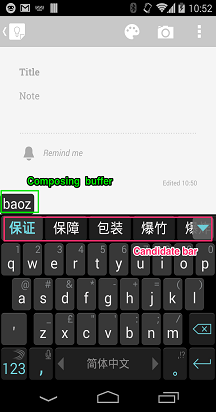
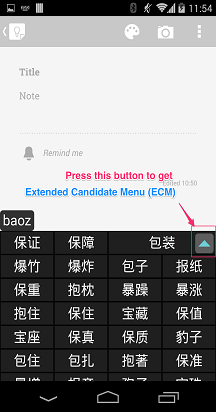
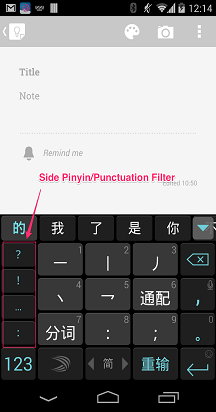
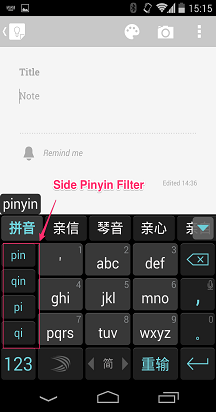
Microsoft SwiftKey uses a standard structure for Chinese, mainly including:
- composing buffer
- candidate bar
- extended candidate menu
- side Pinyin filter on 9-key layout
We hope those technical names will help you have a better understanding of how Chinese works on your Microsoft SwiftKey Keyboard.
2 - How to switch to another Chinese layout
Your Microsoft SwiftKey Keyboard offers many different Chinese layout options, but fortunately it's easy to switch to a different layout. To do this:
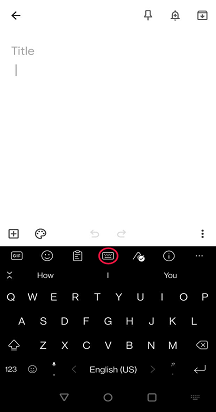
- From Toolbar: Tap the three dots ... then select the 'Layouts' icon.
- You'll see all of the languages you've installed - tap to select one.
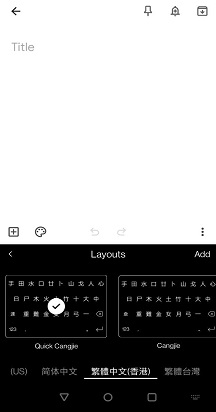
- Scroll left and right to cycle between the different layout options. The selected layout will be made default.
A note on default layouts:
For Taiwan Traditional Chinese - Full keyboard Zhuyin layout is the default layout. You can find 9-Key Zhuyin and Stroke as alternatives.
For Hong Kong Traditional Chinese - Quick Cangjie is the default. You can find regular Cangjie and Stroke as alternatives.
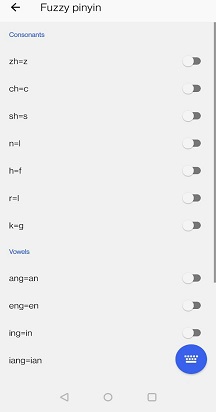
3 - How to set up Fuzzy Pinyin Chinese input
Microsoft SwiftKey supports Fuzzy Pinyin from version 6.5.5 onwards.
The option to enable Fuzzy Pinyin is available to all users with 'Chinese (PRC)' or 'Chinese (TW)' languages.
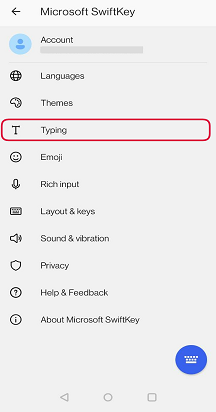
- Open the Microsoft SwiftKey app
- Tap 'Typing'
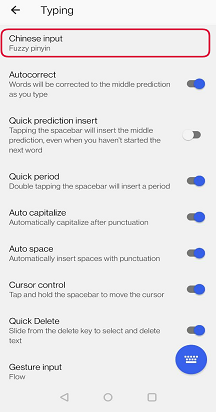
- Select 'Chinese input'
- Select 'Fuzzy Pinyin'
- Change Fuzzy Pinyin mappings to suit your typing style.
Contact Us
For more help, Contact Support at Microsoft SwiftKey Support - Contact us