Skip to main content
Support
Microsoft 365
Office
Microsoft 365
Outlook
Microsoft Teams
OneDrive
Microsoft Copilot
OneNote
Windows
more ...
Surface
PC Accessories
Xbox
PC Gaming
HoloLens
Surface Hub
Hardware warranties
Account & billing
Community forums
Microsoft 365 Admins
Developer
Education
Report a support scam
Product safety
Buy Microsoft 365
Sign in with Microsoft
Sign in or create an account.
Hello,
Select a different account.
You have multiple accounts
Choose the account you want to sign in with.
Remove or clear a hanging indent
Applies To
Word for Microsoft 365
Word for Microsoft 365 for Mac
Word for the web
Word 2024
Word 2024 for Mac
Word 2021
Word 2021 for Mac
Word 2019
Get help with Copilot
Explain how to remove or clear a hanging indent.
How do I change units used for margin measurement?
How do I remove WordArt?
Windows
macOS
Web
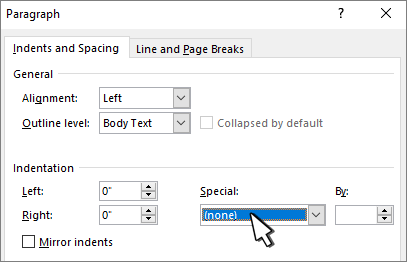
Select the text where you want to remove a hanging indent.
Go to Home > Paragraph dialog launcher
>
Indents and Spacing
.
Under
Special
, select
None
.
Select
OK
.
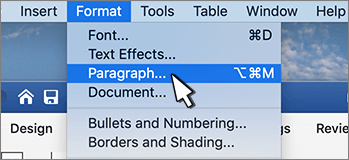
Select the paragraph where you want to remove a hanging indent.
Go to
Format
>
Paragraph
.
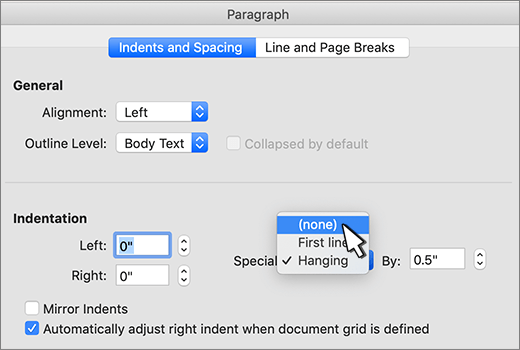
Under
Special
, select
None
.
Select
OK
.
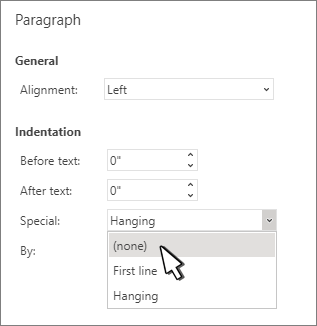
Select the text where you want to remove a hanging indent.
Go to Home > Paragraph dialog launcher
>
Indents and Spacing
.
Under
Special
, select
None
.
Select
OK
.
Was this information helpful?
Yes
No
Thank you! Any more feedback for Microsoft?
Can you help us improve?
(Send feedback to Microsoft so we can help.)
What affected your experience?
Resolved my issue
Clear instructions
Easy to follow
No jargon
Pictures helped
Other
Didn't match my screen
Incorrect instructions
Too technical
Not enough information
Not enough pictures
Other
Any additional feedback? (Optional)
Submit feedback
By pressing submit, your feedback will be used to improve Microsoft products and services.
Your IT admin will be able to collect this data.
Privacy Statement.
Thank you for your feedback!
×
English (United States)
Your Privacy Choices Opt-Out Icon
Your Privacy Choices
Your Privacy Choices Opt-Out Icon
Your Privacy Choices
Consumer Health Privacy
Sitemap
Contact Microsoft
Privacy
Manage cookies
Terms of use
Trademarks
Safety & eco
Recycling
About our ads
 Support