
Though you may see equations that are already in your document, you cannot write equations in Word for the web. If you have the desktop version of Word, that’s where you can add or edit mathematical equations.
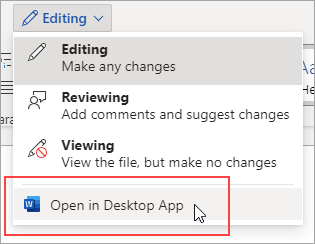
To open your document in the desktop version of Word, at the top of the ribbon, select Editing > Open in Desktop App.
Then, follow the instructions in Write an equation or formula.
When you save the document and reopen it in Word for the web, you’ll see the changes you made.
If you don’t have the desktop version of Word, you can try it or buy it in the latest version of Office now.