
Note
- Multilingual recording is not available in the classic view for the iOS version of Epic Haiku or Canto.
- The recording language options, features, and functionality that you see in DAX Copilot for Epic might vary based on your organization's configuration.
Do you have conversations with your patients in different languages?
If enabled by your administrator, DAX Copilot for Epic supports recording in English and Spanish. Your administrator can also enable Multilingual recording to allow you to record conversations where both you and your patient speak a language that's different from English or Spanish.
Supported languages
| Afrikaans | Arabic | Armenian | Azerbaijani | Bangla (Bangladesh) | Bengali (India) | Bosnian | Bulgarian | Catalan | Chinese Mandarin | Chinese Cantonese | Croatian | Czech | Danish | Dutch | English | Estonian | Filipino (Tagalog) | Finnish | French | Galician | German | Greek | Hebrew | Hindi | Hungarian | Icelandic | Indonesian | Italian | Japanese | Kannada | Kazakh | Korean | Latvian | Lithuanian | Macedonian | Malay | Marathi | Nepali | Norwegian | Persian | Polish | Portuguese | Punjabi | Romanian | Russian | Serbian | Slovak | Slovenian | Spanish | Swahili | Swedish | Tamil | Thai | Turkish | Ukrainian | Urdu | Vietnamese | Welsh |
You can change the language setting between recordings for the same encounter to capture the conversation in the language that is most comfortable for both you and your patient. The new language setting applies to the next recording and remains selected until you change it again.
To record conversations with a patient in their native language:
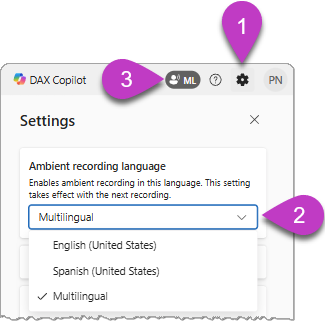
- Select the gear icon
 to open Settings.
 - Under Ambient recording language, select Spanish or Multilingual from the dropdown menu.
- A recording icon appears to the left of the Help and feedback icon when your recording language is set to Spanish (ES) or Multilingual (ML).
- Record your patient conversation as usual.
Important considerations
- DAX Copilot for Epic supports multiple recording languages. DAX Copilot for Epic captures conversations and assists with documentation workflow. It doesn't translate conversations or provide AI-assisted translation.
- Recording language options depend on your regional and organizational settings. Check the list of available recording languages in the dropdown menu and select accordingly.
- Ensure you and your patient are fluent in the selected language. If multiple languages are used during a conversation, ensure you're fluent in all used recording languages to avoid any misunderstanding or inaccuracies in the documentation.
- Transcripts for multilingual recordings don't indicate who is speaking. The transcribed conversation appears as one continuous block of text in the recording language, and isn't translated into the default recording language.
- Documentation appears in English. The clinical documentation that DAX Copilot for Epic generates from multilingual recordings appears in English.
- Check for accuracy. The clinical documentation that DAX Copilot for Epic generates from multilingual recordings might not be as accurate as documentation generated from conversations recorded in English or Spanish. Consider recording important medical facts in English before or after the encounter. Review the documentation carefully and make any necessary edits to ensure it accurately reflects the patient encounter.