Generate a practice math quiz with Math Assistant in OneNote
Applies To
Quiz yourself on math concepts by generating a practice quiz based on an equation you're solving. Math Assistant will work with Microsoft Forms to create a practice quiz of up to 20 questions featuring similar problems to your original problem, then embed it on your OneNote page. You can create as many practice quizzes as you like. Practice quizzes help students build confidence through repetition before a test or exam.
Warning
For now, this feature is only available on OneNote for the web with a valid Microsoft 365 subscription. We're working to bring the updated experience to OneNote for Windows and OneNote for iPad soon.
Generate a practice math quiz with Math Assistant in OneNote
Create a practice quiz from any math problem
OneNote can generate problems that are similar to those you're assigned to help you practice the steps of solving equations.
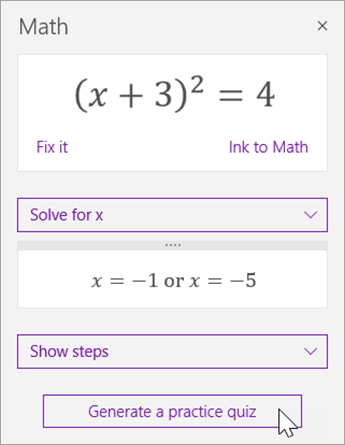
First, solve your equation using Math Assistant.
Next, select Generate a practice quiz.
You may be prompted to sign into Microsoft Forms using your school account.
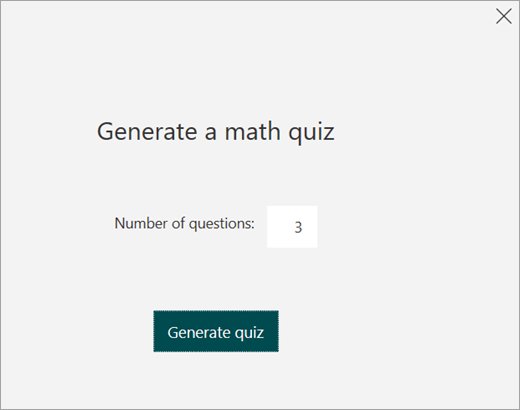
Type in the number of questions you'd like to be included in your practice quiz. You may enter up to 20.
Select Generate quiz. Microsoft Forms will automatically insert the quiz onto your open OneNote page.
You can interact with the quiz entirely in OneNote, or click theMicrosoft Forms link to take the quiz at https://forms.cloud.microsoft instead.
To take the quiz, select an answer for each multiple choice question and select Submit. From there, select View results to see your score and the questions you answered correctly and incorrectly.
Learn More
Independent learning with math tools in OneNote
Solve math equations with Math Assistant in OneNote
Draw graphs of math functions with Math Assistant in OneNote