

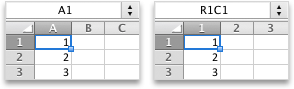
Cause: The default cell reference style (A1), which refers to columns as letters and refers to rows as numbers, was changed.
Solution: Clear the R1C1 reference style selection in Excel preferences.
Difference between A1 and R1C1 reference styles
- On the Excel menu, select Preferences.
- Under Formulas and Lists, select Calculation
 .
. - Clear the Use R1C1 reference style check box.
The column headings now show A, B, and C, instead of 1, 2, 3, and so on.