

Worksheet cells display formula results, and the formula bar shows formulas. Formulas don't appear when you print. When you show formulas in the cells, you can easily find cells that contain formulas or check for errors.
By using a key combination, you can see formulas instead of formula results in a worksheet.
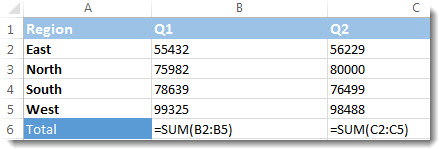
To show formulas in all cells, press CTRL+` (the grave accent mark key). When the formulas are visible, print your worksheet as you normally would.
To switch back to showing formula results in all cells, press CTRL+` again.
Tip
If you have trouble finding the grave accent mark key (`), it's usually located next to the One key in the upper left corner on keyboards. If it's difficult to find on your keyboard, go to the Formulas tab and choose Show Formulas in the Formula Auditing group. To switch back to the standard view, select the button again.


