

To quickly see how numbers in selected cells add up, select data and then take a look at the status bar below your spreadsheet. When you select two or more cells that have numeric data, Excel for the web automatically summarizes that data and shows the average, count, and sum on the status bar. These summarized values update immediately when you change values in the selected cells or select a different range of cells.

Copy a summary value
Select a summary value on the status bar, such as Average, Count, or Sum, to copy it to the clipboard. You can then paste the value into a cell or another application.
Change what's shown on the status bar
Excel for the web can show status bar entries for average, count, numerical count, min, max, and sum. You can customize the status bar to show and hide any or all of them. Here's how:
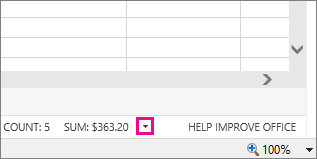
- In the status bar, click the arrow next to the last status bar entry.
- In the Customize Status Bar gallery, pick the status bar entries you want.
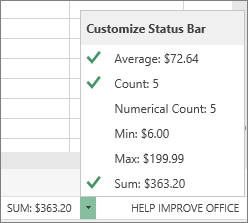
A check mark appears when an entry is selected. To deselect entries, click them again to remove their check marks.