To provide improved function accuracy, consistent functionality that meets expectation, and function names that more accurately describe their functionality, several Excel functions have been updated, renamed, or added to the function library in Excel 2010.
For backward compatibility, renamed functions remain available with their old name.
In this article
Functions with accuracy improvements
For the following functions, algorithm changes have been implemented to improve function accuracy and performance. For example, because the BETADIST function was inaccurate, a new algorithm has been implemented to improve the accuracy of this function. The MOD function now uses new algorithms to achieve both accuracy and speed, and the RAND function now uses a new random number algorithm.
Renamed functions
The following Statistical functions (reference) have been renamed so that they are more consistent with the function definitions of the scientific community and with other function names in Excel. The new function names also more accurately describe their functionality. For example, because CRITBINOM returns the inverse of the binomial distribution, BINOM.INV is a more appropriate name.
Some renamed functions, such as BETA.DIST, have an additional parameter so you can specify the type of distribution (left-tail cumulative or probability density).
For backward compatibility with earlier versions of Excel, the functions are still available with their old name in the Compatibility functions (reference) category. However, if backward compatibility is not required, you should start using the renamed functions instead.
Renamed statistical functions
New functions
The following functions have been added to the Excel function library. These functions can be used in the current version of Excel but are incompatible with earlier versions of Excel. If backward compatibility is required, you can run the Compatibility Checker so that you can make the necessary changes in your worksheet to avoid errors.
| New function | Function category | Purpose |
|---|---|---|
| NETWORKDAYS.INTL function | Date and time functions (reference) | Returns the number of whole workdays between two dates using parameters to indicate which and how many days are weekend days |
| WORKDAY.INTL function | Date and time functions (reference) | Returns the serial number of the date before or after a specified number of workdays using parameters to indicate which and how many days are weekend days |
| AGGREGATE function | Math and trigonometry functions (reference) | Returns an aggregate in a list or database |
| CEILING.PRECISE function | Math and trigonometry functions (reference) | Rounds a number the nearest integer or to the nearest multiple of significance. Regardless of the sign of the number, the number is rounded up. |
| ISO.CEILING function | Math and trigonometry functions (reference) | Rounds a number up to the nearest integer or to the nearest multiple of significance |
| CHISQ.DIST function | Statistical functions (reference) | Returns the cumulative beta probability density function |
| CHISQ.INV function | Statistical functions (reference) | Returns the cumulative beta probability density function |
| CONFIDENCE.T function | Statistical functions (reference) | Returns the confidence interval for a population mean, using a Student's t distribution |
| COVARIANCE.S function | Statistical functions (reference) | Returns the sample covariance, the average of the products deviations for each data point pair in two data sets |
| ERF.PRECISE function | Engineering functions (reference) | Returns the error function |
| ERFC.PRECISE function | Engineering functions (reference) | Returns the complementary ERF function integrated between x and infinity |
| F.DIST function | Statistical functions (reference) | Returns the F probability distribution |
| F.INV function | Statistical functions (reference) | Returns the inverse of the F probability distribution |
| FLOOR.PRECISE function | Math and trigonometry functions (reference) | Rounds a number the nearest integer or to the nearest multiple of significance. Regardless of the sign of the number, the number is rounded up. |
| GAMMALN.PRECISE function | Statistical functions (reference) | Returns the natural logarithm of the gamma function, Γ(x) |
| MODE.MULT function | Statistical functions (reference) | Returns a vertical array of the most frequently occurring, or repetitive values in an array or range of data |
| PERCENTILE.EXC function | Statistical functions (reference) | Returns the k-th percentile of values in a range, where k is in the range 0..1, exclusive |
| PERCENTRANK.EXC function | Statistical functions (reference) | Returns the rank of a value in a data set as a percentage (0..1, exclusive) of the data set |
| QUARTILE.EXC function | Statistical functions (reference) | Returns the quartile of the data set, based on percentile values from 0..1, exclusive |
| RANK.AVG function | Statistical functions (reference) | Returns the rank of a number in a list of numbers |
| T.DIST function | Statistical functions (reference) | Returns the Percentage Points (probability) for the Student t-distribution |
| T.INV function | Statistical functions (reference) | Returns the t-value of the Student's t-distribution as a function of the probability and the degrees of freedom |
Backward Compatibility
If you have to share your worksheet with other people who do not have Excel 2010 installed, you can use the compatibility functions instead of the renamed functions. Earlier versions of Excel recognize the old names and provide the expected results.
Finding compatibility functions
To find all compatibility functions, do the following:
- On the Formulas tab, in the Function Library group, click Insert Function.
- In the Or select a category box, click Compatibility.

Selecting the right function in the worksheet
When you start entering a function in the worksheet, Formula AutoComplete lists both renamed and compatibility functions. Distinguishing icons make it easier for you to click the one that you want to use.

Checking for compatibility issues
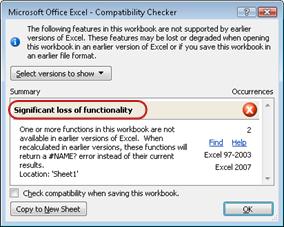
As mentioned earlier in this article, new functions are incompatible with earlier versions of Excel. Earlier versions of Excel cannot recognize the new functions, and #NAME? errors will be displayed instead of the expected results. Before you save your workbook to a file format of an earlier version of Excel, you can run the Compatibility Checker to determine whether new functions were used. This way, you can make the necessary changes to avoid errors.
To run the Compatibility Checker, do the following:
- Click the Office Button, and then click Info.
- Under Prepare for Distribution, click Check for Issues, and then click Check Compatibility.