

Microsoft Copilot agents can help streamline recurring project updates. For updates shared with leadership, it’s important to balance efficiency with accuracy, context, and tone, and to ensure humans remain responsible for reviewing, validating, and approving outputs before sharing.
This scenario focuses on deliberately choosing between three approaches for each step: automate with human review, use Copilot as support while keeping the step human-led, or keep the work fully human-led.
Scenario: Balance automation and judgment to streamline weekly updates
You’re responsible for a weekly project update for executives and cross functional stakeholders, pulling together inputs from multiple teams and tools.
You spend hours each week preparing this update. With time pressure increasing, you're considering whether a Copilot agent could help. The goal isn’t just to automate—it’s to decide which steps are best suited to each of the following approaches:
- Automate with human review (Copilot does the work, you review)
- Support with Copilot but remain human-led (Copilot assists, you decide)
- Keep fully human-led (you retain full ownership and execution)
Which parts of my project update can I safely automate?
Start by breaking your update into key workflow steps and evaluating each one. Not every step carries the same level of risk or requires the same degree of judgment. Making the human role explicit at each step helps prevent over‑automation and ensures accountability.
Use these four checks to evaluate each step:
- Repeatability: Does the task follow a consistent pattern each time?
- Risk exposure: What happens if the content is incorrect?
- Error detectability: How easy is it to spot and correct mistakes?
- Time sensitivity: How important is speed for this step?
Together, these checks help you decide when to automate, when to use Copilot for support, and when to stay fully hands-on.
Match each workflow step to the right level of automation
| Workflow step | Repeatability | Risk exposure | Error detectability | Time sensitivity | Recommended approach |
|---|---|---|---|---|---|
| Collect status updates | High — same sources weekly | Low — gaps are visible | High — easy to verify | Medium | Automate with human review |
| Compile metrics | High — structured data | Medium — wrong numbers mislead | Medium — needs cross-checks | Medium | Automate with human review |
| Draft first-pass summary | Medium — wording varies | Medium — tone matters | Medium — needs review | Medium | Automate with human review (refine manually) |
| Interpret risks and issues | Low — context shifts | High — affects decisions | Low — errors are subtle | High | Copilot-supported, human-led |
| Adjust executive tone | Low — varies by audience | High — affects trust | Low — subjective | High | Keep fully human-led |
| Decide emphasis | Low — situational | High — shapes attention | Low — omissions hidden | High | Keep fully human-led |
| Final review | Medium — consistent process | High — you're accountable | High — caught before sharing | High | Keep fully human-led |
The following diagram visually summarizes how these factors come together to guide your automation decisions across each workflow step.
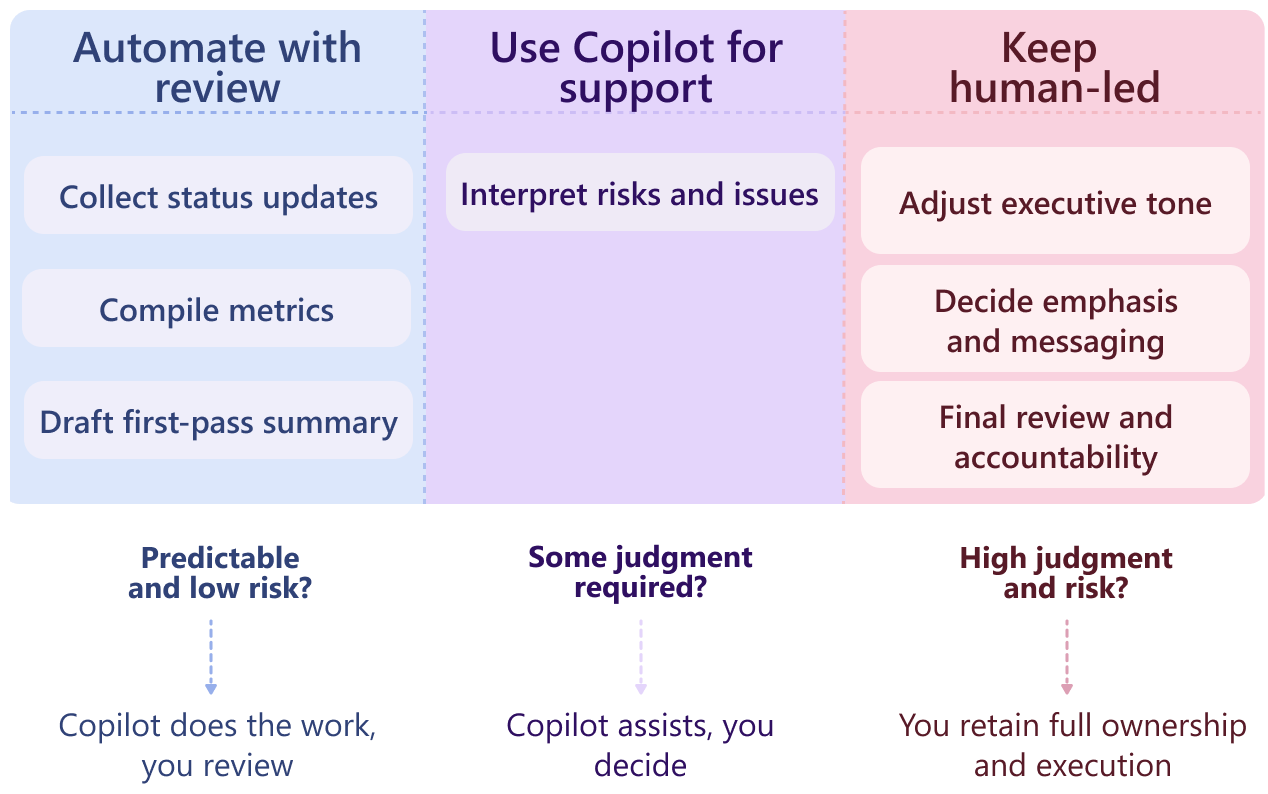
Takeaway: Tasks that are highly repeatable with low risk and clear error detection are strong candidates for automation. As risk increases or errors become harder to detect, human judgment becomes more important.
How can I use Copilot prompts to support these workflow decisions?
Example prompts for steps to automate with human review
Gather status updates
 Collect this week’s status updates from the Project Alpha Teams channel and Planner board. List missing inputs clearly instead of filling gaps.
Compile metrics
Pull completion rates and open risks from the project tracker and summarize them in a table. Flag anything that looks inconsistent with last week.
Draft first‑pass summary
Draft a concise weekly project summary based on the inputs provided. Use neutral language and leave placeholders where judgment is required.
Example prompts for steps supported by Copilot but remaining human-led
Analyze risks
Based on this week’s data, list potential risk areas and supporting evidence. Do not make recommendations.
Prepare for executive review
Identify questions an executive reader might ask about this update and suggest where clarification might be needed.
Where do I need to review an agent’s work?
Once you decide which steps are AI‑supported, identify your required review checkpoints.
| Review point | Purpose |
|---|---|
| Review compiled data | Catch omissions, anomalies, or incorrect assumptions. |
| Edit draft summaries | Adjust tone, clarify meaning, and remove uncertainty. |
| Check for missing inputs | Ensure the agent didn’t infer or guess information. |
| Perform final review | Confirm accuracy, tone, and readiness before sharing. |
These checkpoints ensure that “automate with human review” does not become “automate without accountability.”
What does a balanced AI‑assisted workflow look like?
By intentionally deciding what to automate and where to stay involved, you create a reporting workflow that saves time without sacrificing quality or trust.
Copilot automates structured, repeatable work with required review, supports you in analysis where judgment is needed, and stays out of decisions that require full human ownership.
The agent takes care of routine gathering and first‑pass drafting, while you lead judgment‑heavy decisions and approve the final output.
Automation doesn’t remove responsibility—it refocuses your effort on the decisions that matter most and ensures you remain accountable for the final update.