

Microsoft Copilot can quickly generate a solid first draft of a project proposal. However, when the audience is senior leaders or clients, speed alone isn’t enough. High‑stakes documents need clarity, focus, and a tone that reflects confidence and intent.
This scenario shows you how to review and assess a Copilot‑generated proposal to ensure it’s ready for stakeholders—without starting over or over‑editing.
Scenario: Improve a proposal for a critical audience
You’re a project manager preparing a proposal for executive stakeholders. To save time, you use Microsoft Copilot Chat to generate an initial draft based on your project notes and goals. The draft is usable—but not ready to share.
As you review, the issues you notice map to four evaluation criteria—the same lens you'd apply when you evaluate any Copilot-generated output:
- Clarity: The proposal doesn’t clearly explain why the project matters until several pages in.
- Accuracy: A few details (dates, owners, metrics, or scope statements) look uncertain or need verification against your source material.
- Tone and audience fit: The tone shifts between cautious and confident, which weakens the message.
- Coverage (completeness): Some sections include detailed background information that isn’t relevant to this audience, while key claims are mentioned without enough context to be persuasive.
Your task isn’t to rewrite the proposal. It’s to evaluate what Copilot produced, identify gaps, and iterate with purpose. Using consistent criteria helps you explain why a change is needed—not just what to change.
What should I look for when reviewing a proposal as a stakeholder?
Before making changes, pause to assess the draft from a stakeholder's point of view. Ask yourself whether the value is clear early, whether each section earns its place for this audience, whether claims are specific and supported, and whether the tone is consistent and decisive.
This evaluation step is what turns Copilot’s draft into something you actively improve—transforming a usable first pass into a decision‑ready proposal. It also gives you a repeatable checklist you can use on future drafts.
How do I evaluate a review a Copilot-generated proposal?
You work through the proposal one section at a time, using Copilot selectively. For each section, identify which of the four criteria needs improvement (clarity, accuracy, tone and audience fit, or coverage)—then make a targeted change.
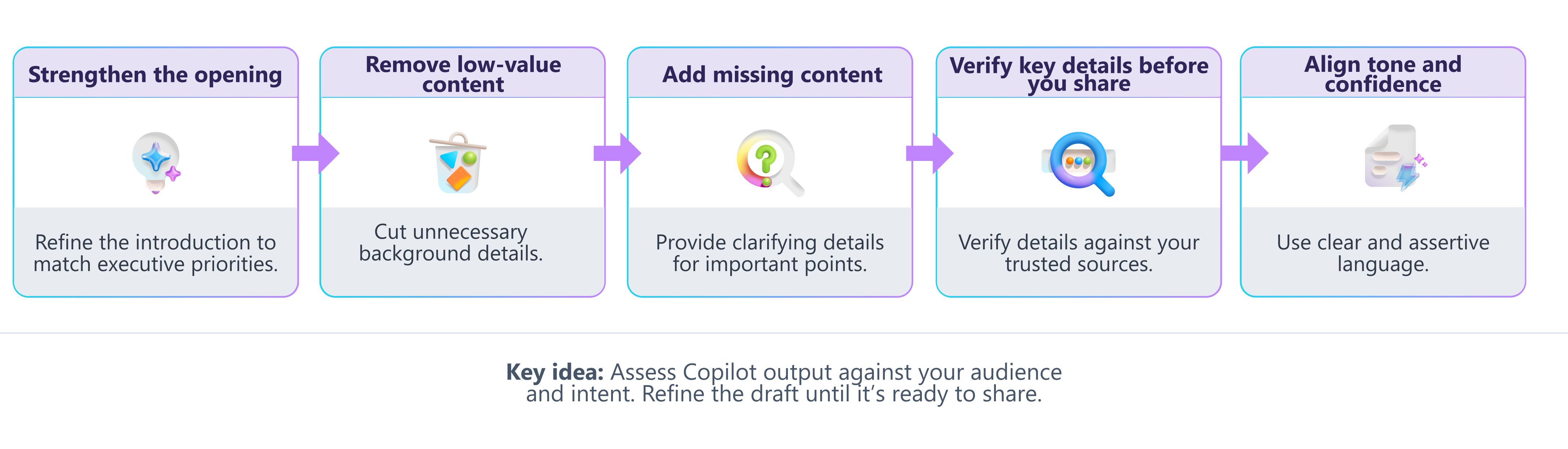
Strengthen the opening of the proposal
As you begin reading the draft, consider whether the opening makes the project’s value and business outcome clear within the first few sentences. This improves clarity by helping decision‑makers quickly understand why the project matters.
| Before: Copilot draft | After: Revised |
|---|---|
| Opening sentence “This proposal outlines the scope and objectives of the upcoming project initiative.” |
Revised opening sentence “This proposal recommends launching a phased automation initiative to reduce operational costs and improve delivery timelines across the organization.” |
Why it needed improvement
|
What changed
|
Remove or condense low‑value content
A background section explains internal team history in detail. You remove it entirely and ask Copilot to tighten the transition between the surrounding sections. This improves coverage (completeness) by keeping what leaders need—and removing what they don’t.
| Before: Copilot draft | After: Revised |
|---|---|
| Background section “Our team has undergone several organizational changes over the past several years and has worked on multiple initiatives related to process improvement, tool adoption, and cross‑functional collaboration.” |
Condensed structure “Building on recent process improvements, this proposal focuses on scaling automation to reduce costs and improve delivery timelines.” |
Why it needed improvement
|
What changed
|
Add missing context manually
Copilot referenced “results from the previous phase” without explanation. You add a short sentence clarifying what was achieved and why it matters. This strengthens coverage (completeness) by filling in key decision context Copilot couldn’t infer.
| Before: Copilot draft | After: Revised |
|---|---|
| Reference to prior work “Results from the previous phase indicate progress.” |
Clarified context “The previous phase reduced manual processing time by 30%, enabling faster turnaround and informing this next stage of investment.” |
Why it needed improvement
|
What changed
|
Verify key details before you share
Even when a proposal reads well, it can still include inaccuracies—especially around numbers, timelines, ownership, and scope. This improves accuracy by ensuring the content reflects verified, decision‑ready information.
| Before: Copilot draft | After: Revised |
|---|---|
| Unverified details “The project will be completed in Q3 with support from the operations team.” |
Validated and qualified content “The project is planned for completion in Q3 (pending final resource confirmation), with ownership assigned to the operations team per the approved plan.” |
Why it needed improvement
|
What changed
|
Align tone and confidence
As you read the draft, assess whether the language sounds confident and specific enough to support a clear recommendation. This improves tone and clarity by aligning the message to executive expectations and decision‑making needs.
| Before: Copilot draft | After: Revised |
|---|---|
| Draft text “We hope this approach might lead to improved efficiency.” |
Revised text “This approach is expected to improve efficiency by reducing manual handoffs.” |
Why it needed improvement
|
What changed
|
How can I use prompts to improve specific sections?
After reviewing the draft, you apply your own judgment first, then use Copilot with concise, focused prompts. The goal is to improve individual sections—not to regenerate the proposal.
Improve clarity
If the proposal takes too long to explain why the project matters, ask Copilot to sharpen the opening.
 Revise the opening paragraph so the business value is clear in the first two sentences. Emphasize cost, efficiency, and timeline impact for executive stakeholders.
 |
|---|
Check accuracy
If a claim feels uncertain—or includes specific numbers, dates, or owners—use Copilot to help you spot what needs verification.
|
Highlight any facts, figures, timelines, or named owners in this section that should be verified against my project notes. |
|---|
Improve tone and audience fit
If the language sounds tentative or inconsistent, ask Copilot to revise for clarity and confidence.
|
Revise this paragraph to use confident, factual language. Remove tentative wording and clearly state expected outcomes. |
|---|
Improve coverage (completeness)
If a section might be missing decision‑critical information—or includes extra detail leaders don’t need—use Copilot to assess what’s missing or unnecessary.
|
For an executive audience, what key information is missing or underexplained in this section—and what details could be removed because they don’t support a decision? |
|---|
How do I know the revised proposal is ready to share?
After iterating, you review the proposal against clear criteria you can apply again in the future:
- Clarity: Key points are easy to find. The value, scope, and impact are clear within the first page.
- Accuracy: Facts, figures, names, dates, and claims are verified (or appropriately qualified) based on your source material.
- Tone and audience fit: The tone is confident, professional, and appropriate for the stakeholder audience—and consistent throughout.
- Coverage (completeness): The proposal includes everything leaders need to decide—and removes background or detail they don’t need.
By comparing the revised version to the original Copilot draft, you can clearly explain why the proposal is stronger—and why the changes matter.
Why iteration matters when working with Copilot
Iteration isn’t a sign that Copilot failed. It’s how you get the most value from it.
- Prompts are starting points, not final instructions.
- Different prompts produce meaningfully different results.
- Your judgment determines what to keep, change, or remove.
- Tool choice matters—Copilot supports thinking, not replaces it.
Copilot accelerates drafting. Your evaluation and iteration turn that draft into a decision‑ready document.